Einleitung

  1. 3jETuMAJGuYOyrM1
    3jETuMAJGuYOyrM1
    lENxZXOSlnxhjUKM

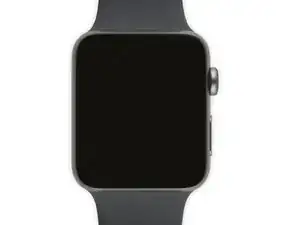
    Verify your model. The back of the Cellular model just says GPS, so be sure to check the groves where the watch band goes to determine you model. I made the mistake of just reading the back of the device and since I’d been gifted the device didn’t know it was cellular. Cellular has a different type of touch force gasket, different screen, and different battery connections.

    Ryan Holt -

    From what I just read on Apple, the only differences in watch series 3 is 38mm and 42mm.

    mcr4u2 -

    As a consumer all you need to know are 38mm and 42mm

    Michael Adoga -

    The back will say GPS LTE if it’s the cellular version. If it doesn’t say LTE it is only the GPS version. The displays are different whether or not it is LTE(cellular).

    themepark -

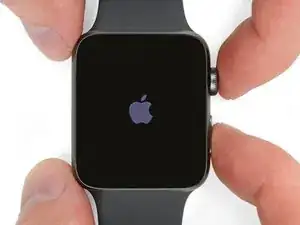
    This alternative method only reboots the watch.

    Gregg Stanley -

  2. dAlO5MlADoI4aHmQ
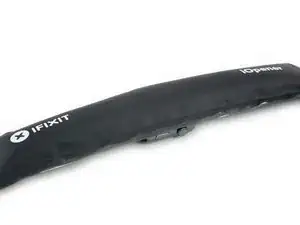
    • Verwende einen iOpener (oder einen Haartrockner oder ein Heißluftgebläse), um das Display so zu erwärmen, bis es sich fast nicht mehr anfassen lässt.

    • Lasse den iOpener mindestens eine Minute auf dem Display liegen, so dass dieses überall heiß wird und der Kleber darunter aufweicht.

    • Wahrscheinlich musst du den iOpener mehrfach erwärmen oder auf dem Display bewegen, bis es überall heiß genug ist, um es abzuhebeln.

    I have heated up the iOpener to 165 degrees and left it on for more than a minute. No way I can lift the screen off with the exact knife. Tried different angles in various places, but no go. I also used a hair dryer un til the watch screen was too hot to touch and even tried a very hard cutting tool blade and also no go. Could n ever get the blade under the face I applied enough force where I could see that the blade left small marks, not very big, but could never get anything to move or lift. What am I doing wrong? I spent 47 years at a global computer company and I am used to taking apart small things and applying force when required. I don’t know what I am doing wrong. Please help me.

    Rafael Blanco -

    Getting the initial gap is not easy. Maybe a playing card could work its way in the tiny gap and cut some adhesive. After that there might be some success with an exacto knife. Or you want to try a piece of aluminum foil (folded for more rigidity) for cutting the adhesive. Be aware of the force touch gasket and that it might get damaged during that procedure.

    Tobias Isakeit -

    I finally used a hot air gun set to 150 deg. C heating up the edges by slowly spinning the watch around before the technique worked. Difficult is the level noted and it’s correct. Finally worked and watch perfectly functioning.

    Chris Giavotto -

    I used a heat gun, too. I was worried after reading comments that it would burn up the LCD, so I heated it a little bit at a time, rotating it like you did, and checking to see if I could get my knife under it. I must have hit one of the buttons because it did turn on, but that did reassure me that the display was okay.

    It's open. Now that the watch and I have had a few minutes to cool down, I'm ready for the next step. Not as difficult as I thought it could be. Tomorrow, I'll be replacing the battery in an iPod Touch 6th Gen.

    bester -

    I had to heat the iOpener 2 times and leave it on top of the watch for 10 minutes.

    Axel Trujillo -

  3. TiPIaVjFQZ6OJlTT
    TiPIaVjFQZ6OJlTT
    6hNke1uI3WvUQ3Im
    yys2M1eO4GHOURDx
    • Weil der Spalt zwischen dem Display und dem Uhrgehäuse sehr schmal ist, benötigst du zum Trennen der beiden eine sehr scharfe Klinge. Lies folgende Warnhinweise sehr aufmerksam durch, bevor du weiterarbeitest.

    • Schütze deine Finger und halte sie fern von der Schneide. Schütze im Zweifelsfall deine freie Hand mit einem schweren Handschuh, wie z.B. einem Arbeitshandschuh aus Leder oder einem Gartenhandschuh.

    • Sei vorsichtig und wende nicht zuviel Druck mit dem Messer auf, es könnte sonst abrutschen und dich verletzen oder die Uhr beschädigen.

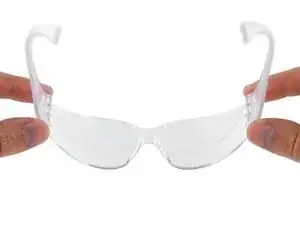
    • Trage eine Schutzbrille. Das Glas oder das Messer könnten brechen, so dass Splitter herumfliegen.

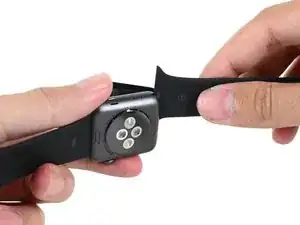
    • Du kannst das Armband dranlassen oder abnehmen, je nachdem, wie du die Uhr beim Reparieren besser halten kannst.

    Don’t cut your finger off!

    Mike -

    The Watch 3 stainless Steel has an additional Frame. Where do i have To Open it?

    asteffen@me.com -

    I wore thick gardening gloves just to be safe 😅 and it took a while but the screen did come off.

    Axel Trujillo -

  4. ZkWMSNMJYG6IZhkL
    ZkWMSNMJYG6IZhkL
    NQIDl3ZOwVEC44ZA
    oZFcsBuOlJ6JyOK3
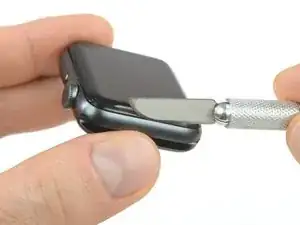
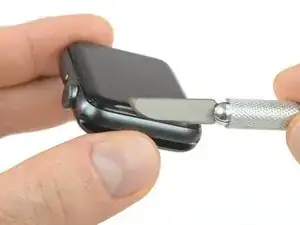
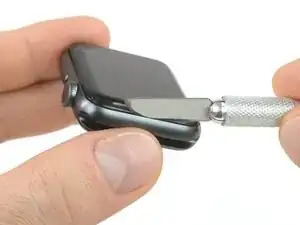
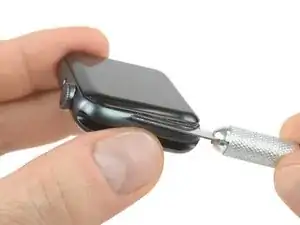
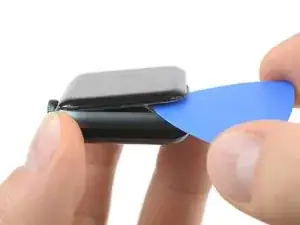
    • Setze eine gebogene Klinge in den schmalen Spalt zwischen Display und äußerem Gehäuse. Beginne an der kurzen Seite des Displays, nahe der Krone.

    • Drücke die Klinge mit viel Kraft gerade runter in den Spalt.

    • Wenn die Klinge drin ist, dann neige die Klinge seitwärts, um das Display etwas zu öffnen.

    • Setze die Klinge nicht tiefer als 2 mm ein.

    It’s difficult to grip case in a way that keeps fingers safe from the blade but doesn’t hit the side buttons and turn the device on!

    If it’s a struggle to get the display to release, warm case for a few more minutes.

    Kyle Powderly -

    I have tried so may times to get the display to release but nothing works. Should have bought a new watch LOL. Kept the iOpener on 2 times for 10 minutes and it still won't open. There must be a better way.

    Susan E. White -

    Hi Susan,

    if you're struggling to get the adhesive loose enough a hair dryer, heat gun, or hot plate may also be used, but be careful not to overheat the device. The edge should feel slightly too hot to the touch.

    Dominik Schnabelrauch -

    It's no way to place the edge of a curved blade into the thin gap between the display and the outer case!! The blade is far too think to place into the thin gap for mine😭 already heated the watch with hair dryer for like 10minutes..

    Melody M -

  5. AjRJCyCiMOCZ3rad
    AjRJCyCiMOCZ3rad
    ARGTNpwjNblelqda
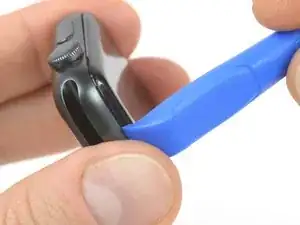
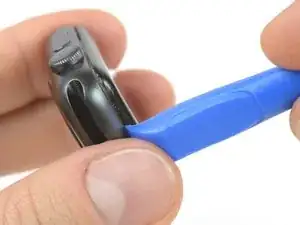
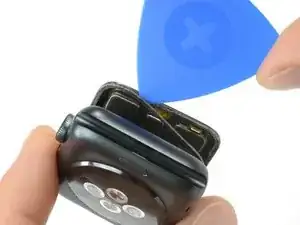
    • Wenn du mit der gebogenen Klinge einen schmalen Spalt geöffnet hast, dann entferne die Klinge und setze die dünne Kante eines Plastiköffnungswerkzeugs in den Spalt.

    • Drücke das Plastiköffnungswerkzeug in den Spalt hinein und vergrößere ihn, wobei du es mit deinem Daumen abstützen kannst.

    • Achte darauf, das Display noch nicht ganz zu öffnen oder abzulösen.

  6. R4FIOpCBksWgGmXY
    R4FIOpCBksWgGmXY
    XUMQGYuCDf4DO6MI
    GWW1SH1I4KqcmfKr
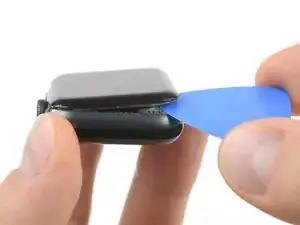
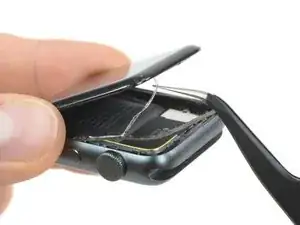
    • Setze ein Plektrum unter das Display und trenne die Force Touch Dichtung behutsam vom Display.

    • Bei den Akku- und Display Repair Kits von iFixit ist eine neue Force Touch Dichtung dabei, mach dir also keine Sorgen, wenn deine alte Dichtung kaputt geht.

    • Andernfalls kannst du deine Dichtung schonen und sehr sorgfältig unter der Dichtung hebeln. Wenn die Dichtung beim Hebeln und Hochheben des Displays reißt, musst du die Dichtung natürlich auch erneuern.

    • Schiebe das Plektrum um das Display herum und trenne den Kleber zwischen Force Touch Dichtung und Display auf.

    • Setze das Plektrum nicht tiefer als 2 mm ein

  7. rPZ1tKy2Hq2hQToM
    rPZ1tKy2Hq2hQToM
    vdTqXtcOWsXKFMeh
    x5qVggWBkbWBMNls
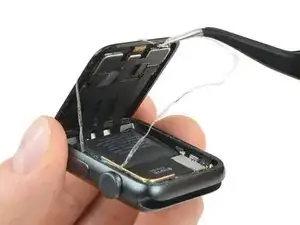
    • Öffne das Display noch nicht ganz, sonst ziehst du an den Kabeln.

    • Ziehe den Klebstoff mit einer Pinzette vom Display und dem Force Touch Sensor Kabel, während du das Display im 45° Winkel öffnest.

    • Fädle den Klebstoff hinter die Displaykabel und über das Display um ihn zu entfernen.

    There seems to be something attached to this end that I am supposed to open looks like something metal which isn’t showing on your photos, whatever it is doesn’t want disconnect and I am worried about forcing it in case I break something . Mine are a a series 3

    Pat gordon -

  8. y1fV1Nd2PZhidSJy
    y1fV1Nd2PZhidSJy
    iJkqEdVVY2YdLKMo
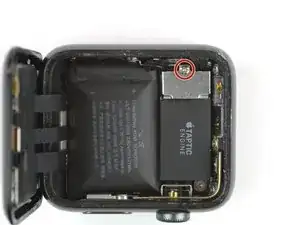
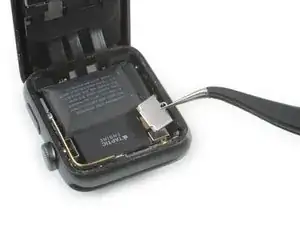
    • Entferne die Tri-Point Y000 Schraube, mit der die metallene Abdeckung des Akkusteckers befestigt ist.

    • Entferne die Abdeckung.

  9. rCcSY1GiFOR2oeRP
    rCcSY1GiFOR2oeRP
    USkmJGVUcoYa1Oal
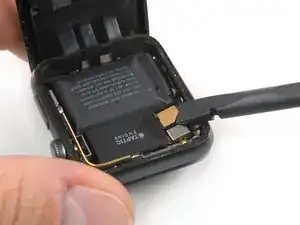
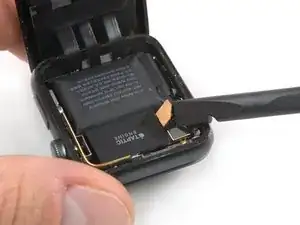
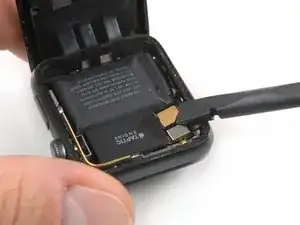
    • Trenne den Akku ab, indem du seinen Stecker mit der Kante eines Plastiköffnungswerkzeugs nach oben hebelst.

    • Biege den Stecker leicht nach oben, damit er sich nicht versehentlich wieder verbindet.

Abschluss

Um dein Gerät wieder zusammenzubauen, folge dieser Anleitung in umgekehrter Reihenfolge.

Tobias Isakeit

Mitglied seit: 31/03/14

125672 Reputation

0 Kommentare