Einleitung
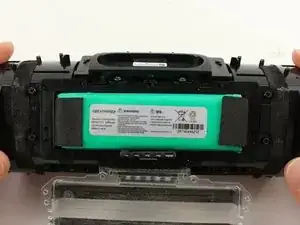
Wenn dein Akku sich nicht mehr gut aufladen lässt, musst du den Akku austauschen. Im Charge 3 ist ein 6000 mAh Akku eingebaut.


Ersatzteile

-
-
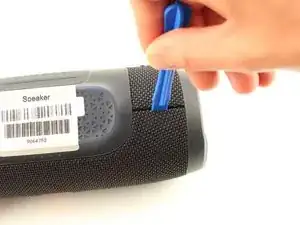
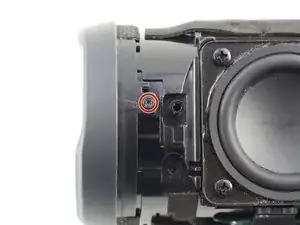
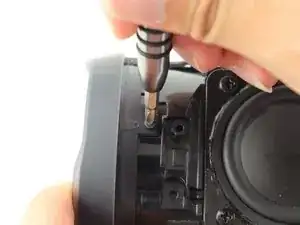
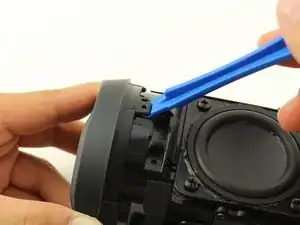
Lege dein Gerät mit der Unterseite nach oben und setze ein Plastiköffnungswerkzeug vertikal in den Schlitz in der Frontabdeckung ein.
-
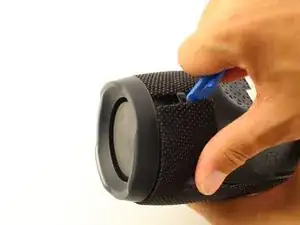
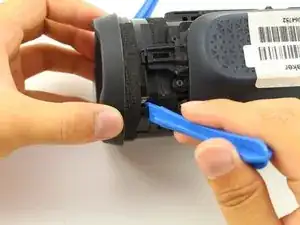
Ziehe das Werkzeug langsam nach außen und löse die Rasten, mit denen die Abdeckung befestigt ist.
-
Wiederhole dieses Verfahren an allen vier Kanten der Frontabdeckung.
-
-
-
Ziehe die Abdeckung auf beiden Seiten vorsichtig auseinander und entferne sie vom Gehäuse.
-
-
-
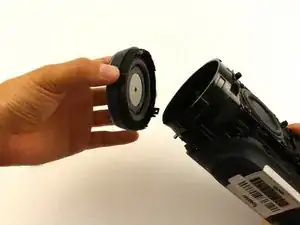
Verdrehe den Passivstrahler und ziehe ihn zum Öffnen heraus. Den linken Strahler musst du im Uhrzeigersinn drehen, den rechten gegen den Uhrzeigersinn.
-
-
-
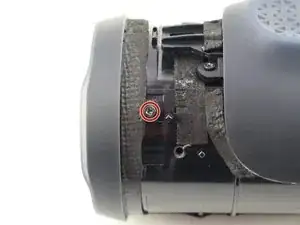
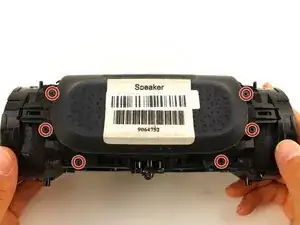
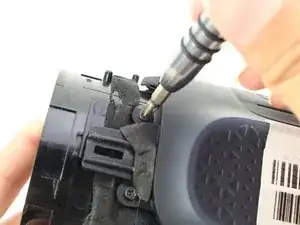
Entferne die sechs 8 mm Kreuzschlitzschrauben #1 von der äußeren Akkuabdeckung.
-
Löse die äußere Akkuabdeckung vom Lautsprechergehäuse ab
-
-
-
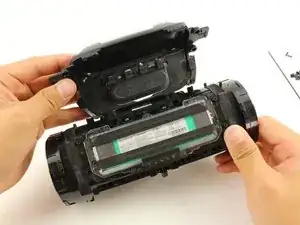
Entferne die sieben 8 mm Kreuzschlitzschrauben #1 von der inneren Akkuabdeckung.
-
Entferne die innere Akkuabdeckung.
-
-
-
Ziehe vorsichtig und löse den Stecker am Kabelbündel an der Seite des Lautsprechers ab. Dadurch wird der Akku von der Hauptplatine abgetrennt.
-




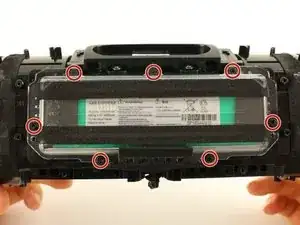
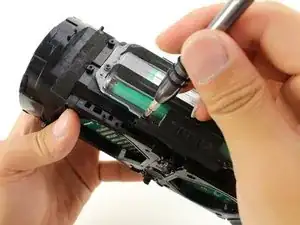
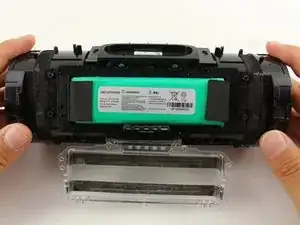
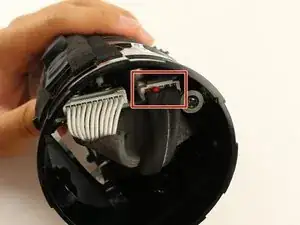
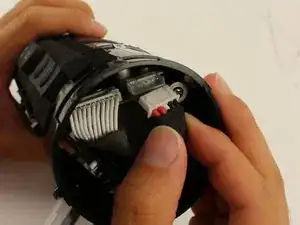

Um dein Gerät wieder zusammenzusetzen, folge den Schritten in umgekehrter Reihenfolge

35 Kommentare
you legend. thank you so much! i was worried it was a seal unit!
Super Anleitung! Hat der Akkutausch hat problemlos funktioniert!
thank you so much :D
Sometimes disassemblers forget that the first time they disassembled the item it didn’t want to give up easily: I didn’t like the forces I was having to apply at all, so I switched to two plastic prying tools per “corner” and one in-between them (total 5, you could use plectrums…) before I was happy the the forces were low enough not to break anything.
Frank Puranik -
the front grill is supposed to be first not the back the back has longer while the front has shorter clip
Water Bass Tester (Water BT) -
There are two Phillips head screws to remove before prying the cover off
jason -
Where in south Africa can I buy jbl charge3 port bay replacement
Donovan Fransman -
There appears to be different versions of the Charge 3. If you find it difficult to pry open a second side the two small screws mentioned by Jason will need to be removed but it also indicates that there will be some additional changes to this tear down that I will try to convey in the comments as well.
john Ramirez -
Sadly I damaged the latches on my charge 3. There was more to it than just prying the front cover up. First, there is a small latch on both sides that you need to push down before pulling the front cover towards you that release the clips holding the front cover in place. Pull only slightly forward because… Second, in the front cover there are 6 circular notches connected to the front cover in tue four corners including the middle corners, you need to squeeze the front cover a little bit gently removing the notches so they dont break (like mine did).
ralphkeneth_gomz -
Definitely had to watch about 10 videos and still couldn’t get it to pop out easily.. Took a look at the first picture in the next step and really took note of where the little hole that lets you through to push down the tab is. Once I took a look at that and combined the techniques I’d seen in some of the videos it finally popped off easily. https://www.youtube.com/watch?v=u7i0_nD9... I only watched the first minute of this video but it helped a good bit if anyone else is having trouble.
Rowan Darko -
How do you know if the speakers or one of them is burned or broken.. i notice that one speaker is playing much less hard then the other one.. I wonder now if maybe there is another problem with my device.. Battery problem?
Bukowski101 -
Bonjour,
changement de batterie effectuée ce jour avec ce tuto trop bien.
J'ai utilisé une batterie made in china (8200 mAh 24€ ) et tout fonctionne très bien.
Merci encore pour votre aide, sans quoi je n'aurai jamais essayer de réparer ma JBL Charge 3.
Bravo !!
Jean-Marie K -