Einleitung

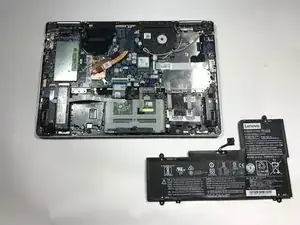
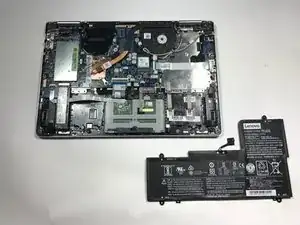
Diese Anleitung zeigt, wie der Akku im Lenovo Yoga 710 ausgetauscht wird.

  1. kChZtk6LroZc6IPB
    • Schalte dein Gerät vor Reparaturbeginn komplett aus.

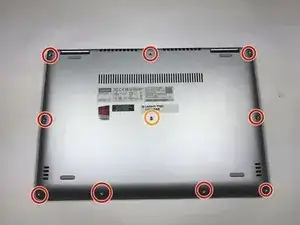
    • Entferne die neun 5 mm langen Torx T4 Schrauben, mit denen die Bodenplatte befestigt ist.

    • Entferne die 8 mm lange Torx T4 Schraube in der Mitte.

    • Ziehe beim Zusammenbau die Schrauben nicht zu fest an, die Bodenplatte könnte brechen.

  2. VIJmpowuxHAU4ny2
    VIJmpowuxHAU4ny2
    hHUtHNSiWAutT3po
    yjYeZmFvbMOIDjFK
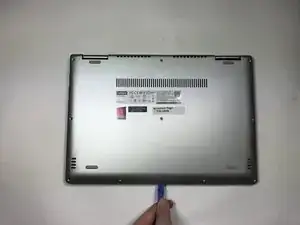
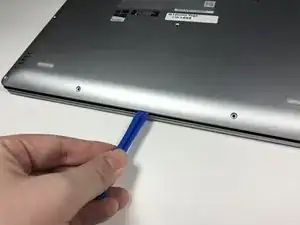
    • Heble die Bodenplatte mit einem Kunststoffwerkzeug nach oben vom Laptop weg. Fange an einer Ecke an und arbeite dich rund um den Rand herum.

    • Die Bodenplatte ist groß, flach und besteht aus dünnem Kunststoff. Sie bricht leicht, heble deswegen nicht zu kräftig.

  3. Rqxe5g5ODfRvFmcZ
    Rqxe5g5ODfRvFmcZ
    BpMthSlCaApxuAJZ
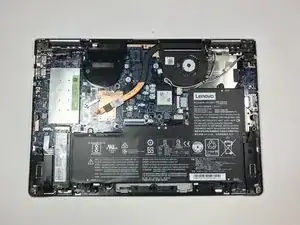
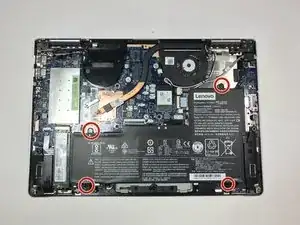
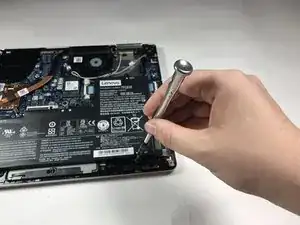
    • Entferne die vier 3 mm langen Kreuzschlitzschrauben #00, mit denen der Akku befestigt ist.

    • Achte darauf, dass die Schrauben nicht beschädigt werden. Achte auch darauf, dass sie nicht ins Gehäuse hineinfallen.

  4. 6FW4Jb22b6AjnqrC
    6FW4Jb22b6AjnqrC
    y6wbOKAXniNN6nbf
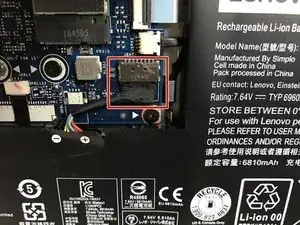
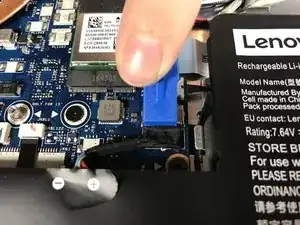
    • Löse den Akkustecker mit einem Öffnungswerkzeug oder deinen Fingern aus dem Anschluss auf der Hauptplatine heraus.

    The connector slides out of the metal housing, not up from the board.

    Matthew Karmel -

    Thanks for the comment! I’ve corrected the step.

    Arthur Shi -

  5. vVeZeSsnHrNIWyeX
    • Entferne den Akku.

    i just bought a battery for my lenovo yoga 710-14ikb from ifixit..and now battery is not detected.

    jeffrey orr -

Abschluss

Um dein Gerät wieder zusammenzubauen, folge den Schritten in umgekehrter Reihenfolge.

Entsorge deinen Elektromüll sachgerecht.

Grant Doerksen

Mitglied seit: 18/04/17

1011 Reputation

8 Kommentare

Thank you for posting this battery replacement guide! I’m not huge on computer tech stuff and because of the holidays a lot of repair shops were closed. So, I found this, the tools I needed and bought a battery off ebay and I did it myself. I saved so much time and money(i’m sure) because of these simple instructions. Although I have the 710-15IKB, everything was basically identical. Thank you !

envykiss99 -

Thank you making this guide for a battery replacement!

envykiss99 -

I replaced the battery, but now the computer won’t turn on! what am I doing wrong?

chrismark1 -

I you haven’t yet, try plugging the laptop into power to see if it runs off of AC power.

Arthur Shi -

Worked great. thx

John Smith -

Holaa, moltes gracies, m'ha anat de primera.

Salutacions

Miquel Prunera -

Thank you for this easy to follow guide to giving new life to my Yoga. The new (ifixit supplied) battery is now installed and seems to perform well.

The step I found trickiest was to remove the battery connector but I did manage.

I really recommend the ifixit tool kit as well. It is has an aura of quality and is a joy to use

ABC80 -

I tried this but my commputer doesnt detect the new battery, i tried updating drivers, deleting them and static release. Nothing seems to work. What should i do? The old Battery is detected

Alejandro Coronas -