Einleitung

Mit dieser Anleitung kannst du den O-Ring deines Nest Hello austauschen, wenn dieser durch Wetter oder beim Zerlegen beschädigt wurde. Alles was du brauchst sind die iFixit Öffnungswerkzeuge.

Es empfiehlt sich, den O-Ring nach jeder Zerlegung des Geräts auszutauschen, da er sehr leicht dabei gequetscht oder zerrissen werden kann.

  1. 4OhVXWLRmT2mwNrZ
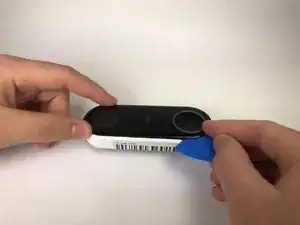
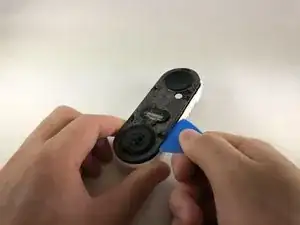
    • Schiebe ein Plektrum zwischen die schwarze Vorderseite und das weiße Gehäuse des Nest Hello.

    • Heble die Vorderseite mit dem Plektrum vom Gehäuse weg.

    • Wenn du dein Nest Hello zum ersten Mal öffnest, wird sich im Inneren ein Schaumstoffschutz befinden, der am Gehäuse klebt. Versuche diesen so tief wie möglich mit dem Plektrum zu zerschneiden.

    • Entferne nun die Vorderseite komplett vom Gerät, zögere nicht, hier fest zu ziehen.

    I had to use a metal spudger tool to start and then used guitar picks.

    Joel Lundi -

    Be afraid to pull hard. The faceplate will break in two.

    B Bremer -

    I did the JerryRigEverything method and slipped a razor under the faceplate to separate it carefully from the body. Worked perfectly and nothing was damaged

    There I Fixed It -

    Be careful with the wiring and the heater element. I must have shorted something together when it put it back together and now it will no longer power up. It is probably best to cut the wires to the heater and deal with the consequences in the cold temperatures.

    Joe I. Fabritz -

    The secret I think is slicing through the adhesive. I shoved multiple picks in and worked my way around. You want to cut the adhesive. Prying is likely to break the faceplate. The big hint is the next picture in the step, seeing where the adhesive is.

    Arnold de Leon -

  2. iOunefeVg4DKHhOu
    iOunefeVg4DKHhOu
    bitW2l5mCQoWhyiQ
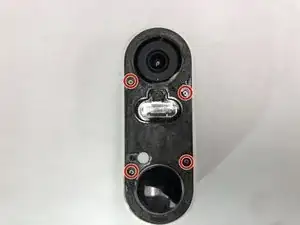
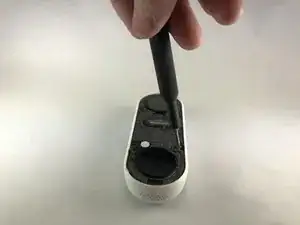
    • Entferne die Aufkleber und benutze einen Kreuzschlitzschraubendreher #000, um die vier Schrauben zu entfernen.

    There is a small circle sticker over each screw, about the size of the red circles in the image above. It wasn't clear from the directions what the "cover stickers" were. A small exacto knife was helpful to pry up the edge of each sticker.

    Tim Scott -

  3. HtCWfAHNKEYHltQb
    HtCWfAHNKEYHltQb
    Ik6niEiyH3bvD1nX
    JnHFQwOrSANXfEaJ
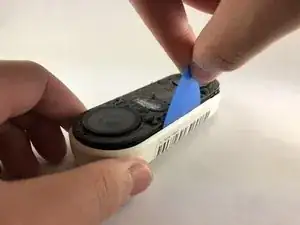
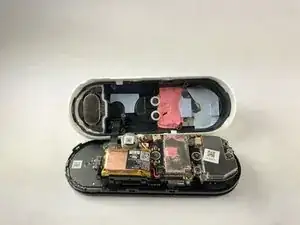
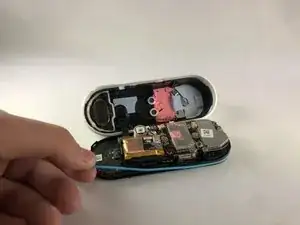
    • Schiebe ein Plektrum zwischen das weiße Gehäuse und die schwarze interne Platine, um diese heraus zu hebeln.

    • Ein kleines Flachbandkabel verbindet das weiße Gehäuse mit der Platine. Achte darauf, dieses nicht herauszureißen, wenn du die Platine vom Gehäuse trennst.

    Where can you get a replacement faceplate from?

    nick -

    I ended up doing the headlight lens restoration method - I scraped away any plastic that was flaking off and then I used progressively finer sandpaper (start with 400-600 grit and go up from there). I finished it with rubbing compound and polish. Looks decent.

    There I Fixed It -

    Also - be careful not to cut or displace the rubber gasket that runs around the outside of the main body that has the circuitry - you'll risk losing the waterproofing

    There I Fixed It -

    What is the replacement battery type please?

    Dave Pawson -

    BUSFUIVA Replacement Battery for Nest 1ICP7/17/26, Hello, NC5100US, C1241290, Vido Doorbell Wired. 3.7V 280MAH https://a.co/d/38BD8qY

    Brandon H -

    The top end has some kind of mild adhesive (the blue stuff). The bottom end came out more easily for me, and then I ended up bending my board slightly by trying to pry out the top end. May be better to start on the top end if you can get something under the edge of the board to get leverage.

    somebody -

    The black ribbon cable was instantly sheared in half the moment I got the two halves apart, which took more force than I was hoping to need. Turns out the ribbon cable is attached to a sharp metal piece and it will easily tear through it. No longer worth it to replace the battery for me, sadly.

    Ryan Littlefield -

    What a stupid design by Nest. If they know that battery will fail they should at least make it user accessible when removed from mount. Replaced mine. It’s a pain getting to the battery and it’s easy to crack the faceplate when prying it off. Also the plastic tools included with kit will fail before you’re into the device.

    If you can manage to get to the battery without destroying the Nest Doorbell it’s worth it to get a few more years of use.

    C Whitcher -

    Some more clarity about where the ribbon cable is located would be helpful. It is unclear from the photos which side it is on and I was very apprehensive about where to separate the bodies while avoiding severing it.

    Jensie -

    The pick was inadequate to separate the two parts. It actually broke. Had to use a flat head screw driver.

    Jensie -

  4. 6nIlrl4wxiZqxlQG
    • Entferne den (blau gefärbten) O-Ring aus dem Gerät. Er liegt am Rand um die Hauptplatine herum.

    where can I get a new o-ring? I cant’t find it anywhere

    Curica -

Abschluss

Um dein Gerät wieder zusammenzubauen, folge der Anleitung in umgekehrter Reihenfolge.

Jason Valencia

Mitglied seit: 14/01/20

389 Reputation

2 Kommentare

Is there a link available for spare replacement parts? I can’t seem to find anything other than replacement internal batteries . Thanks!

Andres Chavez -

Also looking for this replacement part. Googling did not produce results.

KB_KB -