Einleitung

Irgendwann muss vielleicht die Hauptplatine deines Nintendo 2DS XL ausgetauscht werden. Diese Anleitung zeigt Schritt für Schritt, wie das geht. Ziehe vor Reparaturbeginn das Netzteil vom New Nintendo 2 DS XL ab.

  1. R3WrHkdaFuZjfZ3d
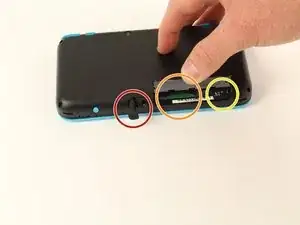
    • Bevor du mit der Reparatur beginnst:

    • Entferne den Stylus

    • Entferne die Game Cartridge

    • Entferne die SD-Karte

    This is a great repair instructional, but I would advise also looking at the below video link. (I used both.) Sometimes watching 2 repair guides can help when you think you think you’re stuck. For example, I had a really hard time getting the hinge off!

    https://www.youtube.com/watch?v=Zuu_T2ls...

    (HINT: Works best if you rotate it 180 degrees, so that you are repairing it from the same perspective as the technician)

    skat1140 -

  2. qInyERKyTGMKUtxf
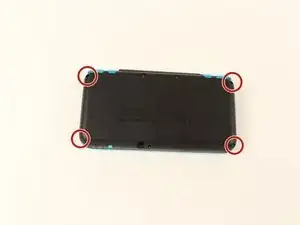
    • Drehe die vier 6 mm Tri-Point-Schrauben in den Ecken der Rückabdeckung heraus.

    The Y0 was too big; I ended up using a Y00 and that worked fine

    Christopher Gilmer-Hill -

    Would not recommend using a Y000 like I tried to do

    Daniela Magaña-Ochoa -

    gotta use Japanese Industry Standard YOO (blunt end)- I did not, and accidentally stripped two of the screws… still trying to figure out how to remove them -_-;

    Yanko Artidiello -

    Did you ever have any luck with this? It looks like the y00 stripped my bottom screws as well and I'm kinda frustrated about it considering I just had a debacle involving a stripped screw on an old DS lite

    Terra C -

    Yeah I can confirm, the y0 does not work.

    Arc Turus -

    I'm using the Y-0.6 and seems to only unscrew 2 of the screws on the right side of the handheld, the other 2 aren't moving

    Xx_Definity_J0rd4n_xX -

    screws are too tight

    Albert Einstien -

  3. FUiabbAOYVaNjG4X
    FUiabbAOYVaNjG4X
    MiHqoVbAY3mST6Ls
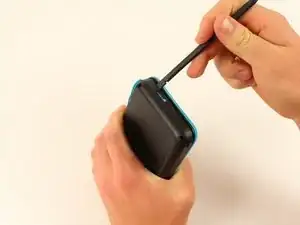
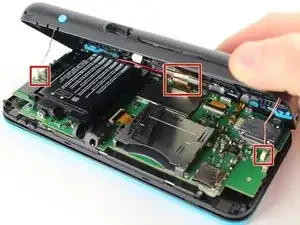
    • Sei vorsichtig beim Trennen der unteren und oberen Gehäusehälften und beschädige nicht die drei an der Hauptplatine angeschlossenen Kabel. (Eines auf jeder Seite und eines hinten).

    • Heble die untere und obere Gehäusehälfte mit dem flachen Ende des Spudgers behutsam voneinander.

    • An der Scharnierseite sind viele Rasten, wir empfehlen, zuerst an einer kurzen Seite und den beiden langen Seiten anzufangen, dann erst die letzte kurze Seite zu bearbeiten.

    You need to be super careful separating the top from the bottom at the rear end. I got stuck there, applied a lil more force and ripped the right shoulder button straight off the pcb!

    Dominik Leicht -

    The front headphone Jack got stuck in the bottom case and snapped when opening, didn’t notice until after replacing the battery (which is a nightmare btw) I used some floss underneath the battery to give you better leverage since the side plastic is so thin and fragile. I cannot get the headphone Jack back into position now and will have to take it to a shop for (I’m sure much more expensive) repairs. Honestly DO NOT try repair this thing, just pay someone else to repair these. Compared to the OG 2011 3DS these are a nightmare to work with. Nintendo really went out of their way to make this impossible to repair, I had an extra set of pretty capable hands too.

    radioactiverhino 04 -

    I also ripped off the headphone jack when taking the case apart. I never pulled hard. You need to be careful to give the headphone jack clearance before applying any force.

    Mikaela Orbon -

  4. hN4JmkBHkaqtRlxN
    hN4JmkBHkaqtRlxN
    sLnMpviSoWENSJQk
    CxaLwKZ2IuAS5cAV
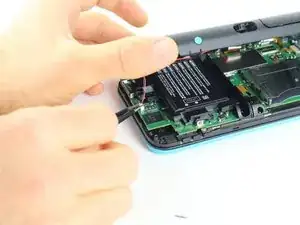
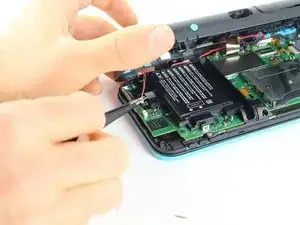
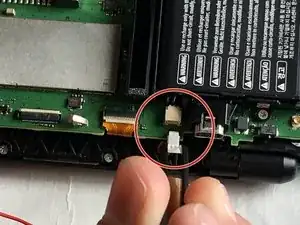
    • Nimm eine Pinzette und ziehe die beiden Kabel, die die beiden hinteren Tasten auf jeder Seite mit der Hauptplatine verbinden behutsam nach oben und trenne sie ab.

    I unfortunately took off the base of one when trying to pull apart. Is there a fix or will it not be broken?

    Phoenix Typhoon -

    Did you manage to fix this at all?

    Owen McKay -

    When you are putting these cables back, make sure to check the orientation of the cable. You have to match the cable head to the entry point, so you may have to turn the cable around. I spent a bit too much time trying to connect the cables just because I didn't realize that I had to turn the cable around.

    Hongda Wang -

    Aren't these the speaker cables? I haven't taken any 2DS's apart in a while, but I'm pretty sure these cables connect to the speakers

    darth mango -

  5. 6AT5OJ1MuuBaICeA
    6AT5OJ1MuuBaICeA
    ua4Ruiu5ewlgVKlO
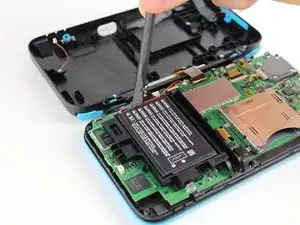
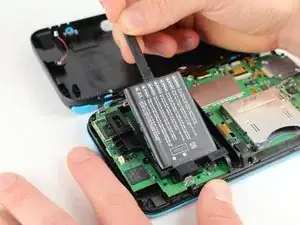
    • Hebe den Akku mit einem Spudger heraus.

    • Denke dran, dass der Akku mit einem Klebepad in seinem Fach festgeklebt ist. Es kann schon sein, dass du mehrere Werkzeuge benutzen musst, um den Akku aus seinem Fach und von der Hauptplatine zu lösen.

    Some might see this as an optional step. But you probably do NOT want to skip this. I did, and now I have malfunctions on the Nintendo (touch screen functionality not working, possibly as a result of shorts from skipping this step.)

    skat1140 -

    Personally, I skipped this step and everything still works fine. I wasn't able to take the battery out because the adhesive was too strong.

    Hongda Wang -

    Small square of adhesive. Pull up slowly and it’ll release after 10-20 seconds

    Jacob Cocanig -

    Any advise for dealing with CTR-003 spicy pillow? So far in this transplant operation, both my devices batteries are okay... but... I dunno, if I were to run into a spicy pillow in the future, what would be the least awful way to pull it out?

    Not sorry, when I see these repair jobs that involve the company gluing the battery into the device (or even soddering in that soon to be spicy pillow) this is just something I'm wondering about

    Katrina Payne -

    I haven't taken my 2ds apart yet, depending on how devices are built it might work to slide a solid thread (eg fishing rope, or floss but that might rip) under it, and do a sewing motion.

    Franziska (Natsu) -

    Be careful when putting the clamshell back together. The plastic volume slider likes to fall out. if not aligned correctly, you may snap off the actual slider and be unable to physic change the volume

    Daniel Adezio -

  6. SSMvQDgl1DwcocIH
    SSMvQDgl1DwcocIH
    mDsPxLStvgmPJlHp
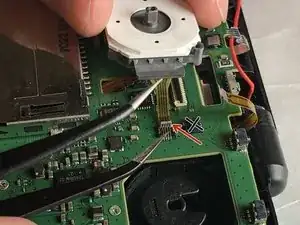
    • Im Foto sind acht Flachbandkabel zu sehen, die gelöst werden müssen.

    • Zwei Verbindungen (grün markiert) halten - anders als die übrigen sechs - nur durch Reibung. Trenne diese Kabel ab, indem du sie behutsam herausziehst. Versuche nicht, die Anschlüsse in irgendeiner Weise zu entsichern oder zu öffnen. Sie gehen dadurch kaputt.

    • Klappe die Sicherungsbügel an den restlichen sechs Anschlüssen (rot markiert) mit einer Pinzette hoch und ziehe die Flachbandkabel heraus.

    • Im zweiten Bild ist ein kaputter Anschluss neben dem Anschluss für den Joystick (rechts vom roten Pfeil) zu sehen. Versuche nicht diesen Anschluss so wie im Bild gezeigt zu öffnen!

    Do not just pull up “latches”, two of these are not zif connectors and pulling the top off will break it! I now have a dead 2DS XL because I followed this guide.

    Pressing the ZL button on device turns system off.

    Dunnymeister -

    I made the same mistake. The guide is now updated.

    Mike -

    Trying to follow this guide... uh... what is a latch? That is a type of leverage based opening/closing device right? I'm not seeing anything on my board or in the images that I could call a "latch"

    I'm not able to find this locking mechanism described in the image... much less know what I am using tweezers on

    I would love to go further... but uh... there is no leverage based locking/closing/opening device in any of the images that I can see... no I can see on my board

    Katrina Payne -

    Oh right, and it doesn't take a psychic to know somebody is going to be all "ooh, why not Google it". After about a full page of ads, this is the Wikipedia entry for Latches. I do not see anything in the image, or on my board that matches that

    Katrina Payne -

    Okay update on how I got confused... turns out all the latches (except one) were already open. Apparently I tend to jostle my game device a bit on the hard side... and at some point they all (except one) came exceptionally loose. I literally could have just pulled the ribbon cables out

    On a related note... the reason my R-Button wasn't working wasn't due to stickiness... turns out I had somehow managed to push it so hard it depopulated itself from the board and was just sitting loose inside the case (well... as loose as it could be... it did not travel too much)... going to need to figure out how to repopulate the R-Button--looks like it could prolly be resoddered back in

    Prolly a good thing these repair guides exist

    But yeah... turns out all the clasps/latches whatever were completely open when I opened the case... that would prolly explain why the battery kept draining so quickly

    Katrina Payne -

    Is there any way to fix those "latches" if open?

    Mim Howell -

  7. lENbxc1owHxJd2B5
    lENbxc1owHxJd2B5
    Ty63qp3gtGSWq2Df
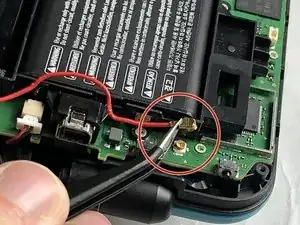
    • Trenne die markierten Kabel mit einer Pinzette von der Hauptplatine ab.

  8. GqvOCteO2iYPDwUf
    GqvOCteO2iYPDwUf
    AfDTdwEG1IjHHCef
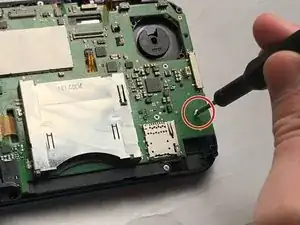
    • Entferne die sieben 4,4 mm langen J00 Schrauben. Du kannst auch iFixits PH00-Bit verwenden.

    • Entferne die Hauptplatine vom Gerät.

    Step 8 motherboard screws are J00 Phillips.

    Joseph Costello -

    Thank You!!!

    Zach -

    Guide has been updated.

    Mike -

Abschluss

Um dein Gerät wieder zusammenzubauen, folge den Schritten in umgekehrter Reihenfolge.

Caleb Hayhurst

Mitglied seit: 06/11/19

358 Reputation

6 Kommentare

On step 6, what is the top left circled connector for?

The screen on the device I am repairing keeping going black and this connector is damaged. (it doesn’t clamp shut)

Can anyone recommend where to buy a replacement board connector?

Billy Holliday -

This doesn’t actually give ALL the tools you need. You can’t use a Tri point screwdriver on the CROSS screws that are in the pictures on the motherboard.

tomh1512 -

I know this might be a year too late, but the tri point is required for removing the back plate of the system. If you don't have a small philips head laying around your house, idk what to tell ya

Zach Cunningham -

Followed on a 2ds having bad input feedback, no major issue. screws on motherboard are cross so you need a small one (most diy nintendo kits have one) and a small clamp (like the one in pictures) is mandatory for the 7 small cables. there is something a bit tricky regarding volume button which is a bit hard to get back in place when you reassemble the console, take care of pushing the inner slider to the most far position for easier mounting.

Arnaud “Kilbane” Jamet -

I opened the friction fit connectors before reading this, but I pushed them back down and now my 2ds won't boot. I even tried holding them down to make contact but it still just flashes the backlight and shuts off...

Tipsy The Cat -

Im having this same issue, do we know if they sell replacement parts for these or if were just screwed

Kendrick Turcios -