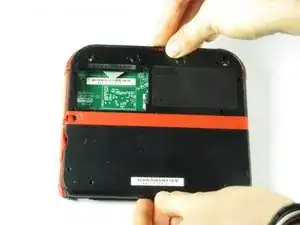
Einleitung
Hier wird der Austausch der Rückabdeckung gezeigt.
Werkzeuge

-
-
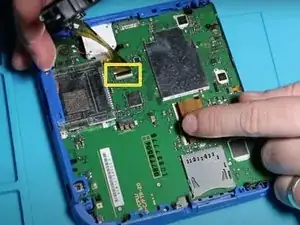
Klappe den Sicherungsbügel des Flachbandkabels mit dem Fingernagel oder dem flachen Ende des Spudgers hoch und ziehe das Kabel von der Hauptplatine ab.
-
Löse das Kabel aus dem Anschluss ab.
-
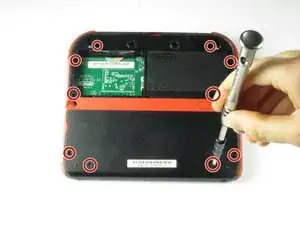
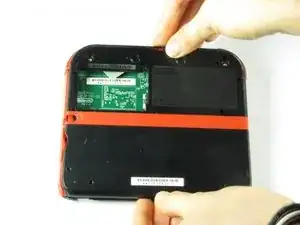
Abschluss
Um dein Gerät wieder zusammen zu setzen folge den Schritten in umgekehrter Reihenfolge.

2 Kommentare
The two top screws on the backpanel I cannot get out, I used the same screwdriver I used for every other screw.
Please help!
For those two screws that are on the top cap aren’t supposed to come out, if the do come out it means you’ve broken those screws. Also after unscrewing that top it should just slide up.
Can't take off the screw top left next to the battery. What type of screwdriver do I use and where can I find some?
Little Mac -
I used a husky with changeable heads, you could probably find one on amazon
Minecrafter Pig -
These screws aren't Phillips, they're JIS, if you use a Phillips head you can and will strip the screws, please update this as it can cause more harm to people's systems than good if they get stripped.
Sneakii -
yep. i stripped my screws
Persvicx -
The screws are 6.2mm long
Martin Samuelsson -
god I thought it was because I was repairing a sibling's ds that had something spilled on it (idk maybe that they didn't clean it good when it happened) but continued to struggle even with screws that looked fine... wish I had checked the comments sooner :/ Please like the above, update this guide! It sucks knowing that someone like me is also gonna probably miss this. I didn't get super far but well. I already stripped down some which sucks either way. Ironically, I noticed that using a size slightly smaller gets the job done better. Ironic in that you'd normally avoid that because it's more likely to strip with small bits scrapping the inside. But if you are real careful it can hang on and twist. I'd recommend just getting the JIS but maybe this might work for some- I also want to emphasize SLIGHTLY smaller phillips.
Alexandria.P -