Einleitung

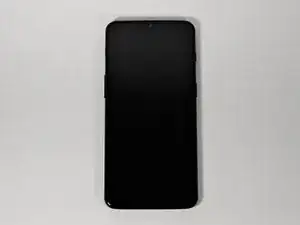
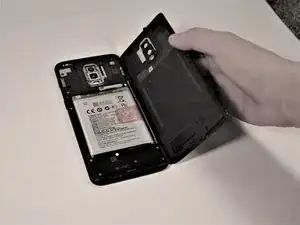
Wenn die Rückseite deines OnePlus 6T beschädigt oder zerkratzt ist, oder wenn du an innere Bauteile herankommen möchtest, musst du die Rückseite öffnen. Diese einfache Anleitung zeigt, wie das geht.

Schalte das Gerät vor Reparaturbeginn aus und trenne das Netzteil ab.

  1. QnG4LXYaqLslvlYd
    • Schalte dein OnePlus 6T aus und lege es mit der Rückseite nach oben auf eine stabile Arbeitsfläche.

  2. GlmtQ2lbErO6W4Wy
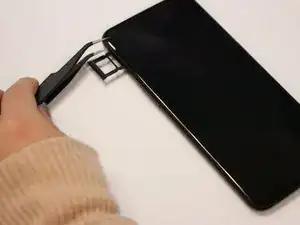
    • Setze ein Werkzeug zum Öffnen des SIM-Karteneinschubs in das kleine Loch in der oberen linken Seite des Smartphones ein. Lasse den Einschub herausspringen.

    • Entferne behutsam den SIM-Einschub.

    Remove the SIM card tray from the phone. Don't need to remove the actual card from the tray, just be careful you don't lose it…

    SayIDidIt™ -

  3. SEOAbe1VJT4htmt4
    • Weiche den Kleber am Smartphone mit Hilfe eines iOpeners oder eines Haartrockners auf.

    • Wenn du mit einem Haartrockner arbeitest, dann halte ihn mindestens 20 cm vom Smartphone entfernt. Bewege ihn in kreisender Form um die Kanten des Gerätes.

  4. ZFfAKQo3yDUUuVSa
    ZFfAKQo3yDUUuVSa
    rNJyYyGSscfBUtvq
    D6Nmxbmo3tiaMNsO
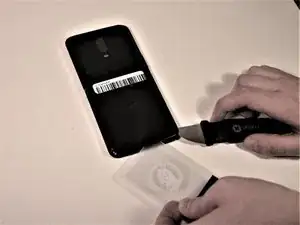
    • Setze einen Jimmy in eine der erwärmten Ecken ein und hebe sie ein wenig hoch.

    • Setze eine Kunststoffkarte in den Spalt ein und lasse sie vorsichtig unter dem Gehäuse entlanggleiten.

    • Beim Ablösen wird sich die Karte etwas schwer bewegen lassen, aber das ist normal.

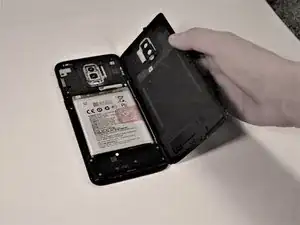
    • Entferne die Rückseite vom Smartphone.

    • Beseitige alle Kleberreste von der Rückseite und vom Rahmen. Benutze dazu hochkonzentrierten Isopropylalkohol (mindestens 90%ig) und ein fusselfreies Tuch.

    Do you need to replace the glue when reassembling?

    S Marlin -

    It was sufficient for me to re-heat the adhesive from the phone.

    Also, I used a pair of tweezers to lift the initial corner, which was a breeze compared to the Jimmy’s as suggested by the guide.

    Michel Rummens -

    The gaps were very tight. After warming the adhesive, it was helpful to have a helper use a suction cup to tug on the back to enlarge the gap for the jimmy.

    tbrannam -

    Theres a big patch of glue on the right side of the camera. Be careful with this part, cuz ure proabably under the curved side trying to get inbetween and in my case this shattered the coating of the backside of my phone. It still works, but it has a spider skin on the back now.

    Shwyne -

Abschluss

Um dein Gerät wieder zusammenbauen, folge den Schritten in umgekehrter Reihenfolge.

Entsorge deinen Elektromüll fachgerecht.

Lief die Reparatur nicht wie geplant? Schaue zunächst auf unserer Troubleshooting-Seite, oder frage in unserem Forum nach Hilfe bei der Fehlersuche.

Kira D'Agostino

Mitglied seit: 15/10/19

1613 Reputation

3 Kommentare

I wonder if this is the same for OnePlus 6 (6000/6003)?

karlkristians -

another greath guide, repaird check.
In same time rplacd the battery so phone is ready for another few years

yoeri -

Thanks for this guide. But is there something particular after removing the old piece to install the new one ? How the new one will be glued ?

Alexandre Herbreteau -