Einleitung

Diese Anleitung zeigt, wie der Deckel auf der Rückseite der Samsung Galaxy Watch4 geöffnet wird.

  1. tPsOU1qJlNmqKJJs
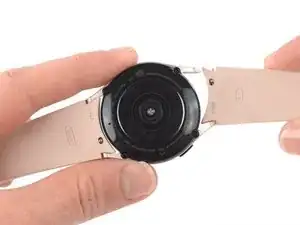
    • Trenne die Uhr vor Reparaturbeginn vom Ladegerät und schalte sie aus.

    • Entferne das Armband.

  2. ds3Zrry4BmkM4wQH
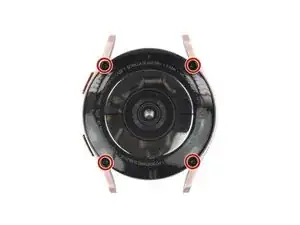
    • Entferne die vier 4,0 mm langen Tri-Point Y00 Schrauben.

    The correct tool to use here is a tri-point Y00 screwdriver.

    David C -

    What if 2 won't come out?

    Sharon Shelton -

    Yes this step needs to be edited as the correct tool is y00 not y000. I think I stopped my brand new y000 before I figured it out.

    Ryan Stokes -

    Definitely 00

    Andrew -

    Idk guys in my case the Y000 fit much better, the Y00 did turn the screws but felt like it will strip at any moment.

    Adam Duda -

    Ⓨ1.5 can also be used

    coltman88 -

  3. ymfKdMVQZhNEFppe
    ymfKdMVQZhNEFppe
    KDQOI5ShvA2eCphC
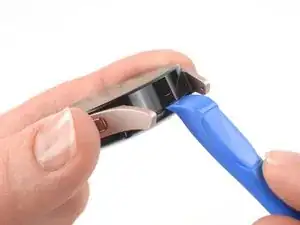
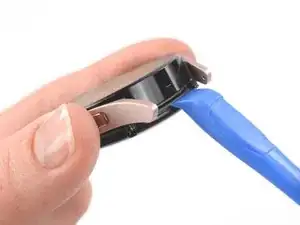
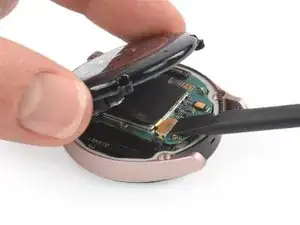
    • Setze ein Öffnungswerkzeug in die Naht zwischen der Rückabdeckung und dem Metallgehäuse ein.

    • Verdrehe das Werkzeug, damit ein Spalt entsteht.

    • Entferne die Rückabdeckung noch nicht ganz. Das Flachbandkabel zum Sensor ist immer noch an der Hauptplatine angeschlossen.

    That isn't glue holding the cover in place. That is the rubber gasket used to waterproof the device. It WILL get damaged and you WILL have to replace it.

    David C -

    Is there a way to remove the casing without damaging this gasket?

    Cove Shores -

  4. IEoNXm5eiJOjSaBs
    IEoNXm5eiJOjSaBs
    IhlOWESk3nwubB1w
    • Lege die Uhr mit dem Zifferblatt nach unten auf die Arbeitsfläche.

    • Klappe den Deckel auf der Rückseite vorsichtig vom eben erzeugten Spalt her auf.

    • Heble das Flachbandkabel zum Sensor mit dem flachen Ende des Spudgers von der Hauptplatine nach oben und trenne es ab.

  5. D5HLPRTGUcyScmHE
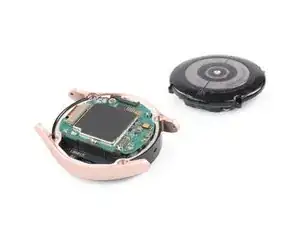
    • Entferne die Rückabdeckung.

    • Kontrolliere, ob die Gummidichtung der Rückabdeckung noch in Ordnung ist. Wenn sie beschädigt ist, dann tausche sie aus, damit die Uhr weiterhin wasserfest bleibt.

    If there is then what do I do and also how do I know if it's damaged

    Zev Kaff -

Abschluss

Um dein Gerät wieder zusammenzubauen, folge den Schritten in umgekehrter Reihenfolge.

Hat die Reparatur nicht ganz geklappt? Versuche es mit ein paar grundständigen Lösungen, ansonsten findest du in unserem Forum Hilfe bei der Fehlersuche.

Adriana Zwink

Mitglied seit: 18/12/19

58292 Reputation

7 Kommentare

the glass broke on the back of my watch 4 and i have managed to get all the shards and seal out without damaging anything, but I am having trouble finding remplacement glass for the sensor in canada

Champy Ton -

It just suddenly turned off and won't turn on it just vibrates in sequences, i don't know what to do.

Salim Juma -

I am having a real tough time unscrewing the screws despite having the right screwdriver. It is like they are stuck on.

Mishaal Jadunundon -

hello, I replaced the sensor but once I connect the flex cable to the motherboard it just doesn't work.
meaning that the sensor is not working (even no green light on the back) but the wireless charging is working.
I tried to disconnect and reconnect again but still no way to let the sensore work.
is there anything that must be reset softwarewise in order the watch can recognize the sensor?
Or probably the flex cable is not working properly?
thanks in advance

Daniele -

I am having the same exact issue. Did you ever find a solution?

Jasmine -

How do I get off a tiny stripped screw from the back of my galaxy 4 smartwatch?

Grace -

Hi Grace, sorry to hear about the stripped screw. Fortunately, we have a guide with some way to try to get the screw out. However, some of these tips might not work for screws of this size. Hope this helps!

Manuel Haeussermann -