Einleitung

Sollte das Betriebssystem Ihres Chromebooks einmal beschädigt werden, können Sie es mit dem Wiederherstellungsprogramm von Google wiederherstellen. Bei diesem Prozess entfernt das Tool das aktuell installierte Betriebssystem vollständig und installiert es neu auf dem Gerät.

Obwohl Chrome OS dafür bekannt ist, ein recht stabiles Betriebssystem zu sein, gibt es Momente, in denen Sie ein Wiederherstellungslaufwerk zur Hand haben möchten. Zum Beispiel würden Sie in einem der folgenden Szenarien ein Wiederherstellungs-USB verwenden wollen...

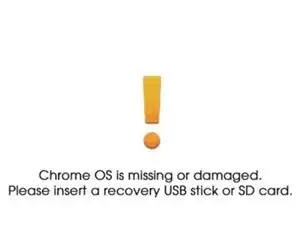
  • Sie sehen diese Fehlermeldung: "Chrome OS fehlt oder ist beschädigt"
  • Andere Schritte zur Fehlerbehebung haben keine Auswirkung auf das unmittelbare Problem.
    • Für die Herstellung Ihres Wiederherstellungsgeräts benötigen Sie die folgenden Gegenstände.

    • 1 x USB-Laufwerk oder SD-Karte (8 GB ist das Minimum)

    • Alle Inhalte, die auf diesem Laufwerk gespeichert sind, werden in den nächsten Schritten gelöscht. Sichern Sie alle Inhalte, die Sie speichern möchten, oder stellen Sie sicher, dass es sich um ein Laufwerk handelt, das Sie für zukünftige Geräte verwenden möchten.

    • 1 x Computer, auf dem der Google Chrome Browser oder Chrome OS läuft.

  1. XtX2xi3LtSKARpOs
    XtX2xi3LtSKARpOs
    IoUcf2DLpUZRihyE
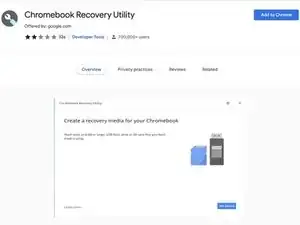
    • Öffnen Sie Google Chrome, navigieren Sie zum Chrome Web Store und laden Sie die Erweiterung Chromebook Recovery Utility herunter.

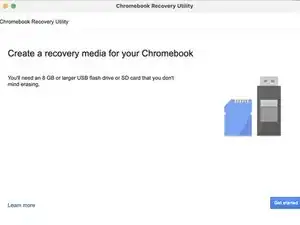
    • Fügen Sie das Dienstprogramm zu Chrome hinzu und starten Sie es. Sie werden mit dieser Seite begrüßt.

    Ich möchte gern die Chrome riparian

    Ahmad Zadran -

  2. qJZuKbKXNLwI3GA4
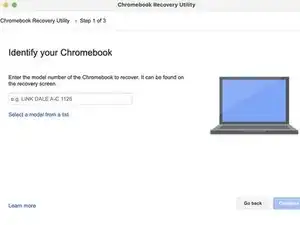
    • Klicken Sie auf "Starten" und Sie werden aufgefordert, das Modell Ihres Chromebooks einzugeben.

    • Sie haben die Möglichkeit, entweder den Code einzugeben, der auf dem Wiederherstellungsbildschirm des Geräts angezeigt wird, oder aus der Modellliste auszuwählen.

  3. SsWw4lyUY31iAAAH
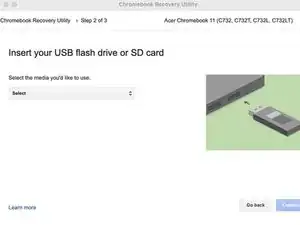
    • Schließen Sie Ihr Ersatz-USB-Laufwerk mit 8 GB an und wählen Sie es aus dem Dropdown-Menü aus.

    • Alle auf dem Laufwerk gespeicherten Inhalte werden in den nächsten Schritten gelöscht. Stellen Sie sicher, dass das Laufwerk leer ist oder keine Daten enthält, die Sie nicht verlieren möchten.

  4. 6FKmF5V6cc23ILAT
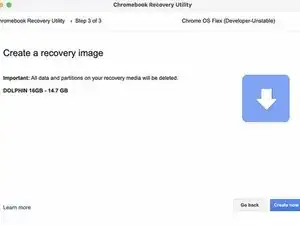
    • Es wird ein Bildschirm mit dem von Ihnen ausgewählten Laufwerk angezeigt. Klicken Sie auf die Schaltfläche "Create now" und der Prozess beginnt.

    • Entfernen Sie das Laufwerk während des Vorgangs nicht. Der Vorgang dauert etwa 5 Minuten und Sie werden gefragt, wann das Wiederherstellungslaufwerk fertig ist.

Abschluss

Wenn Sie das Laufwerk zum Speichern von Dateien wiederverwenden möchten, müssen Sie die Anwendung "Recover Utility" verwenden, um die Daten auf dem Laufwerk zu löschen, und es mit einem Wiederherstellungstool neu formatieren.
Jacob Mehnert

Mitglied seit: 18/10/21

39983 Reputation

15 Kommentare

Thanks only this is working all the other instructions on google didnt work… Direct and simple instructions

idide akeh -

I'm glad to hear that this guide helped you out!

Jacob Mehnert -

Hello....I followed all you said here yet my USB flash drives got corrupted after the recovery utility completed

Amos -

Hello, you might need to wipe the USB drive and attempt to install the recovery tool again. You might also want to check that the drive is formatted to FAT32. Other formats have been known to cause errors with the recovery tool.

Jacob Mehnert -

Does it matter if it’s a 2.0 or 3.0 USB drive???

Josh Knapp -

Hey there Josh,

Ideally you would want a USB 3.0 drive especially if the device that you are attempting to recover has USB 3.0. Hope this is helpful.

Jacob Mehnert -

i dont think so, unless the usb port is usb 2.0 and you insert usb 3.0 or usb 3.1

SKIBIDI OHIO RIZZLERRRRRR -

Creates about 11 partitions on the USB? And CB311-10H isnt in the list?

nikki.k.85 -

Saya ingin memulihkan Acer chromebook c733 tanpa melalui administrator sekolah, bagaimana caranya?

taufik jie -

Halo, sayangnya sebagian besar sekolah akan menggunakan Google Admin, atau perangkat lunak lain untuk mengelola Chromebook mereka, jadi memulihkannya tidak akan menghalangi sekolah untuk mengelolanya. Jika Anda membeli perangkat dari sekolah, sebaiknya bicarakan dengan departemen TI sekolah Anda agar perangkat tersebut dirilis dari Google Admin.

Jacob Mehnert -

I think step 5 should be step 2

Bill Holmes -

I can't find my hp elite c1030 model Jinlon os

Vuthea -

Are you attempting to find it using the specific model in the model list, or are you attempting to search for the model with the model number?

Jacob Mehnert -

This info is simply WRONG ! The recovery tool requires that you are using your chromebook already. The software B4 it downloads tries to change the host hard drive. If your chromebook OS isnt working this wont help you !

Steve Wilson -

Howdy there Steve, the utility tool is used through the Chrome Web Browser extension. The intent is that you use the tool to create a recover drive on a different computer than the one you are attempting to fix. Also, if you are having issues with the storage drive you are attempting to use is being detected by your computer, and is at least 8 GB.

Jacob Mehnert -