Einleitung

Sollten die Pedale deiner Logitech G29 falsche oder ungenaue Eingaben tätigen, liegt das wahrscheinlich an den verbauten Potentiometern und/oder deren Verbindung. Da die Pedale hauptsächlich auf dem Boden stehen, können sich Staub oder andere Partikel leicht in den Potentiometern ansammeln, wodurch die fehlerhaften Eingaben entstehen. Mithilfe dieser Anleitung kannst du die Probleme diagnostizieren und die Verbindungen und/oder die Potentiometer der jeweiligen Pedale reparieren.

Das Potentiometer ist zuständig für den Grad der Betätigung der Pedale. Die Verbindungen des Sensors sind dafür da, die ermittelten Informationen an den Computer weiterzuleiten. Ist eine oder sogar beide dieser Komponenten kaputt, so kann sich dies in falschen Eingaben äußern.

Bevor du mit der Arbeit an den Pedalen beginnst, stelle bitte sicher, dass diese nicht mit dem Lenkrad verbunden sind und du dich geerdet hast.

  1. yXcUiUUmVARXvUHY
    yXcUiUUmVARXvUHY
    DGgrXAWGT6IkgCjl
    HAgLagKHXvSoJBBV
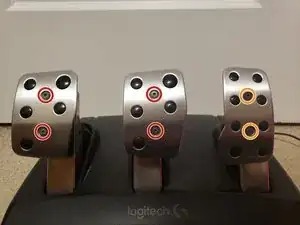
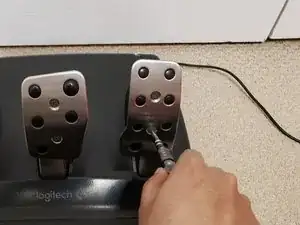
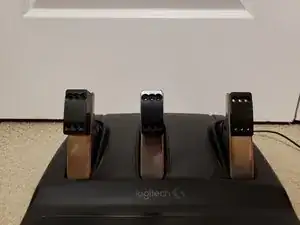
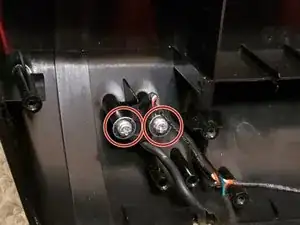
    • Entferne die vier 30 mm Schrauben des linken und des mittleren Pedals mithilfe eines 1/8-Inbusschlüssels.

    • Entferne die beiden 16,3 mm Schrauben des rechten Pedals mithilfe eines 1/8-Inbusschlüssels.

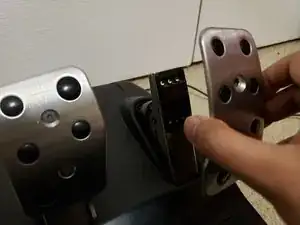
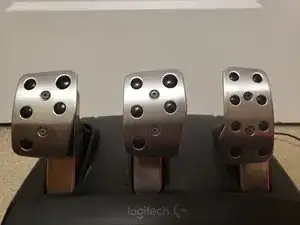
    • Löse die silberfarbenen Pedalkappen von den Pedalen ab.

  2. KWiNcOPFEvGRWMZR
    KWiNcOPFEvGRWMZR
    eHn4rTps11U1MeoN
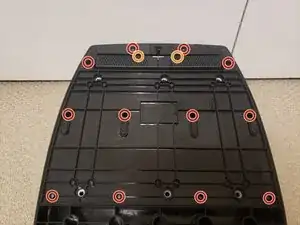
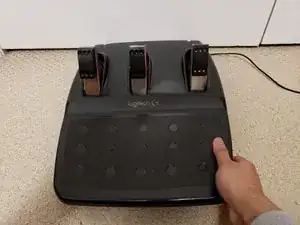
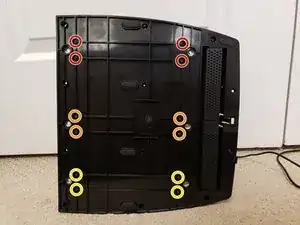
    • Drehe das Pedalset um.

    • Entferne die zwölf 15,8 mm Schrauben auf der Unterseite mit einem Kreuzschlitzschraubendreher #1.

    • Hinter den Teppichgreifern befinden sich zwei weitere 15,8 mm Schrauben. Diese kannst du auch mit einem Kreuzschlitzschraubendreher #1 lösen.

    • Diese Metallschrauben sind in den Kunststoff geschraubt. Achte beim Anziehen dieser Schrauben darauf, dass du sie nicht überdrehst und das Gewinde beschädigst, da die Schrauben danach nicht mehr halten.

  3. BZQ6rksNW1FSEsOr
    BZQ6rksNW1FSEsOr
    fJcCQMGJOOoWqBgA
    cTGAGTuUuDnlre5H
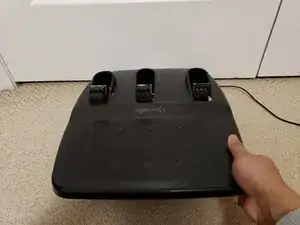
    • Trenne vorsichtig das obere Gehäuseteil vom unteren.

    • Hebe das obere Teil nicht zu weit vom unteren ab, da ein Kabel daran hängt, das im nächsten Schritt abgeschraubt werden muss.

  4. yQ2OOmlvVVsY25wl
    yQ2OOmlvVVsY25wl
    NUCZa6fvH4iowNWc
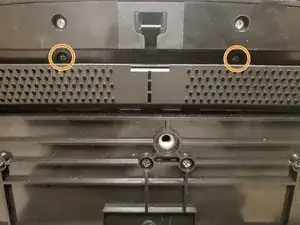
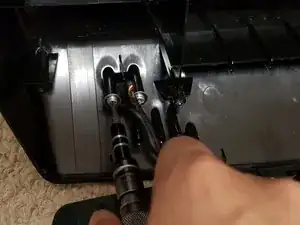
    • Drehe die beiden 7,4 mm langen Schrauben mit einem Kreuzschlitzschraubendreher #1 heraus, um das Kabel am oberen Gehäuseteil zu lösen.

    Check the wire for any cuts; also test each cable ends connexion with a multimeter, mine had an slight cut on the black outside wire cover right where the cable exits the base, barely visible, but inside two cables were completely cut hence having no connectivity between ends and causing misreadings on OS/Games; solder them back together and all reading problems got fixed.

    Rodolfo Medina -

  5. bApwwyG6UAJYTZOn
    • Drehe die Pedale auf die Seite.

    • Jedes der drei Pedale wird mit jeweils 4 Schrauben gehalten.

    • Löse die vier 15,8 mm langen Kreuzschlitzschrauben #1 an dem Pedal, welches du reparieren möchtest.

    • In dieser Anleitung wird nur das rechte (Gas) Pedal gezeigt. Bei den anderen Pedalen ist der Vorgang genau derselbe

    • Nachdem du die Schrauben gelöst hast, kannst du vorsichtig das Pedal herausnehmen, um einen besseren Überblick über das Potentiometer und die Verbindungen zu bekommen.

  6. ybgR4u1hgDYYl5RE
    ybgR4u1hgDYYl5RE
    LB5DPRrEonCMHbhv
    uWHQ52EkIgaUZMvX
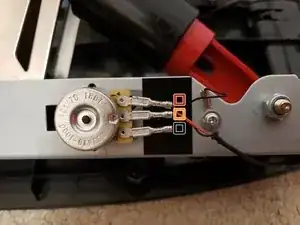
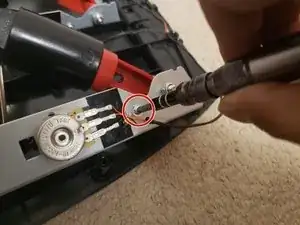
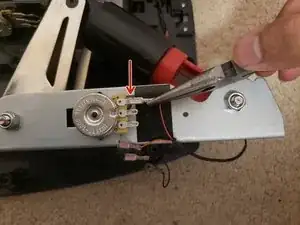
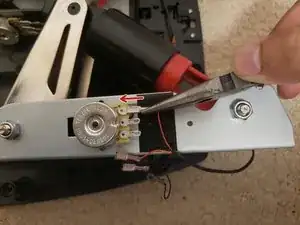
    • Die Farben der Kabel variieren für jedes Pedal. Merke dir zunächst, welches Kabel wohin gehört.

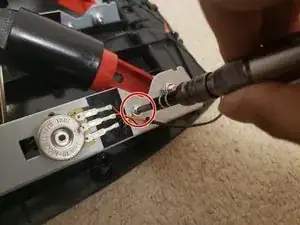
    • Nutze einen Kreuzschlitzschraubendreher #1 um die 6,2 mm Schraube zu lösen, die den Erdungsring in Position hält

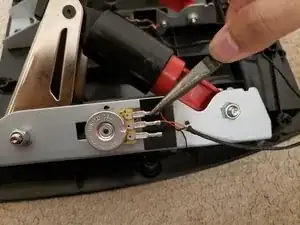
    • Nutze eine kleine Zange oder Pinzette, um die drei Verbindungen vorsichtig zu lösen

    • Beim Ziehen an den Verbindungspunkten kann es einen kleinen Widerstand geben. Ziehe vorsichtig an den Kabeln, um Beschädigungen zu vermeiden

    Can I use the potentiometer from the clutch or the brake and swap it with the one on throttle

    Greg Cook -

    utter $@$* i did the cable remova;ls carefully wih a paire of pliers and it broke off and now i have to sepdn money on new sitty vables because theres fuckwits dontm kbnwoo what ther doing thess inbread &&^&^$^ terrorist us fattys go and &&^& yourself

    this webistye is usless -

  7. Km2o1HUooUki2ayv
    Km2o1HUooUki2ayv
    oUjomiQEiSXQRUWw
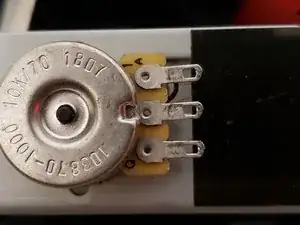
    • Überprüfe die Anschlüsse auf Verunreinigungen oder kleine Partikel. Falls nötig, säubere die Anschlüsse, um eine störungsfreie Verbindung zu gewährleisten.

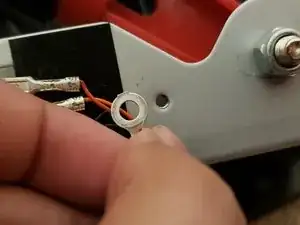
    • Überprüfe den Erdungsring und seine Verbindung auf Verschmutzungen. Damit das Pedal korrekt funktioniert, muss der Ring das Metall am Pedal direkt berühren.

    • Falls die Verbindungen verschmutzt sind, reinige sie mit Isopropyl-Alkohol.

  8. gfLZqPfQGSKGX2WJ
    gfLZqPfQGSKGX2WJ
    sEPPEwPSd5MShZZr
    VxBNyILNSYUPMfR4
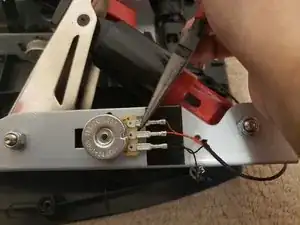
    • Verbinde die Kabel erneut mit den Anschlüssen

    • Stelle sicher, dass die Kabel (siehe Bild) vollständig verbunden sind.

    • Sollte die Verbindung sich dennoch lose oder wackelig anfühlen, drücke sie mit wenig Kraft fest, um sicheren Halt zu gewährleisten.

  9. PwcWXAvBujfF1oRZ
    • Schraube die Erdung mithilfe der Schraube erneut fest.

  10. FfWDy1lJ1dVPbFmx
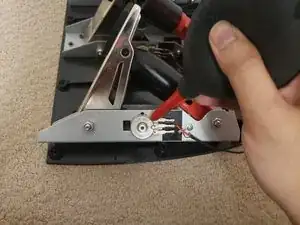
    • Nutze Druckluft, um das Potentiometer von Verunreinigungen zu befreien, die seine Funktion beeinträchtigen könnten.

    Brilliant guide we was going to throw our pedals but this worked brill we used contact spray on potentiometer. Now it's as good as new. Thanks

    Mark Waring -

Abschluss

Um deine Pedale wieder zusammenzubauen, führe die Schritte 1-5 in umgekehrter Reihenfolge durch.

Jeremy Sukhai

Mitglied seit: 18/01/22

501 Reputation

18 Kommentare

Jeremy thank you so much for the information very helpful. I have a question what if I was wanting to have my throttle to run wide open when I get off the throttle and decelerate when I push down on the throttle kinda like a dozer there for not wanting to have to push on the throttle all the time

Bill Davis -

This could be achieved through software rather then altering the pedals itself. Most games or software will provide you with options to customize the functionality of pedals, that way you can invert the input so 0input=full throttle and 100input=no throttle. If you cant do this through software, you could swap the 5v and ground connections which are the connections not in the middle. This will reverse the voltage reading for the potentiometer, then the throttle will be wide open by default, and decelerate when you press the pedal.

Jeremy Sukhai -

Thank you Jeremy so much I will try to do this.

Bill Davis -

Im having a problem where the throttle accelerates wide open when i let off the pedal but when i push on the pedal it decelerates, how can i fix this?

Octavio Reyes -

Im having a problem where my brake doesn't work and when I accelerate it also activates the brake. How can I fix this

James Stanford -

did you solve the problem?

infantry -

same happens to me, if you solved it, how did you do it?

Martí Ton cosí -

Thanks so much Jeremy. Although I have another problem. My bunny cutted the wire of the pedals that connects to the PC. The worst is that I moved to another house and I lost the cutted cable. What can I do in this case?

Gp ultra -

You can buy a wiring harness on eBay or Amazon. B0CD7FZ3QN (Copy and paste into Amazon Search) That's the USB version I believe

stacey davis -

My pedals don't want to go to 100%, and when I push hard, the green scale on the dash or the gas gauge keeps jumping back and forth, like from 100 to 80, 90, 80, 100 percent, I don't know. is left over. stable, I go to logitech support, and they don't have spare parts, and what I think is, the small rotor connection between the pedal and the cable that goes to the steering wheel is defective, or is it that the pedals are no longer useful,, Do you have any solution? , thank you

Jose Peer -

I've had similar issues before and it seems to be the issue of the cable that connects from the pedals to the base of the wheel. I found that applying tension on the pedal cable can fix this issue, although it definitely isn't a permanent fix. Try cleaning the connector for the pedal cable and also the port it plugs into on the base of the wheel and try pulling on the pedal cable(pull the part of the cable that comes out the back of the wheel) to apply tension and see if that solves the problem. If it does solve the problem, you will have to figure out a way to maintain that tension on the cable or it will stop working correctly again. If I still had my g29 I would have a better solution for you but I do not have my g29 anymore. After experiencing so many issues with the g29 I simply upgraded to the Moza R5.

Jeremy -

i think with software you can try to put the maximum throttle when is not in the top, i dont know if you can do it in the logitech g hub or maybe inside the game, assetto corsa, for example, you can change that

Martí Ton cosí -

I bought the tools today , since I already had some air spray which was my last check , I added a connector spray, they didn't have to Allen key as a single one, I bought the whole key chain, now on my way to hit and brake my TP ,

I'll let me know how it'd goes, ok

Jose Peer -

Jeremy that's the way I had it but too much spinning out on corners, but the brake pedal has the same ill, so imma do what Mr Page has to offer

Jose Peer -

hi Jeremy,weist du wo ich Original Logitech G29 Potentiometers kaufen kann???

FattyMorgana -

I’m having an issue where if there is nothing pressing the gas pedal it registers as roughly 20% pushed. I’m trying to use this and I’ll get back to you if it works.

Ranveer -

Brother, please, the G29 pedal cable connector is broken. I bought a new connector and soldered the wires, but everything didn't work properly. It seems that there is a problem with a wire. Can you show me which wire color is suitable for each screw in the connector? Thank you. Hamudiatr@gmail.com

hamudi atrash -

any idea where to purchase the potentiometers?

Albert Newton Slusser -