Einleitung

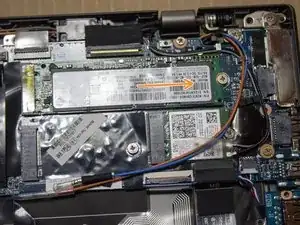
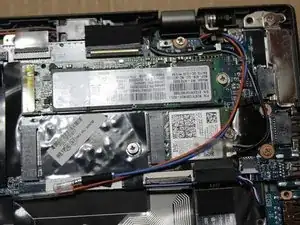
Du wirst lernen, wir man ein ThinkPad X1 Carbon öffnet und den Arbeitsspeicher (SSD) ersetzt. Diese Anleitung beinhaltet nur die Entfernung der SSD. Sie beinhaltet nicht das erneute Aufspielen des Betriebssystems auf das Laptop.

  1. mcEmxGH5wfmXAl3D
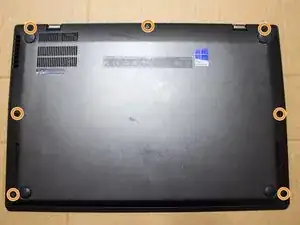
    • Benutze einen #2 Kreuzschlitzschraubendreher um die sieben Schrauben der Abdeckung zu lösen.

    Don’t forget to backup your data

    Oliver -

  2. JUqnPnWCsGESXnYq
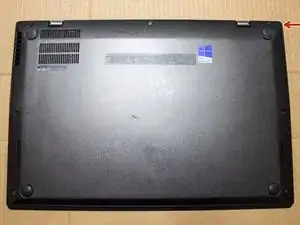
    • Benutze einen Spudger um eine Ecke zu lösen und entferne die Abdeckung dann.

  3. iNDDLLC1O4baDfWB
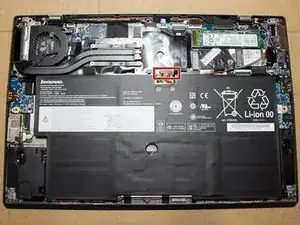
    • Diskonnektiere den Akkukonnektor von der Hauptplatine, indem du den Konnektor in Richtung des Akkus ziehst.

  4. Ocbey4sCqra2acAB
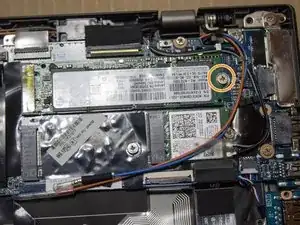
    • Benutze einen #2 Kreuzschlitzschraubendreher und entferne die Schraube, welche die SSD an ihrem Platz hält.

  5. PmNktLxkhBDORhPL
    • Entferne die SSD, indem du sie aus dem Konnektor auf der rechten Seite herausschiebst.

    I could be noted, that the M.2-connector has very strong spring, so at least my SSD pops up so hard it bounces the screw if not kept hold of. Also the insertion of SSD should be made in same angle as it comes out, not vertically sliding. The type of M.2 SSD is single-sided SATA, not NVMe.

    TJI -

Abschluss

Um dein Gerät wieder zusammenzusetzen, befolge diese Schritte in der umgekehrten Reihenfolge.

Mike

Mitglied seit: 23/06/16

1906 Reputation

8 Kommentare

hi, can advise me which of the latest ssd 256/500 GB ssd's would work on a x1 carbon i5?

hardtail1969 -

Really need to put the version/generation of the x1 carbon.. The gen 1 does not look like this inside and I’m spending way too much time trying to figure out what SSD it will take

Eric Metzger -

Even for new models still can be used. same m.2 drive that might be located in the middle or top right of the device. Once the screws are off it is a very easy process.

jwalker8931 -

I just replaced the SSD on my gen 6 and the steps are so easy: undo 5 screws, open up, undo 1 screw to loosen the M.2 module, replace and put things back together. There is no need to mess around with the battery connection at all.

haivu -

A proper way, yes you need to disconnect the battery. You will learn it a hard way just a minor mistake, will blow your Mother Board and you will remember to disconnect them next time. The instruction is great.

Ryan Chau -

Can someone confirm the m.2 type on these units?

Thomas Keats -

Is anyone aware (before I take mine apart) of whether or not a Gen 7 can accommodate a M.2 SSD fitted with a heatsink? Thanks.

Nhonz -

X1 Carbon Gen 3 20BS here: It could be noted, that the M.2-connector has very strong spring, so at least my SSD pops up so hard it bounces the screw if not kept hold of. Also the insertion of SSD should be made in same angle as it comes out, not vertically sliding. The type of M.2 SSD is single-sided SATA (double-sided bends the connector too much, not enough space for proper fit), not NVMe.

TJI -