Einleitung
In den folgenden Situationen musst du Gerät möglicherweise im Wiederherstellungsmodus wiederherstellen:
- Du hast dein Passwort vergessen.
- Dein iPhone ist außer Betrieb.
- Wenn dein Bildschirm mehrere Minuten lang auf dem Apple-Logo verharrt, ohne dass ein Fortschrittsbalken angezeigt wird.
- Dein iPhone geht beim Start in eine Dauerschleife.
Hinweis: Wenn du dein Passwort vergessen hast, musst du das Gerät löschen.
-
-
Schließe dein iPhone mit einem Lightning- oder USB-Kabel an einen Mac oder PC an. Wenn dein Betriebssystem MacOS Mojave oder früher ist, dann installiere iTunes.
-
-
-
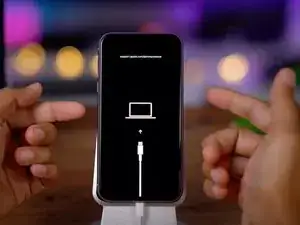
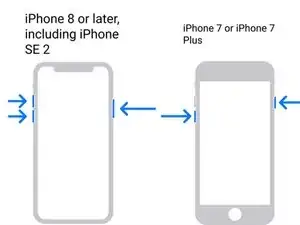
Wenn du ein iPhone 8 oder höher hast, drücke die Taste Lauter und lasse sie los. Drücke die Taste Leiser und lasse sie los. Drücke die Seitentaste und halte sie gedrückt, bis du den Recovery-Bildschirm siehst.
-
Für das iPhone 7 oder iPhone 7 Plus: Halte die Seitentaste gemeinsam mit der Leiser-Taste gedrückt, bis du den Recovery-Bildschirm siehst.
-
Auf dem iPhone 6s oder früher: Halte die Einschalttaste gemeinsam mit der Home-Taste gedrückt, bis du den Recovery-Bildschirm siehst.
-
-
-
Anleitung für macOS (Catalina und später): Öffne den Finder. In der Seitenleiste findest du dein Gerät. Klicke darauf, dann erscheint ein Fenster, in dem du nach Update oder Wiederherstellen gefragt wirst. Update stellt das Betriebssystem ohne Datenänderung wieder her. Wenn das nicht geht, löscht die andere Option zusätzlich die Daten.
-
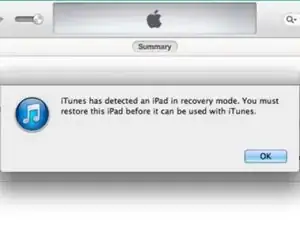
Anleitung für macOS (Mojave und früher) und Windows: Öffne iTunes, klicke auf das Icon für dein iPhone in der oberen linken Ecke . Im nachfolgenden Fenster wirst du nach Update oder Wiederherstellen gefragt. Update stellt das Betriebssystem ohne Datenänderung wieder her. Wenn das nicht geht, löscht die andere Option zusätzlich die Daten.
-

Folge diesen Anweisungen, um dein iOS-Gerät in den Wiederherstellungsmodus zu versetzen. Du benötigst einen Mac oder PC mit iTunes.

7 Kommentare
My power button is not working on an iphone 6, so I can't use these directions! Do you have a work around for this situation?
Thanks
Jeff
On iPhone 6, the power button is really only necessary to turn the device off. You can also accomplish this by disconnecting the battery. Which isn't ideal, but it's better than not being able to do it at all. After it's off, reconnect the battery, then hold down the home button and connect the lightning cable from the USB cable to your computer.
Alisha C -
Some repair tools can get the device into or out of Recovery Mode without pressing buttons physically. TunesKit iOS System Recovery has this feature for totally free, you can use this to put your iPhone into Recovery Mode without any limits.
My home button is not functioning, so even if I disconnect the battery and reconnect it, I will be at the same place. I had to use the digital home button to use the phone before it got disabled. It's that white circular digital button that can be used as an alternative when the physical home key is not functioning.
My phone just suddenly off by itself an iPhone 12 Pro Max please I don’t know what to do