Einleitung
Nach einem Wasserschaden ist der An-/Aus-Schalter eines MacBooks für gewöhnlich defekt, weil er ein Teil der Tastatur ist. Das MacBook ist eigentlich betriebsfähig, allerdings ist ein Anschalten durch den An-/Aus-Schalter nicht möglich.
Um das MacBook anzuschalten kann man Kontaktstellen auf der Hauptplatine nutzen. Manchmal funktioniert das allerdings auch nicht. Hier erkläre ich eine andere Methode um das MacBook in diesem Fall anzuschalten.
Diese Methode funktioniert durch Diskonnektierung von Ladegerät und Akku. Schließe den Akku danach wieder an und das Ladegerät wiederum ein paar Sekunden danach.
Alle Bilder stammen von öffentlichen Posts und werden nur zur Veranschaulichung gezeigt. Für dein Gerät musst du die passende Anleitung finden.


-
-
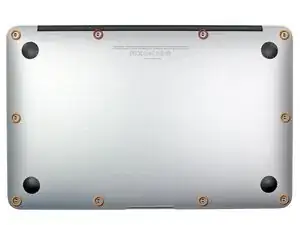
Entferne die folgenden zehn Schrauben:
-
Zwei 8mm 5-Punkt Pentalobe Schrauben.
-
Acht 2,5mm 5-Punkt Pentalobe Schrauben.
-
-
-
Greife mit abgeknickten Fingern zwischen das Display und die untere Abdeckung und ziehe nach oben, um die untere Abdeckung vom Air aufzubekommen.
-
Entferne die untere Abdeckung und lege sie beiseite.
-
-
-
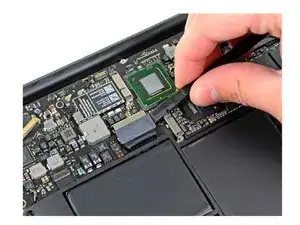
Diskonnektiere den Akku. Benutze deine Finger oder ein Kunststoffwerkzeug um den Akkukonnektor abzutrennen.
-
-
-
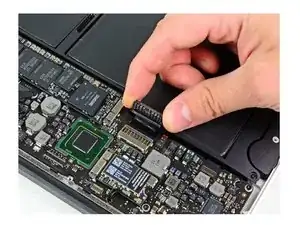
Stelle die Verbindung des Akku wieder her. Warte ein paar Sekunden und schließe den Akku dann wieder an.
-
-
-
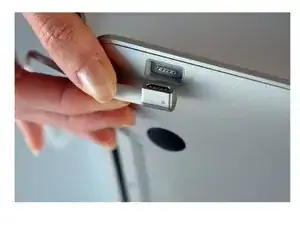
Stecke das Ladegerät ein. Du solltest jetzt sehen, dass der Lüfter läuft, auch wenn das MacBook geschlossen ist. Das ist das Zeichen, dass das MacBook angeht.
-

Um das Gerät wieder zusammenzusetzen, befolge diese Schritte in der umgekehrten Reihenfolge.

5 Kommentare
All images are from public posts and for demonstration purpose only. Find the proper guide for your specific device.
Hello, thanks for the tutorial. I was wondering if you could help me. I spilled some water on my MacBook Pro, bought in 2015. I cleaned the water off, and if worked fine. However, after I left the Mac to go eat dinner, the keyboard was not working the way it should be. A couple of keys worked, and a couple didn’t. On top of that, a few keys, when pressed, would give me the key I wanted and a number. For example, when I pressed the key z, it would give me z1. The same goes for the numbers, pressing 1 would get me z1. On top of that, numbers 4 and 5 don’t work at all. Also, the delete button, when pressed, would delete AND make my Mac’s screen go a shade darker. I also went to an Apple Store to see how much money it would be to fix it. They weren’t too sure on what the issue was, but they said that they might have to just replace my built in keyboard, which would cost hundreds of dollars.
Thank you so much! Your tutorial was fantastic, and I look forward to your reply.
Hey thanks again for the tutorial. I have this problem and this solution works for me, however; it’s a bit fatiguing to open a computer up everytime you’d like to power it on. and i was wondering if there are any other solutions to this problem, perhaps replacing the power button on the keyboard or the flexcable or something. Thanks again for the tutorial.