Einleitung

Durch das Entsperren des Bootloaders kann man benutzerdefinierte Firmware auf seinem Android-Smartphone installieren und erhält volle Zugriffsrechte, um Änderungen am Telefon vorzunehmen. Solche Modifikationen könnten das Ändern eines Teils der vorinstallierten Software nötig machen oder könnten sogar das Ersetzen des gesamten Betriebssystems umfassen.

Einige Bootloader sind gar nicht gesperrt, manche können mit einem Standard-Fastboot-Befehl entsperrt werden, für andere braucht man einen Entsperrcode des Herstellers. Es gibt auch Telefone, für die überhaupt keine Entsperrmethode funktioniert und nur durch einen Software-Exploit entsperrt werden können. Diese gesperrten Geräte sind normalerweise Vertragshandys.

In dieser Anleitung werde ich allerdings nur das Entsperren von Bootloadern mit dem Standard-Fastboot-Befehl behandeln.

Warnungen

  • Durch das Entsperren des Bootloaders wird dein Gerät zurückgesetzt, stell also sicher, dass du all deine Daten gesichert hast!
  • Den Bootloader zu entsperren kann bei einigen Herstellern zum Erlöschen der Garantie führen.
  • Ein entsperrter Bootloader löst die Play Integrity API (zuvor SafetyNet Attestation API) aus, was dazu führen kann, dass einige Dienste wie GPay nicht mehr funktionieren.
  • Ein entsperrter Bootloader macht das Gerät anfällig für Hacker mit physischem Zugriff auf das Gerät, es empfiehlt sich also nicht den Bootloader von einem Gerät, auf dem du Staats- oder Firmengeheimnisse speichern willst, zu entsperren.

Zusätzliche Informationen

  1. KAHYI5jMmWjWUwQY
    KAHYI5jMmWjWUwQY
    qPOPSWMFSDr12ycl
    CKfbT2kwvb346wEx
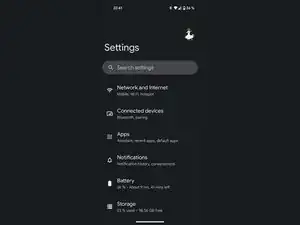
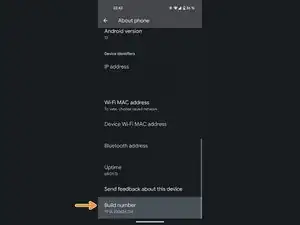
    • Als Erstes müssen wir nach der Buildnummer suchen.

    • Normalerweise findet man sie unter Telefoninfo > Buildnummer oder System > Telefoninfo > Buildnummer, aber da dies von Gerät zu Gerät unterschiedlich ist, ist die Suchfunktion zu verwenden normalerweise der schnellste Weg.

    15min-1hour is incorrect for xiaomi phones. for xiaomi phones its 5-7 buisness days

    Filip -

  2. dZljVNRjUgSx2yp5
    dZljVNRjUgSx2yp5
    A6DaFEGyI6mNYl1S
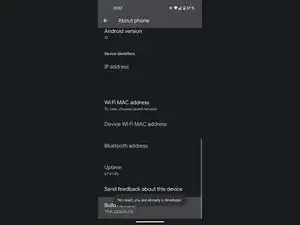
    • Jetzt musst du nur noch mehrmals auf die Buildnummer tippen, bis du eine Bestätigungsmeldung mit der Aufschrift „Sie sind jetzt ein Entwickler.“ oder „Der Entwicklermodus wurde aktiviert.“ bekommst. Ich hab die Entwickleroptionen auf meinem Gerät schon aktiviert, also muss ich es nicht noch einmal machen.

    • Du wirst möglicherweise nach deinem Sperrbildschirm-Passwort gefragt, falls du eines eingerichtet hast.

  3. CYfMStLfhU3LGT6b
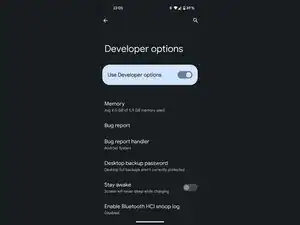
    • Such in den Entwickleroptionen nach der Option OEM-Entsperrung und aktiviere sie.

    • Du wirst möglicherweise aufgefordert, dein Sperrbildschirm-Passwort einzugeben, falls du eines eingerichtet hast.

    I can't enable the OEM on my phone

    Ibsan Furgassa -

    i have the same issue while enabling oem it's says i didn't complete the two weeks

    Fana$onic -

  4. FNKXMHl1sYMiMMVY
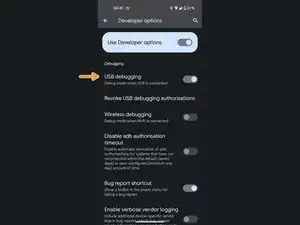
    • Such in den Entwickleroptionen nach der USB-Debugging-Option und aktiviere sie.

  5. D2AwKGELHrj6G1Hl
    D2AwKGELHrj6G1Hl
    E6UE3pqOkVRJQUAU
    • Schließ dein Handy mit einem USB-C auf USB-A Kabel an deinem Rechner an.

    • Falls du ein schlechtes Kabel verwendest, könntest du auf Probleme stoßen. Einige ältere Geräte kommen auch mit USB 3 im Fastboot-Modus auch nicht klar.

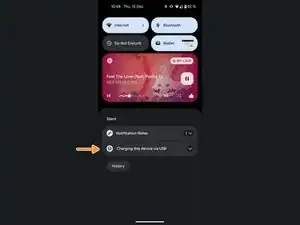
    • Zieh die Benachrichtigungsleiste nach unten und tippe auf Dieses Gerät über USB aufladen.

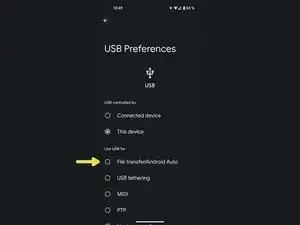
    • Wähle die Option Dateiübertragung/Android Auto.

    • Auf einigen älteren Geräten könnte diese Option stattdessen MTP heißen.

    Well that takes care of that cuz I don't have a regular PC but I will save these directions since Someone is donating a Chromebook to me, I went back to consumer cellular after they went with ATT instead of TMobile also & ATT installed software and what looks like bootloader and something about binding? Permissions say NO or NA but they were allowed to do this anyway! I'm furious

    deb patterson -

  6. JSs6S3EdtJORw3SK
    JSs6S3EdtJORw3SK
    vk2adCqunMswSINu
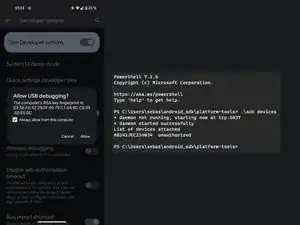
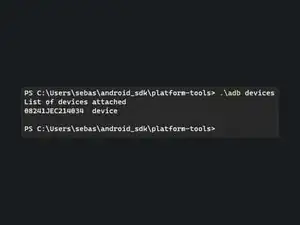
    • Öffne die Terminalanwendung auf deinem Rechner mit installierten SDK Platform Tools und gib adb devices ein

    • Dies sollte ein Popup auf deinem Gerät auslösen. Stell sicher, dass das Häkchen gesetzt ist, und klicke auf Allow (Erlauben)

    • Ich habe den Plattform-Tools-Ordner nicht zum PATH zugefügt. Deshalb muss ich mein Terminalfenster im Plattform-Tools-Ordner öffnen und .\ als Präfix für meine Befehle verwenden.

    • Du kannst den Befehl erneut ausführen, um zu überprüfen, es funktioniert hat. Es sollte jetzt device anstelle von unauthorized melden.

    PS C:\Users\ADMIN> adb reboot bootloader

    adb : The term 'adb' is not recognized as the name of a cmdlet, function,

    script file, or operable program. Check the spelling of the name, or if a

    path was included, verify that the path is correct and try again.

    At line:1 char:1

    + adb reboot bootloader

    + ~~~

    + CategoryInfo : ObjectNotFound: (adb:String) [], CommandNotF

    oundException

    + FullyQualifiedErrorId : CommandNotFoundException

    help me pls how do I do that

    Lê Minh Khôi -

    Since you probably haven't "installed" the platform tools, you'd have to use the terminal in the folder you downloaded. You could do that by first running the command cd C:\[location of the folder]\platform-tools first and adding a .\ in front of every subsequent command, like I do in the guide images. Alternatively, if you have a current version of Windows 10 or 11, you can actually install the platform tools via the Microsoft Store by running winget install --id=Google.PlatformTools -e

    Sebastian -

    Okay, so how do I get into the terminal mode on my laptop?

    ArlinaEinstein -

    i had gotten the same error as mentioned in above comment. What should I do?

    Riya Dasani -

    I don't have installed platform-tools, What should I do?

    Riya Dasani -

    "draw the rest of the owl" xd

    Jesus Christ -

    i installed sdk platform tools and android studio, but it says "the code execution cannoty proceed becuase AdbWinApi.dll was not found. reinstalling the program may fix this issue"

    Reginald Jackson -

    Have you already tried reinstalling Android Studio? If that doesn't work, you can alternatively use the methods I mentioned in my response to the first comment on this step. You don't necessarily need the full Android Studio suite unless you're developing an app. Using Winget or simply directly downloading the platform tools folder directly is typically a better option.

    Sebastian -

    What if it says device not found

    whyaren'tthingssimple -

  7. aNayoXwsQqmBED6i
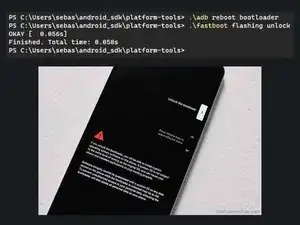
    • Gib den Befehl adb reboot bootloader ein

    • Warte ein paar Sekunden, bis dein Gerät in den Bootloader gestartet hat, und gib dann den Befehl fastboot flashing unlock ein.

    • Einige Geräte verwenden stattdessen den Befehl fastboot oem unlock.

    • Wenn du eine Fehlermeldung erhältst, die ähnlich lautet wie FAILED (remote: 'Failed to unlock, decrypt failed!'), ist dein Bootloader gesperrt. Du benötigst einen Entsperrcode vom Hersteller.

    • Wenn du bei < waiting for any device > feststeckst und bereits sichergestellt hast, dass die Verbindung stabil ist, musst du möglicherweise den USB-Treiber deines Telefons aktualisieren.

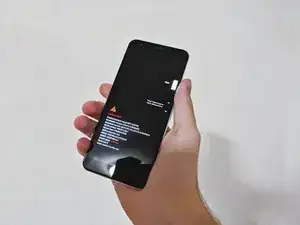
    • Du solltest jetzt eine Eingabeaufforderung sehen, die der im Bild gezeigten ähnelt. Wähle mit der Lautstärkewippe die Option Unlock the bootloader und bestätige durch Drücken der Ein-/Aus-Taste.

    Hw long step take

    Josh Chibs -

    for me it says what can i do? and nothing happens

    C:\Windows\System32>fastboot flashing unlock

    < waiting for any device >

    Murathan Kilic -

    That means that it can't find your device. Have you made sure it's properly connected? Maybe a loose connection? If you are using a USB 3 cable, try using a USB 2 cable instead. USB 3 cables can sometimes cause problems. Sometimes you need to install a USB driver for your device as well, but if ADB worked Fastboot should typically work as well without installing any additional drivers.

    Sebastian -

    I have the same issue.

    John Kieu -

    I get stuck at the fastboot flashing unlock/ fastboot oem unlock step.

    When i use adb reboot bootloader the phone screen does turn on, but show nothing... is that right?

    Also is it ok that my phone disconnects briefly after the adb line?

    oajk -

    The brief disconnect is normal, since the device is rebooting, but it should show a rudimentary interface instead of just showing a blank screen. Doesfastboot device report a device even though the screen shows nothing? If so, maybe you can continue anyways.

    Sebastian -

    I keep getting: "remote: 'the command you input is restricted on locked hw'" What do I do?

    The RadioDemon -

    Are you trying to unlock an Amazon Fire device? I don't really have much experience with more locked down devices, you might find someone who can help you on the XDA Forum or Reddit.

    Sebastian -

    I need help and the command works fine but my phone turns off to show me the menu problem is that my automatic mode is charging only and not file transfer


    Le pro -

    I'd like instructions to unlock bootloader and flash via magisk app from one phone to another with termux, (terminal emulator app)

    Roger -

    Que puedo hacer si no detecta las teclas de volumen?

    Como le doy en 'yes'?!

    Para aceptar el desbloqueo

    A VTRX -

    My phone is not detected after the reboot to boot loader is done, when execute fast boot command the device not detected in the bootloader mode.

    Soundararajan Soundarapandian -

    PS C:\Users\sound\Downtoads\ptatform—toots—tatest—windows\pIatform—tooIs> .\adb devices

    List of devices attached


    its blank there after when in boot loader cant detect the device

    Soundararajan Soundarapandian -

    In bootloader you need to run ./fastboot devices

    Sebastian -

    when i write reboot bootloader , the phone goes in fast boot but 1 second later it turns on

    ismaele tortora -

    It’s possible that your phone is locked by the manufacturer, which might be why it doesn't enter bootloader mode. This is common with some brands, like Oppo. You might want to check via a quick Google search, if your phone model allows it or if it's restricted by the manufacturer.

    Sebastian -

    i cant enter the bootload by using adb reboot bootloader for my oppo r11,it just normal boot after I type "adb reboot bootloader"

    One star no tips -

    use another method

    Lê Minh Khôi -

    my phone just says downloading , i think its infinitly loading now :/

    Liam Zriouil -

    whenever i do adb reboot bootloader my phone turns off, then turns back on completely blank exept for the words enterring fastboot mode... and it just stays like that for ages, i can turn it back to normal but i cant really progress or do anything with fastboot mode

    DuskDomed -

    I get this: C:\Windows\System32>fastboot flashing unlock

    < waiting for device > I used the cable from usb-c to usb-c and usb-a to usb-c but the same thing happened and when I entered abd reboot bootloader the device restarts but ends up in the bootloader where I just start reboot If I can select bootloader or power off, what do I have to do?

    Eine deutsche Antwort ist auch möglich lg

    finn -

    Same for me as was mentioned above: the phone just freezes in >Fastboot mode...
    I feel that those Chinese mfs just made it like that or it is blocked by the manufacturer

    El Agua -

    Tengo una Lenovo TB-7304F y al escribir .\adb reboot bootloader se quedó en un pantallazo negro sin nada en pantalla

    Qué puedo hacer?

    Flor Nancy Olascoaga Aburto -

    well, i get an error with both fastboot flashing unlockand fastboot oem unlock : FAILED (remote: 'Unlock failed, data invalid')

    Skye -

Abschluss

Um deinen Bootloader wieder zu sperren, führ einfach den Befehl fastboot flashing lock aus

Sperre deinen Bootloader nur, während die Standard-Firmware ausgeführt wird, sonst wird dein Gerät gebrickt!

Sebastian

Mitglied seit: 19/08/18

29294 Reputation

33 Kommentare

You have shared a very useful post i really like it keep going on, thanks for sharing such an informative content about Samsung Bootloader Unlock with us. I like to visit this helpful blog again for further updates on this beneficial post.☺️

File Rehab -

I'm using a Nokia G60 I was offered.

When I try "fastboot oem unlock" I get:

FAILED (remote: 'Failed to unlock, decrypt failed!')

Please update the guide for such cases.

Thank you

Bruno -

As far as I know, Nokia phones need an unlock code from the manufacturer. I don't have much experience with this, so I suggest you ask/search around on forums like xda developers or reddit. It might even help to directly ask the Nokia support for help. Depending on who you end up with they might even help you out.

Sebastian -

did it work with any realme device?

ëĺäžäžÿ -

Realme requires you to run an app beforehand, but the rest of the process should be pretty similar.

Sebastian -

I didn't complete this step by step but it seems like a pretty well put together and quite possibly useful so I think you deserve the 30 points anyway. going to save this guy and check back in after Ive tried it out

Dago Gomez -

Device does nothing once it restarts to enter bootloader. What to do? No other key combination works too. Device is Coradir C01.

Coco Mark -

Don't waste time, if the hardware has locked oem and that oem unlock is greyed out, you cannot unlock it. You'll need a specific code or unlocking tool from hardware manufacturer to unlock any tablet that has the boatloader locked. there is no other way around it. only a few tablets can load new firmware that was not original. nexus 7 you can load android on it. most tablets you need manufacturers tool to communicate with the software in the chip level. you can remove the chip and put chip in it but that is too much work the tablet is stuck with the OEM software. and you cannot even upgrade it. contact the manufacturer. only pixel cell phones or some cell phones you can unlock oem. these cell phones are subsidize by the cell phone company and you can only use the cell phone on their network. that is the reason you cannot unlock it from business perspective. you subscribe 5 year phone plan and cell phone is free promotions. What you have wrong tech advice telling people you can unlock it when you cannot.

tech2025 -

Motorola g41

Jose -

Hello,

I am getting the following error; Any idea why could I do?

$ fastboot flashing unlock or $ fastboot oem unlock

FAILED (remote: 'unknown command')
fastboot: error: Command failed

cvaa -

The LG G5 works a bit differently, LineageOS has great instructions for that device, though.

Sebastian -

Forgot to mention it is LG G5 phone.

cvaa -

Hello , Why am i getting this error,?

C:\Program Files (x86)\adb_fastboot>fastboot oem unlock

...

FAILED (remote: Token Verify Failed, Reboot the device

)

finished. total time: 0.004s

C:\Program Files (x86)\adb_fastboot>fastboot oem unlock 445G-H3CN-YRUR-UOX

...

FAILED (remote: Token Verify Failed, Reboot the device

)

finished. total time: 0.005s

I used fastboot flashing unlock also but nothing, same error.

Note- The phone I am trying to unlock was locked using ADB ( fastboot oem lock ).

Please help. I used even Xiaomi's official unlock tool (latest v) but says " This device is not activated. Please activate it and try again.

Thank You!

Hacker Aro -

ich bekomme nachdem "fastboot flashing unlock" die Meldung "wait for any device". Was habe ich falsch gemacht?

rene -

Das bedeutet das er kein verbundenes Gerät erkennt. Das könnte viele Gründe haben, z. B. ein Wackelkontakt im Stecker, ein billiges Kabel oder ein USB 3 Kabel. Fastboot ist aus irgendeinem Grund im Gegensatz zu ADB recht empfindlich.

Sebastian -

Was gibt es für Möglichkeiten den bootloader anderweitig zu entriegeln? ich habe jetzt schon viele Kabeln an unterschiedlichen buchsen verbunden, unterschiedliche treiber und adb tools versucht. ich verzweifle allmählich.

rene -

Was für ein Handy hast du denn? Es könnte auch sein, dass der Bootloader auf deinem Handy nicht entsperrt werden kann.

Sebastian -

Need more simple detailed instructions

Robert Wymore -

Thanks again

Bravadel -

so i ordered one of the galaxy knockoffs from amazon. So its unlocked and has dual sim etc. Has a vanilla version of stock android 13 and could be a cool phone. In my developer options it has oem unlocking built in and also a DSU loader. very robust developer options. It does not seem to want to reboot in to bootloader with the commands. I dont know if its already unlocked and i just need to load a rom or what? on amazon its called the Yemjaw C24 ultra. galaxy s24 clone i believe. I'm hoping i can get something else loaded on here, as specs wise its a powerful phone that is being underutilized by the crappy rom it came installed with.

Joshua Hayes -

Im using a Samsung Galaxy M215F (Turkey)

when i try both of the fastboot commands, it doesnt seem to do anything. it takes abnormally long and only stops upon device disconnect

emir eri -

Somebody did this to my phone and installed spyware hack apps you name it destroyed thousands of devices I go through so many phones because they keep getting on to the next phone I get how do I fix them like is there a way to remove these apks. They passing system app so security does nothing passes.... Also is there a way to know if the apps on a new phone are legit system apps or there shouldn't be hundreds of network overlay stacking tethering apps etc is there a list somewhere ?

Megz -

i tried to unlock the bootloder of my infinix hot 40i and bot comand's faild to work pls if you know how to unlock it pleas advice

Blacknight Ravana -

how to get the unlock code for specific smartphone like Huawei P30 pro? i have tried all steps many times but it does not work!!! i need to get the code but i do not know where to get!! i have checked many website including Huawei official site and AI chat tools, where are trusted sources to get unlocking code for android smartphones??

Roman Ismaeel -

Am using sumsang A04e please help with guid on how to unlock payments from watu credit

Isaac12 -

Thx for that tutorial, top quality !

Guilbault Frederic -

Bonsoir je suis ravis de tomber sur cet site internet.je suis un dépanneur j'aimerais bien me lancer plus profond . quelqu'un peut m'aider

Tianne -

please , is that works with HTC U Ultra ?

George Youssif -

Impressed app and am interested in it

Thomas Luate -

I am the first to start these programm what should I do

Hussein Kassimu Nindi -

Please help me to start this business

Hussein Kassimu Nindi -

Bonjour
Comment revenir à un fonctionnement normal pour éviter le message de sécurité au démarrage et revendre son téléphone ?

Claude PRIMAT -

What if OEM unlocking doesn't show on Samsung A7?

Rudy zaq -