Einleitung

Einfacher Austausch des analogen Joysticks des Controllers. Durch eine übermässige Benutzung des Joysticks kann es passieren, dass dieser Stick anfängt zu driften. Der schwierigste Teil dieser Reparatur wird die Demontage des Controllers sein, da sie einen Torx T8h Schraubendreher erfordert. Stelle sicher, dass du einen zur Hand hast, bevor du mit dieser Reparatur beginnst.

  1. vwEJi3mvNbXPv65E
    vwEJi3mvNbXPv65E
    aY2PEpGCLGtIwkqI
    MUkke3sReFsJIWiZ
    • Der linke Joystick ist am häufigsten defekt.

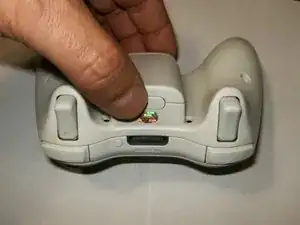
    • Drücke den Batterie-Knopf auf der Oberseite des Controllers. Entferne den Batteriehalter.

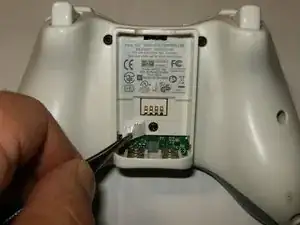
    • Benutze eine Pinzette oder ähnliches, um den Barcode auf dem Batteriefach abzumachen.

    What does .Ove mean

    Dariel Rebollar -

    No idea :-) but it’s fixed

    oldturkey03 -

  2. g16RIMwSZJLaKFFk
    g16RIMwSZJLaKFFk
    URX1kpk4QDb4hb62
    gIQQUsYyEkWAcj44
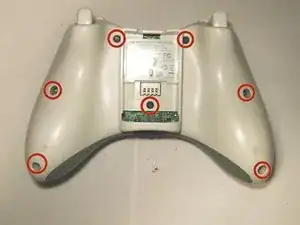
    • Entferne die sieben 9,3 mm T8 Torx Sicherheitsschrauben, die beide Gehäusehälften zusammenhalten.

    • Setze ein Öffnungswerkzeug aus Kunststoff in die linke Kante zwischen dem vorderen und hinteren Gehäuseteil ein. Drehe das Werkzeug zur Vorderseite des Gerätes hin, bis sich die Teile voneinander trennen.

    • Fasse den Controller am Akkufach und an der Kopfhörerbuchse an. Hebe das Akkufach von der Kopfhörerbuchse ab, so dass sich das vordere vom hinteren Gehäuseteil löst.

  3. k2eBFpjvEQvVmMVw
    k2eBFpjvEQvVmMVw
    Z3f6PkcMRdFHOFkL
    OpegeYqxGIEmYHNH
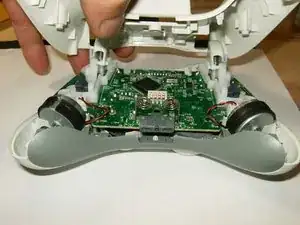
    • Kippe das untere Gehäuse leicht in Richtung der Trigger-Tasten, um es vom oberen Gehäuse abzunehmen.

    • Hier ist eine Ansicht des Inneren des Controllers. Beachte die unterschiedlichen Gegengewichte der Vibrationsmotoren.

    • Trenne den Stecker vom linken Motor (der Controller ist umgedreht positioniert; der linke Controller wird also rechts angezeigt usw.).

  4. BSkZj5ADiDRYTakX
    BSkZj5ADiDRYTakX
    haVB3QxgCab3iu4c
    gXihLOURBmVE1VE5
    • Trenne den Stecker vom rechten Motor.

    • Beide Motoren sind getrennt. Achte beim Wiederzusammenbauen auf die Position der Motoren im Gehäuse.

    • Entferne die Steuerplatine.

  5. DMIh6fovaCCMBYMf
    DMIh6fovaCCMBYMf
    uvqKJI1P3aPKCTil
    Qrabh1PcjNdc4LwH
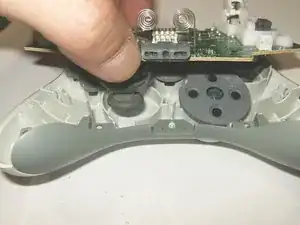
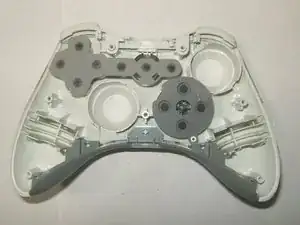
    • Achte beim Wiederzusammenbauen auf die Position der Gummimembranen im vorderen Gehäuse.

    • Um die Abdeckungen der Analog-Sticks zu entfernen, ziehe sie einfach von den Befestigungsstiften ab.

    • Ansicht des linken Analog-Sticks, der entfernt werden soll.

  6. yxaBCGqdAc3MeCKF
    yxaBCGqdAc3MeCKF
    OchOOVRgrW5h6NSY
    eoYDDSyLV6Uymv1x
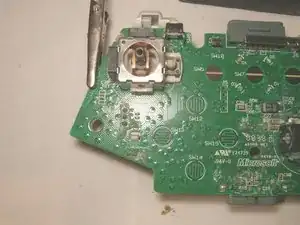
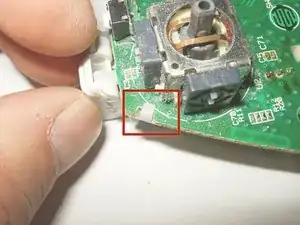
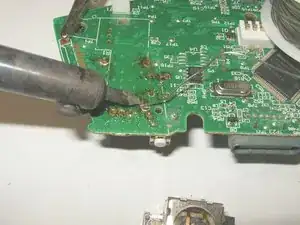
    • Um den linken Analog-Stick zu entfernen, muss zuerst der linke Trigger-Knopf entfernt werden. Löse die drei Lötpunkte. Verwende Entlötgewebe und etwas Flussmittel, um das Lötzinn zu entfernen.

    • Der Lötpunkt des linken Trigger-Knopfs ist entlötet.

    • Es gibt 2 Schnappverbindungen, die das linke Trigger-Stück an Ort und Stelle halten. Entferne diese. Es kann etwas Kraft erfordern, aber drücke einfach die Schnappverbindung nach unten und zur Seite.

    Be extremely careful when soldering. I recently took apart the “for Windows" wired version, and the fragility of the circuit board's connection pads, even the ones for the USB wiring, was astonishing.

    rbol -

  7. SEHMfSgDCBUDaobW
    SEHMfSgDCBUDaobW
    nRRuYRcjKGTNGt5R
    KXgvYnXqxPGGrYwJ
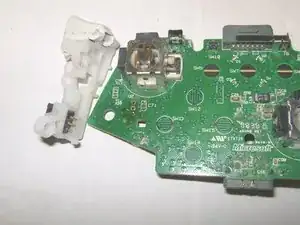
    • Beim Entfernen des linken Triggers stelle sicher, dass die Lötpunkte vollständig entlötet sind. Ziehe den Trigger vorsichtig nach unten.

    • Der linke Trigger wurde entfernt.

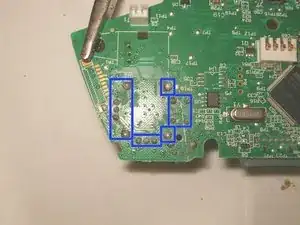
    • Nachdem der linke Trigger entfernt wurde, drehe die Steuerplatine einfach um und finde die 14 Lötverbindungen.

  8. 3tdFWqsSSiRpr4er
    3tdFWqsSSiRpr4er
    ysgSe2M2uAEtxgO5
    BnmKJuprFCYwCEgQ
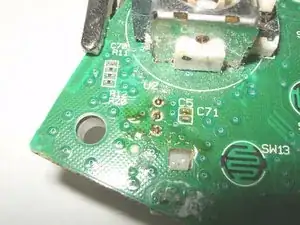
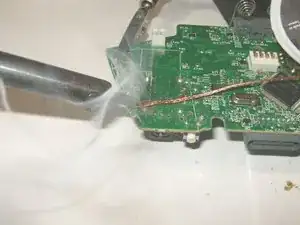
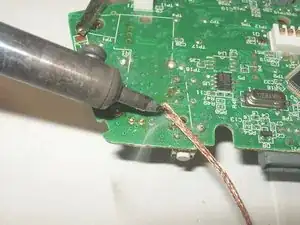
    • Verwende Entlötgewebe und etwas Flussmittel, um das Lötzinn zu entfernen.

    • Stelle sicher, dass keine anderen Komponenten entlötet oder durch die Hitze beschädigt werden.

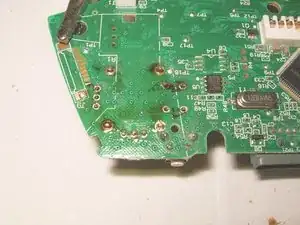
    • Hier sind alle Lötpunkte entlötet.

  9. RYftLMyWjtMdtFVL
    RYftLMyWjtMdtFVL
    osENYq4lQBDOkpJR
    UVgVJ4RaDRBU13ro
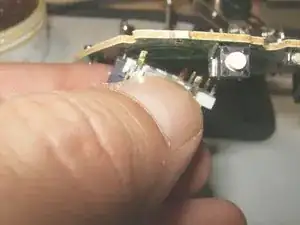
    • Ziehe den 3D-Analogstick vorsichtig ab, um sicherzustellen, dass alle Lötverbindungen gelöst sind.

    • Entferne den Analogstick.

    • Setze den neuen 3D-Analogstick ein. Achte darauf, dass er bündig an der Platine anliegt.

  10. CsL1NMQUl5KTyiKu
    CsL1NMQUl5KTyiKu
    QAUFVJb4oJ3SPhDy
    IswXnAeWOrsjOIYU
    • Trage etwas Flussmittel auf die Lötstellen und den Fuß des Joysticks auf.

    • Löte die Anschlüsse fest.

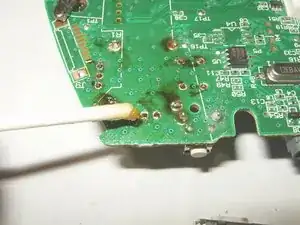
    • Alle Anschlüsse sind verlötet. Die schwarzen Reste ist das Flussmittel. Du kannst es nach Abschluss der Lötarbeiten mit Isopropylalkohol entfernen.

  11. JbBJGoaCulvrUu3d
    • Das Bild zeigt die Platine mit den neuen Joysticks und dem frisch verlöteten linken Auslöser.

Abschluss

Um dein Gerät wieder zusammenzubauen, befolge diese Anweisungen in umgekehrter Reihenfolge.

oldturkey03

Mitglied seit: 29/09/10

820443 Reputation

14 Kommentare

My controller left stick is physically okew..but in gaming it is moving on downwards...

How can I fix this,I don't knew to do this repairing!:(

Mohamed Irfan -

Nice work, excellenté!

sadiqusman23 -

I would like to note, you can unscrew the security screws with a 00 Flat head screwdriver. I just did it now and got all the screws out. Just gotta find the sweet spot, but it works.

gickygouse19 -

Where do you purchase the actual 2-axis module that get resoldered to the board?

ivymaccurtin -

muy buen tutorial, ¿¿¿no te sabras los valores de los condensadores c5 y c71??? es que tube un incidente y los arranque los dos.

un saludo

David Martin -

David Martin I can probably find an old board and measure those for you, at least the capacitance. What happened to your caps?

David Martin Probablemente pueda encontrar un tablero viejo y medirlos para ti, al menos la capacidad. ¿Qué pasó con tus condensadores?

oldturkey03 -

I tried doing this and I mistakenly did not research the process first. I did not have a desoldering wick, so I just tried melting the solder and removing it a little at a time with the iron. I was able to get the old joystick off, but the solder is not sticking to the board, so I'm having trouble attaching the new one. Did I break something on the board?

Jonathan DeMattia -

Jonathan DeMattia

you may have “peeled of the pads. We would need to see your work to give you more of an idea. You want to move this to “Answers” and in there add some pictures to your question.

oldturkey03 -

My original X360 wireless controller just died while I was playing, I double checked the batteries, the connection is good, I tried the play and charge cable but its still dead, and the controller its just 1 year old…

dwayneforgelc -

After resoldering the Left analog stick it look a bit to the left and downwards on the testing software. Is there any way to calibrate the position of the analog stick. Physically it looks straight in the center.

zulpis -

The left joystick seems physically okay, but in game it is nonfunctional. Any clue what has happened and how to fix it?

Random Person -

After soldering the calibration tool would not show movements and while removing the soldering while on it showed up some behavior, could it be that the soldering is not touching the circuit? I tried multiple times to redo it but no luck in one of the sides

Jayson Reis -

Here is one of the soldering attempts https://imgur.com/a/TGk0KD3

Jayson Reis -

Hi

I know the date of this topic is very old but i try this method and my left analog stick is working fine but, right analog and my lt and rt button is not working. I can share you are picture and please help to fix my controller.

Michael -