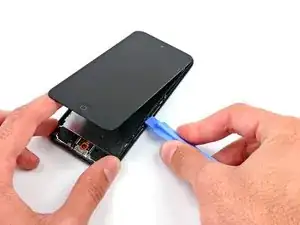
Einleitung

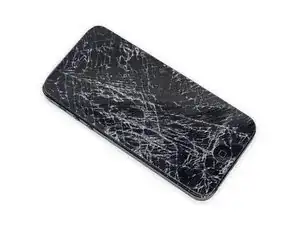
Ist dein Display gebrochen? Dann folge dieser Anleitung, um die Displayeinheit deines iPod touch zu ersetzen.

Beachte, dass die Fotos in dieser Anleitung einen iPod touch der 5. Generation zeigen. Die 6. Generation ist praktisch gleich, es gibt nur ein paar oberflächliche Unterschiede.

  1. DXpoIFFtNjT3dOx4
    DXpoIFFtNjT3dOx4
    avx1b2VIF6fYH2NM
    CV2YITeFQnfwPVTR
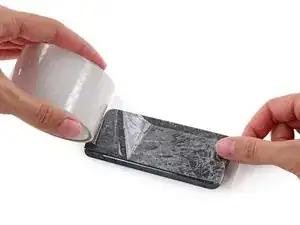
    • Wenn dein Display gesprungen ist, klebe das Display mit Klebeband ab, um zu vermeiden, dass das Display weiter bricht und du dich möglicherweise daran verletzt.

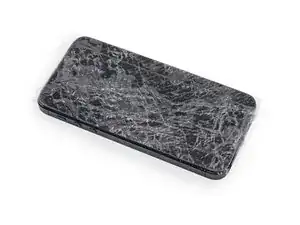
    • Klebe mehrere überlappende Schichten durchsichtigen Klebebands auf das Display des iPods bis das ganze Display bedeckt ist.

    • Das Abkleben des Displays verhindert, dass das Display weiter bricht und stabilisiert das Display beim Lösen vom Gehäuse.

    • Trage eine Schutzbrille, um deine Augen vor Glassplittern zu schützen.

    Any repair guides for front camera?

    ipod touch 5th generation front camera freezes then returns to rear camera. This happened after replacing battery. Any ideas? Tried hard reset & restoring. Nothing worked.

    Libby -
  2. STUdOtPncgKVsjDI
    STUdOtPncgKVsjDI
    2tv3ctdqy4KrKx5Q
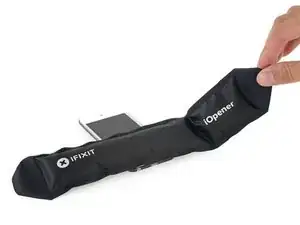
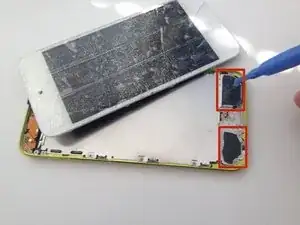
    • Verwende einen Fön oder bereite einen iOpener vor und lege diesen für ca. eine Minute auf das unteren Ende des iPods, damit sich der Kleber an dieser Stelle löst.

    • Das untere Ende des Displays (nahe dem Homebutton) ist mit starkem Kleber mit dem Gehäuse verklebt.

    • Möglicherweise musst du das Display während der folgenden Arbeitsschritte nochmals aufwärmen, damit der Kleber weiterhin warm und flexibel bleibt.

  3. 5wNYMJJ1QTbAKQPT
    5wNYMJJ1QTbAKQPT
    KZxd36ixMtO45EwC
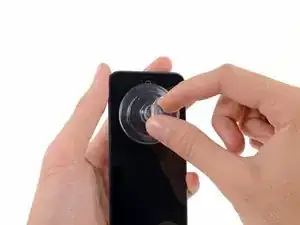
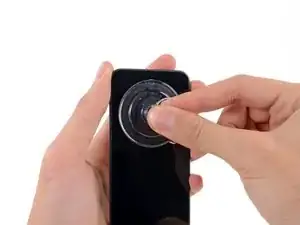
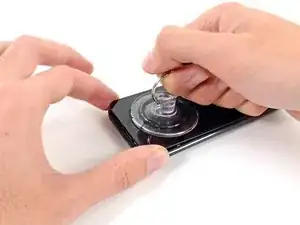
    • Setze einen Saugheber mittig auf das untere Ende des Displays, wobei sich der Rand des Saughebers über dem Homebutton befinden sollte.

    • Drücke den Saugheber gut auf das Display und achte darauf, dass dieser gut hält.

    Be very careful. I have bought the ifixit kit. Tried with the suction cup and it didn’t work. None of the tools actually helped. Follower the instructions carefully and still ended up with a cracked screen. I wish I could go back in time and not doing any of this. I literally just cried and have no money for a new screen.

    César Rodrigues -
  4. D6a3kERyis4ROfRX
    D6a3kERyis4ROfRX
    cBWlIkRsKfBxEstH
    umf1afUIdpCn2LAY
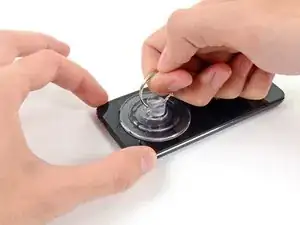
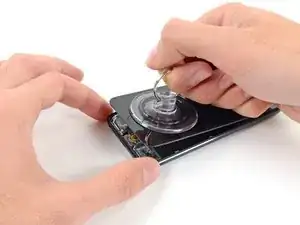
    • Drücke den iPod auf einen Tisch oder eine Bank.

    • Lege deinen Daumen und Zeigefinger auf die unteren Ecken des Displays, um zu verhindern, dass sich das Display zu weit öffnet, nachdem sich der Kleber gelöst hat.

    • Hebe den Saugheber an und ziehe diesen in Richtung oberes Ende des iPods. Sei geduldig und ziehe gleichmäßig fest, bis sich der Kleber löst und das Display sich von dem Gehäuse trennt.

    • Möglicherweise musst du erneut etwas Hitze verwenden, um den Kleber lösen (vor allem in kälteren Regionen). Wenn der Kleber wie Käsefäden von einer Pizza herunterhängt, kannst du ein dünnes Rasiermesser verwenden, um den Kleber abzutrennen.

    • Wenn das Display beginnt, sich vom Rahmen zu lösen, sei vorsichtig, dass du das Display nicht mehr als ungefähr einen Finger breit anhebst – ein dünner Plastikrahmen verbindet immer noch das Display mit dem Gehäuse.

    Step 2.5: Recover iPod from far side of the room due to suction assisted throwing.

    thanks, Apple

    Dave Davidson -

    Did as shown, button switch works fine, when I reinstall button, it's like it won't touch the switch to engage.

    What next?

    Gary Aguilera -

    I've got the same problem, managed to get the screen off, transferred the little steel plate to the new home button and put it in. The switch works fine when I press it with my finger, but it won't work with the home button??? - Did you manage to solve this problem?

    Tom -

    I've got the same problem. Been trying to find a solution for a few days now. Lots of people ask this question, but no one ever answers it. How did you solve it?

    tirgang -

    It sounds like you need to replace the home button dome switch rather than the actual home button. I'm currently searching for one myself. My customer jammed the home button and now it doesn't click. The dome switch is located on the home button ribbon cable and not on the home button.

    Mary Baldwin -

    The "home button" repair shows the physical button, but it's not actually the repair for the switch, which is what should be shown as the home button repair. The switch has a little black plastic tab that breaks off with excessive presses, and that's why the button plate cannot engage the switch when the screen is reinstalled. You will need to replace the switch, or modify it with something small enough to press the switch when the LCD is lowered.

    Rene -

    I also ran in to the Home button not working issue. I have not idea what changed with the button, but it would not work (from the outside) after the battery replacement & re-assembling. If you opened the iPod up, you could press the switch directly and it clicked & worked, but it seemed finicky. I ended up putting the tiniest dot of hot melt on the center of the switch (smaller than the switch 'dome', and thin too, maybe 0.6-0.7mm thick), re-assembled, and it works fine now.

    Jeff Brown -

    Use the hair dryer or a heat gun to loosen the adhesive. This did not work with just a suction cup for me.

    Dmitry Fedoruk -

    All good... But. All I wanted was to replace the cracked camera lens glass. Where in the guide is the instructions for the lens GLASS.

    kwylie -

    I also had to use a heat gun and the opening tool instead of just a suction cup to open the assembly. The rest of the guide worked really well!

    When putting back together, make sure the display connector is in firm or you might get lines. And also, perform a hard reset - my power wasn't working, I took it apart and checked the power flex cable, but all it needed was a hard reset when put back together.

    Tyler Weaver -

    use a razor blade to pry. there is a huge amount of leverage, and the old frame is most likely trash.

    trogfield -

    Suction cup and hair dryer method never worked for me. Even tried my heat gun. Finger went numb before I gave up. Used thin prying + suction cup and eventually opened it but screen cracked in the process when I was too aggressive opening it.

    In hind-sight, it would have been very helpful to know that the adhesive is just in the 2 areas to either side of the home button, nothing along the edges.

    Biggest complaint is the time wasted, should have just bought a replacement iPod, better return on my money/time.

    James Quinlan -

    The adhesive strips are only located to the left and right of the home button. Imagine two small squares of tape in each corner. Be careful heating. I used a heat gun on the lowest heat, but I think I may have overheated the area and damaged the digitizer on the bottom of the screen. I now have small green lines on that section of the screen. I too had to use a thin metal spudger to release the adhesive.

    muck -

    The suction cup is pulling large. pieces of glass off of the screen. What else can I use to pry up the screen?

    Ian Bogue -

    Any pictures on applying adhesive when placing the face plate? I know its two pieces to the left and right of the bottom home button. Are there pre-cut strips available?

    Ron -

  5. GyPdbnVOA2n5OaMo
    GyPdbnVOA2n5OaMo
    bxow53WqNhYUrW3y
    OLZqAu1ZR1WUMUyP
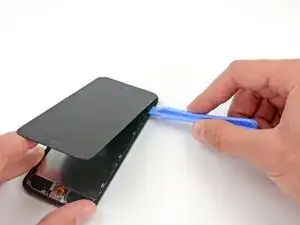
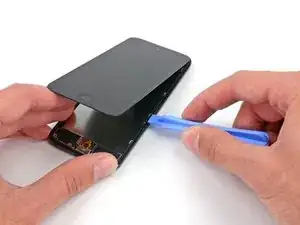
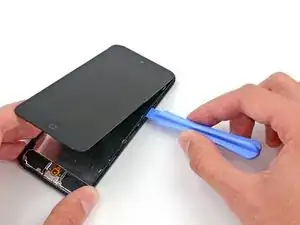
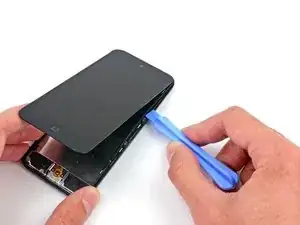
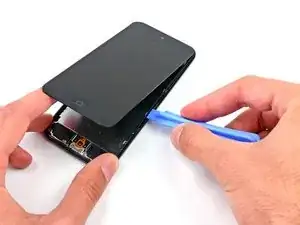
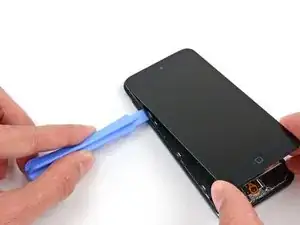
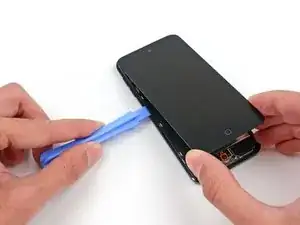
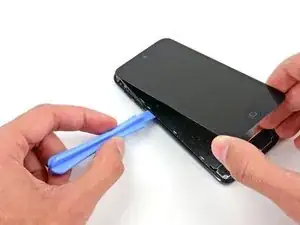
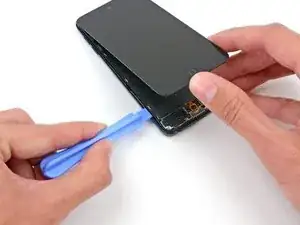
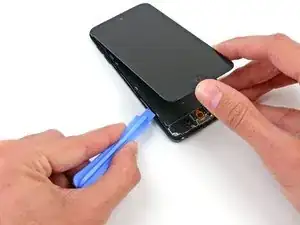
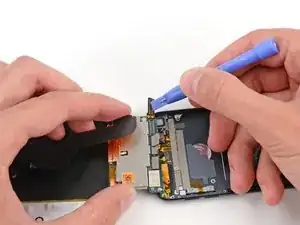
    • In den folgenden Schritten wird der Kunststoffrahmen, der das Display umgibt, abgelöst. Er ist mit mehreren Clips am Rückgehäuse befestigt.

    • Fange oben rechts am Gerät an und setze dort ein Kunststoff-Öffnungswerkzeug in den Spalt zwischen Kunststoffrahmen und Aluminium-Rückgehäuse ein.

    • Schiebe das Werkzeug in diesem Spalt nach unten und löse den Rahmen vom Gehäuse.

    Careful! This piece is super fragile. It really helps to understand the way the clips work. I struggled for 10 min with not a single un-clip, snapped the plastic frame in 2 places because I didn't understand the clips, and as soon as I figured out how they work the piece was off like a prom dress.

    The clips are metal n shapes around the outside of the frame. They need to be pushed away from the center of the device to release the frame. You need to get something in between the plastic and clip to release, a guitar pick is probably too thick. A thin opening device would probably work but I used a razor blade. I'm not sure if these clips are on all of the newer Apple devices, but I've never encountered one before (usually work on android devices.)

    I hope this helps prevent someone from having to replace the frame.

    Nate -

    I wish I had read this comment before I broke my frame, hah! It made sense once I had the clips out, but while they were still in it was mystifying. Thankfully it won't be too big of a problem since all of the frame will still clip in, it just won't be connected.

    Joshua Horan -

  6. ZOJWpkYdSKHwidId
    ZOJWpkYdSKHwidId
    IjCwZdLiuyBEmbCg
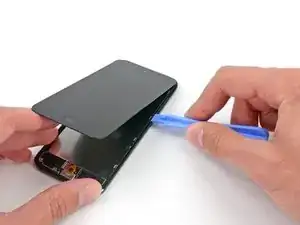
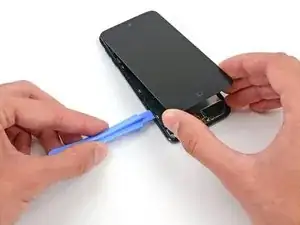
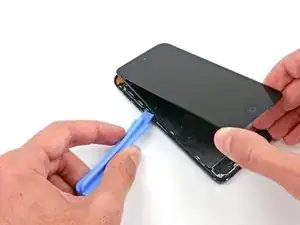
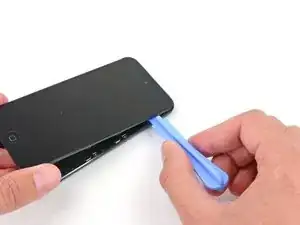
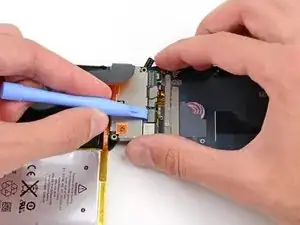
    • Setze das Kunststoff-Öffnungswerkzeug zwischen dem Rahmen und dem Rückgehäuse hinter dem ersten Clip ein.

    • Bewege das Werkzeug hin und her, um den Spalt hinter dem Clip zu vergrößern und ihn vom Rückgehäuse abzulösen.

    • Das wird den Clip eventuell nicht gleich lösen, wiederhole daher diesen Vorgang mehrfach bei jedem Clip.

  7. FO6nBD2Vb3KtxPEK
    FO6nBD2Vb3KtxPEK
    pswh3DSgXckVkQqN
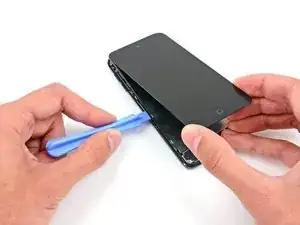
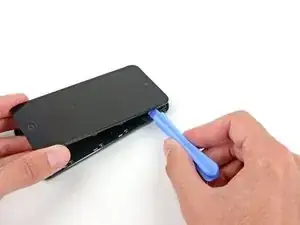
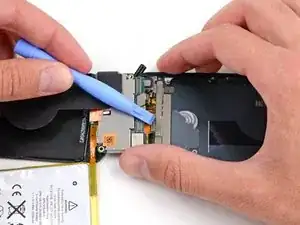
    • Wiederhole diese Vorgehensweise bei den beiden nächsten Clips auf dieser Seite.

    • Möglicherweise musst du immer wieder zwischen den einzelnen Clips hin und her wechseln, um sie alle zu lösen. Lasse dir Zeit und arbeite sorgfältig und geduldig, da der Kunststoffrahmen recht empfindlich ist.

    Take your time with removing this bezel… it’s so easy to get impatient which easily snaps it

    Gary Ayre -

  8. I2SkAMrpHjNdawDP
    I2SkAMrpHjNdawDP
    kCUVZVDdXnsJiDVt
    d6wlOTOZCBmBXOin
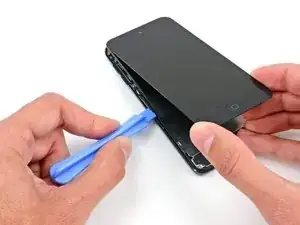
    • Gehe nun zur linken Seite des Gerätes über und setze ein Kunststoff-Öffnungswerkzeug nahe an der Oberseite in den Spalt zwischen dem Kunststoffrahmen und dem Aluminium-Rückgehäuse

    • Schiebe das Werkzeug in diesem Spalt nach unten, um den Rahmen vom Gehäuse zu lösen.

  9. L6E3DRjQYIP1EUvQ
    L6E3DRjQYIP1EUvQ
    kZHgU1nXTKKe6aZQ
    • Setze das Kunststoff-Öffnungswerkzeug zwischen dem Rahmen und dem Rückgehäuse hinter dem ersten Clip ein.

    • Bewege das Werkzeug hin und her, um den Spalt hinter dem Clip zu vergrößern und ihn vom Rückgehäuse abzulösen.

  10. F21hI3HZcDl6MAqY
    F21hI3HZcDl6MAqY
    4se2iOF6FoabcOOn
    • Wiederhole diese Vorgehensweise bei den beiden nächsten Clips auf dieser Seite.

    • Setze das Kunststoff-Öffnungswerkzeug zwischen dem Rahmen und dem Rückgehäuse hinter dem zweiten Clip ein.

    • Bewege das Werkzeug hin und her, um den Clip vom Rückgehäuse abzulösen.

    Hello how are you? I don't know what happens when I go back and put everything I close and the home button doesn't work, I disarm it and check the flex and it works when I press it but with the home button it doesn't.

    Rafael Mata -

  11. wWl6viWlGPAVynXj
    wWl6viWlGPAVynXj
    JufatXVTvLh12RfO
    • Benutze die gleiche Vorgehensweise und löse den letzten Clip, mit dem der Kunststoff-Rahmen am Rückgehäuse befestigt ist.

    this looks more like a 5th gen instead of 6th gen :-)

    ifixshop -

    They have the exact same dimensions.

    Jayson Saavedra -

    do you think if i use reolacement scren of itouch 5th gen to my itou h 6th gen this would work? i cant find screen for itouch 6th gen so im thnking to use the screen of 5th gen pls help me

    alm yuwysha -

  12. AUssLBoNkKEJNRp6
    AUssLBoNkKEJNRp6
    ErPagjMPnDToe2wO
    wSJ2ElmLGVHB6OgB
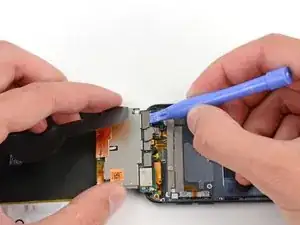
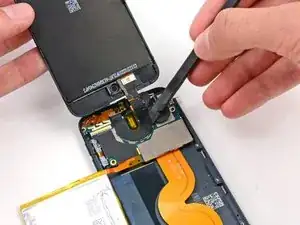
    • Setze das Kunststoff-Öffnungswerkzeug zwischen der Displayeinheit und dem Rückgehäuse nahe an der Oberseite des iPods ein.

    • Verdrehe das Öffnungswerkzeug leicht, um das Frontpanel vom Rückgehäuse abzuhebeln.

    • Löse die Displayeinheit vom iPod ab.

    • Versuche noch nicht, das Frontpanel komplett zu entfernen, da es noch über mehrere Kabel verbunden ist.

  13. 2tXZTP4TtwnbkuXR
    2tXZTP4TtwnbkuXR
    GhYfQKVbxsh6NIyU
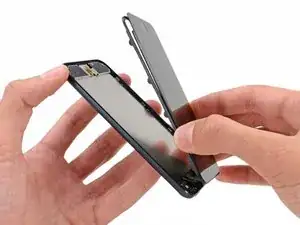
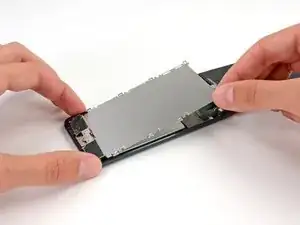
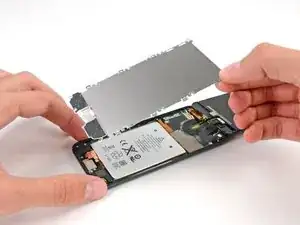
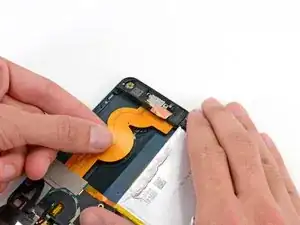
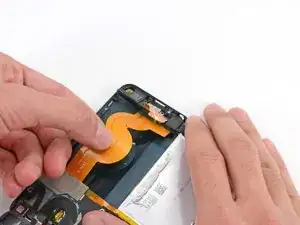
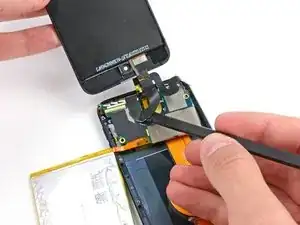
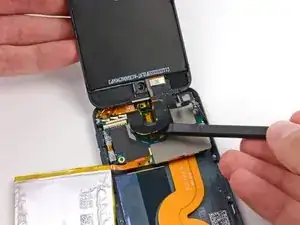
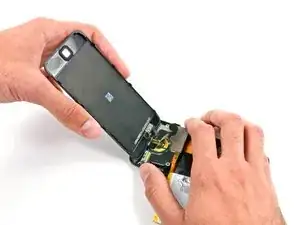
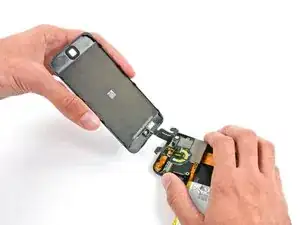
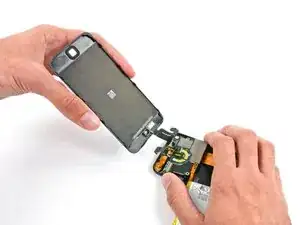
    • Klappe das Display vorsichtig vom restlichen iPod weg und achte dabei darauf, dass keine der Flachbandkabel abgetrennt oder beschädigt werden. Lege die beiden Hälften auf deine Arbeitsfläche.

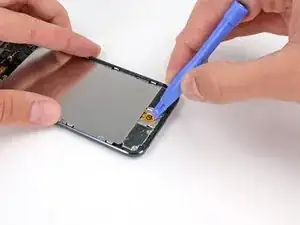
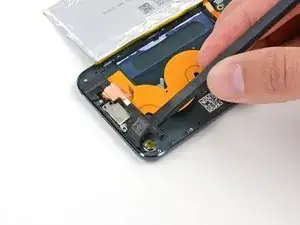
    • Wenn dein iPod eine schwarze Home Button Baugruppe hat, und nicht eine orangefarbene wie hier, kannst du diesen Schritt überspringen. Der Home Button ist nicht an der LCD-Platte befestigt und muss daher nicht entfernt werden, um diese Reparatur abzuschließen.

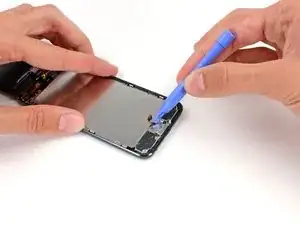
    • Benutze ein Kunststoff-Öffnungswerkzeug, um den Home Button Schalter von der LCD-Platte hochzuhebeln.

    • Eventuell musst du den Kleber auf der Rückseite des Home Buttons mithilfe eines Heißluftgebläses oder eines Föns etwas erwärmen, um ihn zu lösen. Benutze dazu immer die niedrigste Stufe.

    • Versuche nicht, den Home Button Schalter zu entfernen, er ist mit Komponenten unter der LCD-Platte verbunden.

    If you have trouble lifting the home button switch up with the plastic opening tool, you can try using an opening pick instead.

    matthew -

    Hi I just replaced my screen on my ipod touch 5th gen and i connect all the ribbon chords and every thing and when i connect one of the ribbons from the screen to the motherboard the motherboard starts to get hot! The screen isnt actually fully on, I wanted to make sure it turned on before I snapped it back in place. Any ideas? When I disconnect the ribbon the temp goes down. Screen is an OEM screen from Apple. I read somewhere, and i have personally have done it, that you can short the battery on the ipod touch 4th and it fixes it but im not sure on the 5th.

    Eddie -

    I have the same problem. I am going to change the battery. I let you to know if it solved the problem. Please let me know if you solve your problem. Thanks

    ismael452000 -

    Eddie, Did you ever fix this? I have exactly the same issue, Board gets hot and screen remains black. Although i did Hear Siri and iTunes recognises it.

    Dave -

    You need to make sure that all the adhesive covers for the battery and the board are on so that it isn't shorting with the metal cover, this may fix some issues with the board / battery heating up a lot and display not working. I just put some electrical tape over the batter solder and screen cables so that it's all in place properly and no shorting of electric terminal points on the board.

    Ben -

    With some newer versions of the gen 6 iPod, it seems that removing the home button from its adhered position is not necessary. I removed mine and then realized that it was adhered to the metal of the dock, not the actual LCD shield. Just something to keep in mind, might save you some grief later if you have to re-adhere it.

    The Stuff -

  14. KIEUvsnQt51fLMtY
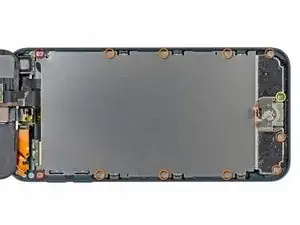
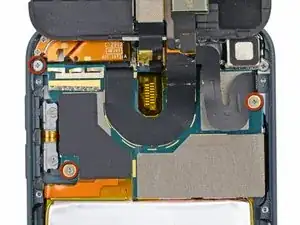
    • Entferne die folgenden Schrauben, mit denen die LCD-Platte am Rückgehäuse befestigt ist:

    • Zwei 1,2 mm Kreuzschlitzschrauben #000

    • Neun 1,6 mm Kreuzschlitzschrauben #000

    • Eine 2,3 mm Kreuzschlitzschraube #000

  15. cZCROd3QGLPadDCk
    cZCROd3QGLPadDCk
    BpjQBrk3U3pUVsFf
    • Hebe die LCD-Platte an und entferne sie vom iPod.

  16. smfOLc6Iw1nMcIFL
    • Entferne die drei 1,6 mm Kreuzschlitzschrauben #000, mit denen das Logic Board am Rückgehäuse befestigt ist.

    Hi, the MPN on that WiFi flex confirms this is not an iPod Touch 6th gen, it is 5th Gen. I am trying to source a 6th Gen WiFi Flex.

    Ricky Pohlman -

  17. DNBptMRXPLGdbc3U
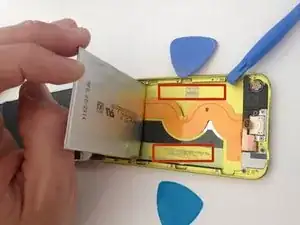
    • Der Akku ist mit zwei Klebestreifen befestigt.

    • Drehe den iPod um und erhitze die RÜCKSEITE des iPod Aluminiumgehäuses mit einem Fön oder einem Heißluftgebläse. Erhitze nicht den Akku.

    • Das Aluminium-Gehäuse muss nicht heiß werden, du solltest alle erwärmten Teile immer problemlos anfassen können.

    Instead of a heat gun or hair dryer, I used a rice sock (http://www.wikihow.com/Make-a-Rice-Sock) to apply heat evenly across the entire back of the case while the case still sat upright for me to work on getting the battery loose. It was a lot easier than trying to heat the back of the case, then flip the case over and work feverishly before it cooled.

    Eric -

    I'm sure this works, but it doesn't seem like the proper way to do this. I didn't like the feeling of prying on a flimsy battery at all. That's not practical. Instead get some molybdenum wire start it underneath the corners, then wrap the ends of the wire on like 2 pencils then tape them so u dont have to wrap the wire around your fingers because it will hurt lol. then apply heat, i went about 130 degrees is what my infrared gun said. I used a geat gun on low and a good distance away. Then just work the wire down the adhesive obviously lol. This worked out very easily for me and I felt safe and more confident about what I was doing. Good luck.

    taylor craig -

    First of all, one of the strips is accessible with a pair of angled tweezers (bottom right of device). Second, where can we get replacement adhesive strips for the battery?

    Ian Bogue -

    If you really don’t want to remove the battery, you may lift the mainboard slightly instead and disonnect display, back camera flexes and antenna connector. Then gently pull back camera module out of the seat. This gives you enough room to connect new display and back camera flexes. Back cam module would be hanging while you connect everything that got disconnected. Screw back the mainboard and push camera module to its seat.

    Slava Belkov -

    Removing the battery is absolutely unnecessary. Its very likely the battery would be damaged during the removal… Similar to Slava up above, just lift the freaking motherboard up, disconnect the cables, and install the new display, easy.

    Conrad -

  18. 5EZPQfvQNDxuKVrv
    5EZPQfvQNDxuKVrv
    VTJe4GUuiSk5CRRC
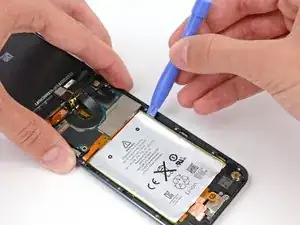
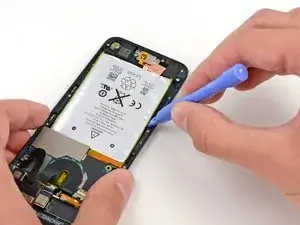
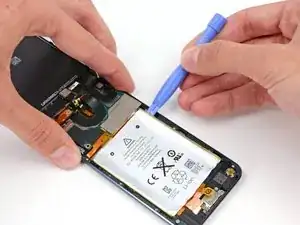
    • Auf jeder Seite des Akkus befinden sich drei Kerben. In den nächsten Schritten wirst du diese Kerben nutzen, um den Akku nach und nach aus dem Rückgehäuse zu hebeln.

    • Der Akku ist mit sehr viel Kleber befestigt, du musst daher langsam und sorgfältig arbeiten, um zu vermeiden, dass der Akku in irgendeiner Form beschädigt wird.

    • Setze ein Kunststoff-Öffnungswerkzeug in die oberer rechte Kerbe und heble vorsichtig am Akku.

    • Versuche an diesem Punkt nicht, den gesamten Akku herauszuhebeln. Löse nur nacheinander den Kleber an jedem der Hebelpunkte.

  19. BVCuXxHoZC5CLVUA
    BVCuXxHoZC5CLVUA
    tCG5cZKiDQFDoat2
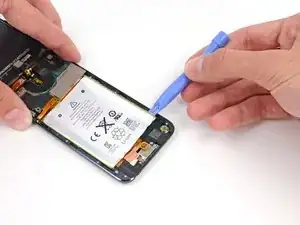
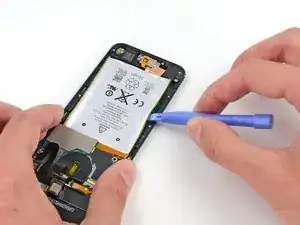
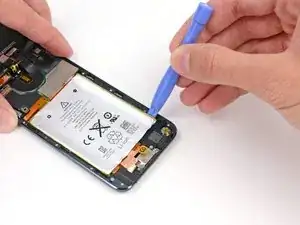
    • Mache an der unteren rechten Kerbe weiter. Setze das Kunststoff-Öffnungswerkzeug in die Kerbe und heble vorsichtig an der Seite des Akkus.

  20. DxfMBArClCbEpWOn
    DxfMBArClCbEpWOn
    MJk5dHvtrWYZQMKP
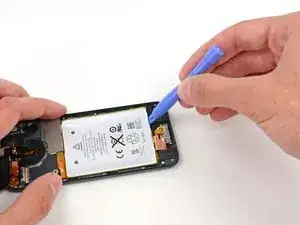
    • Hebel den Akku weiter an der Unterkante hoch.

    • Wenn du an der Unterkante hebelst, vermeide es, zu stark gegen den Lautsprecher oder die Kopfhörerbuchse zu drücken.

  21. qoajNaoATRCxOBx1
    qoajNaoATRCxOBx1
    pRQ2yExWXFWeOrEh
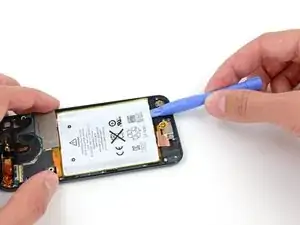
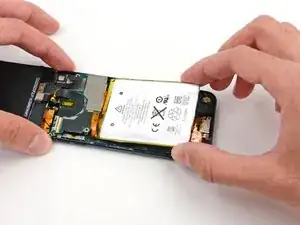
    • Heble dann an der linken Seite.

    • Möglicherweise musst du abwechselnd an den Seiten und der Unterseite des Akku hebeln und dabei jeweils ein kleines Stückchen abhebeln, bis der Akku vollständig vom Klebstoff befreit ist.

  22. gcHWYZefXHQW4qmp
    gcHWYZefXHQW4qmp
    OYHfhEVnFxuEajMj
    YFu1IqKh16cu2GPk
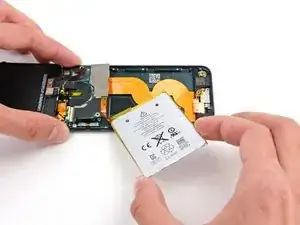
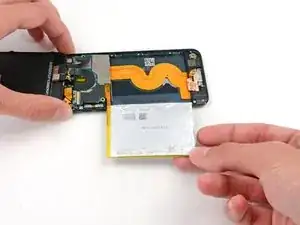
    • Sobald der ganze Kleber abgelöst ist, kannst du den Akku von der Unterkante her zur linken Seite hin aus dem Rückgehäuse heraus drehen.

    • Achte darauf, ihn nicht schwungvoll herauszuziehen, da er am Logic Board festgelötet ist.

    • Klappe den Akku um, damit sein Kabel flach liegt, und lege ihn ab.

  23. jMMpXwVwoP2ropdP
    jMMpXwVwoP2ropdP
    XBqOSiL2cTksWSds
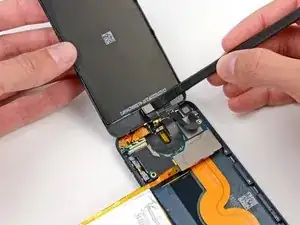
    • Benutze das flache Ende eines Spudgers, um die Frontkamera aus ihrem Anschluss in der Displayeinheit zu klappen.

    • Das Kameramodul ist leicht in seinem Anschluss festgeklebt, aber der Ausbau sollte kaum Kraft erfordern. Gehe mit dem Spudger zwischen den schwarzen Kunststoff des Kameramoduls und den schwarzen Kunststoff des Kameranaschlusses und löse die beiden Teile voneinander ab.

    My camera ceased to work after this. Anybody have the same issue?

    JavierDiaz4 -

    A reboot can sometimes work. Once the camera is seen not to be working (say it was connected after the device goes to sleep), the iPod gives up trying to show any live images from the either front or rear cameras

    mark -

    How do you replace the front facing camera

    brandon landry -

    I have a similar issue, the rear camera doesn't work and the facing camera sometimes works but very slow...everything else works well.

    Any ideas on how to fix this problem?

    carlos lima -

  24. 3w4oq1BNuYsVfxQs
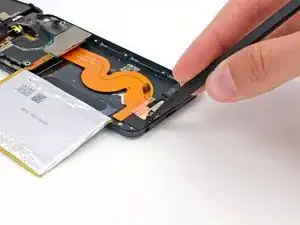
    • Ziehe das kleine Stück Klebeband, das eine kleine Schraube links von der Kopfhörerbuchse bedeckt, mit der Spitze eines Spudgers ab.

  25. EVDO1Li4QJUdfQjO
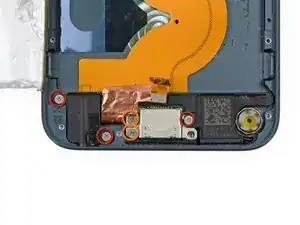
    • Entferne die folgenden Schrauben, mit denen die Kopfhörerbuchse, der Lightning Connector sowie der Lautsprecher befestigt sind:

    • Drei 2,6 mm Kreuzschlitzschrauben #000

    • Zwei 2 mm Kreuzschlitzschrauben #000

    The screw on the right that goes into the headphone jack is a little reluctant to come out

    Zach Heaton -

    NOT NECESSARY: check other guides on Youtube

    Aerosmite -

  26. DZxyZN2OZunRbQgr
    • Benutze das flache Ende eines Spudgers, um den Lautsprecher aus dem Rückgehäuse hochzuhebeln.

    • Versuche nicht, den Lautsprecher zu entfernen, er ist an der Lightning Connector Baugruppe festgelötet.

    NOT NECESSARY: check other guides on Youtube

    Aerosmite -

  27. 5oGU1cRr2koYODBG
    5oGU1cRr2koYODBG
    yIEmPNJsRe6MMc26
    • Fasse das große Flachbandkabel und ziehe die Lightning Connector Baugruppe vorsichtig unten aus dem Gehäuse heraus.

    NOT NECESSARY: check other guides on Youtube

    Aerosmite -

  28. NItOQYboPQUFencG
    NItOQYboPQUFencG
    KZBR1GgnYRW5aN4M
    • Klappe die gesamte Baugruppe um, sodass die Rückseite des Logic Boards nach oben zeigt.

    • Benutze ein Kunststoff-Öffnungswerkzeug, um das Touchscreen-Kabel vom Logic Board abzutrennen.

    When reassembling, the digitizer and display cable connections very easily come loose. Make sure you press them in securely then I held down the logic board with my left hand while rescrewing it down one handed with my right hand otherwise they would disengage. Took several tries to get it right.

    Raymond Rinaldi -

  29. hGtf2KllaqrT6gfu
    hGtf2KllaqrT6gfu
    23jdLuFPY6NTXrTG
    • Benutze ein Kunststoff-Öffnungswerkzeug, um das Display-Kabel aus seinem Anschluss auf dem Logic Board abzutrennen.

  30. btSmofC5LnYvJs6n
    btSmofC5LnYvJs6n
    2g53FYotvRiyD5yl
    bcqaCIhbXHAqCsOF
    • Klappe den Lightning Connector/Logic Board Baugruppe wieder um, sodass die Vorderseite des Logic Boards nach oben zeigt.

    • Das Displaykabel ist leicht oben am Logic Board festgeklebt.

    • Löse das Displaykabel mit dem flachen Ende eines Spudgers vom Logic Board ab.

  31. SNk12VYipaDwJqRD
    SNk12VYipaDwJqRD
    HL1hRIXCT2gKAUXs
    • Entferne die Displayeinheit aus dem iPod.

Abschluss

Um dein Gerät wieder zusammenzubauen, folge den Schritten dieser Anleitung in umgekehrter Reihenfolge.

Andrew W.

Mitglied seit: 11/05/15

8410 Reputation

23 Kommentare

How on earth do you get a suction on the tape? Mine is in a million pieces. I can heat all I want, but if the suction cup won't stick, it doesn't do any good. I'm going into hour 2 now. =(

Jaime Friel -

no effort to put real ipod touch 6 pictures...this is ipod touch 5

KoSLoW -

YEAH why is this here

Ben Capehart -

How do u replace the battery!

Olaunda Johnson -

hey so i have an ipod touch 6 generation can and it has the lines on my screen now is there any way i can fix it .like can any cell phone repair store fix it

shania -

Accidentally missed a step and ripped home button cable

christopher wilson -

Hello! I was reading about the iPod 5th gen LCD didn't have the exact same camera bezel as the 6th gen.1or something like that? But then the LCD is compatible though?

So what s that then? Like if I use LCD from 5th generation model to replace 6th generation LCD, would it mean that the camera won't function afterwards or something like that?? OR......??

Poke guy -

first - it's ipod touch 5 not 6. neralythe same except you don't have undo home button flex.

second - whole guide is misleading - why on earth you'd remove battery and charging port??? undo three screws on logicboard, pull out rear camera and lift the logicboard up - you can reach connectors to connect new screen back. sometimes antenna connector comes off but then you just plug that back on. I've done ipods 5 and 6 w/o removing battery and port and everything.

DigiHead -

Can you use a 5th gen wifi antenna on a 6th gen?

Jason Oestrike -

can i replace an ipod touch 6th display with an ipod touch 5th gen?

fernando garcia -

big thanks … ace work

Michael -

Tried to pry the home button up like directed and broke the home button. Thanks a lot for putting ipod touch 5th gen photos and directions on ipod 6th gen thread. 6th gen doesn’t require you to move the button and btw if you break the button on the cable you have to have it saudered to replace…. This is the first time I have been let down here and the last time I will believe what is said here at ifixit without checking other sources… Wish me luck in figuring out what to do next :|

bairdbrandon -

Nice guide!! One of the most through I’ve seen!!! Kudos!! :-)

apriltanner1975 -

This guide is not correct for an iPod Touch 6th Generation. This guide shows an iPod Touch 5th Generation in all the steps, which is misleading for someone trying to fix their screen. The insides of these two iPod look nothing alike and there are steps in this guide that shouldn’t be there because it is either extra work that isn’t needed, or the entire step is completely wrong. For example, the home button step says to take the connector off, but when I did this, it turned out to be unnecessary and i ended up breaking the metal connector off and now the home button no longer works. Be careful if you follow this guide!

Garrison Stowell -

This is an exact copy of the iPod 5th gen display replacement guide not a 6th gen

Liam Judge -

I truly believe Apple goes out of their way to make it easy to damage while repairing.

Kyle B -

Even though this guide is for the 5th gen I was able to get through the repair with minimal fuss.

Timothy Atwood -

Any one have details on how to apply the adhesive gasket that comes with the new touch screen? It seems really big and it’s not clear where it should go. Got through the repair and everything seems to work ok. Also replaced the battery while I was at it. Used a 25 watt iron and cooled the tip with a damp cloth to avoid over heating the delicate pads. All is well except for my adhesive confusion.

Thanks a million,

Dave Campbell

beepeeo895 -

So I finished replacing my display screen but I am having trouble with it attaching to the case with out popping out and I don’t know if it is because I need to replace the lcd plate or do I need some sort of adhesive to secure the display screen to the iPod.

Any guidance would be helpful. Thanks.

Marco Lopez -

Lots of good questions here: Has anyone answered your questions? You all are brave. I got glass replacement kit and now I’m scared to try it!

Michele Chernega -

Followed this guide to change the battery. Had to desolder old one and resolder new one. Extremely difficult. Must have bent the screen too much during opening because it would not register touch after, so had to order new screen and follow this guide again to install. Also several frozen or stripped screws to deal with. Cable connections to logic board come loose very easily when putting back together. Took several tries reassembling. Had to hold logic board down while replacing screws to keep connections. Almost gave up but finally got everything back together and working.

Raymond Rinaldi -

I skipped a few of the steps (24 to 29) but did need to get the battery removed.

Michael Colello -

you dont need to remove the battery tho, u can either be careful and have patience and only unscrew the motherboard or u can unscrew the antenna (idk what gen of ipod 6 u have but on my last gen no need to unglue the home button)

anonymous -