Einleitung

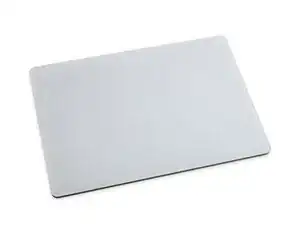
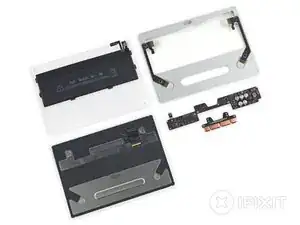
Der Herbst ist eine magische Zeit, geprägt von Erntefesten, warmen Pullovern und Kürbisgewürzen. Zur Feier des Tages hat Apple ein neues Trackpad, das Magic Trackpad 2, auf den Markt gebracht, das die Force-Touch-Technologie auf Desktops bringt. Wir fragen uns, was in diesem magischen neuen Trackpad steckt und ob es repariert werden kann. Es gibt nur einen Weg, das herauszufinden - mit einem Teardown!

Bist du auf der Suche nach den restlichen Maccessory-Reihe für 2015? Sieh dir die Teardowns der Magic Mouse 2 und desMagic Keyboard an!

Willst du mit uns in Kontakt bleiben? Folge uns auf Twitter, Instagram oder Facebook für weitere Tech-News.

  1. qoEflEZHaJZSunOF
    qoEflEZHaJZSunOF
    DwGJVl1VsW6aV1Uy
    • Wie magisch dieses Trackpad wirklich ist, steht noch nicht fest, aber hier ist, was wir bis jetzt wissen:

    • Maße: 1,09 cm x 16 cm x 11,49 (0.43" × 6.3" × 4.52")

    • Drahtlose Bluetooth-Verbindung

    • Interner Lithium-Ionen-Akku

    • Lightning-Anschluss (zum Laden und Koppeln)

    • Force Touch und Multi-Touch

  2. mV1P34nZkxC2KRyA
    mV1P34nZkxC2KRyA
    IOSns3ghYjldECjO
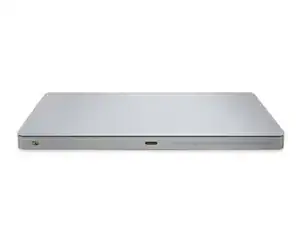
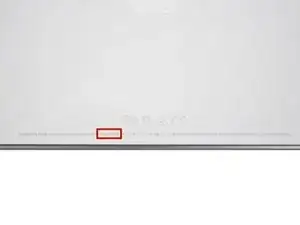
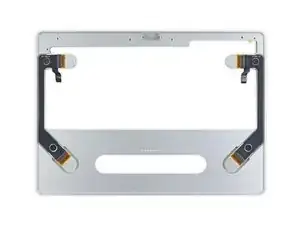
    • Auf der Rückseite des neuen Magic Trackpads befinden sich ein Netzschalter, ein Lightning-Anschluss und eine mysteriöse Kunststoffleiste. Wir spekulieren, dass es sich dabei um eine Aussparung im Metall für eine Antenne handeln könnte, aber wir müssen ins Innere gehen, um es herauszufinden!

    • Der Lightning-Anschluss erfüllt einen doppelten Zweck: Er dient zum Verbinden mit dem Mac über USB und zum Aufladen des integrierten Akkus des Trackpads.

    • Auf der Unterseite des Geräts finden wir die neue Modellnummer: A1535.

    So what does that mysterious plastic bar do?

    Philip S -

    Bluetooth Antenna

    Duck -

    I was just going to ask that…

    anthony.mitchell -

  3. hDhaIWKWalRxWLGD
    hDhaIWKWalRxWLGD
    1yjJDRHFhDWDkuXX
    1CkYZdtx2HOAAwpM
    • Mal sehen, was Apple sich für das Magic Trackpad 2 ausgedacht hat.

    • Dadurch, dass die AA-BAtterien wegfallen, konnte, genau wie beim neuen Magic Keyboard, auch beim Magic Trackpad 2 das Design schlanker gestaltet werden, und die gesamte Oberfläche wurde dadurch trackpadfähig.

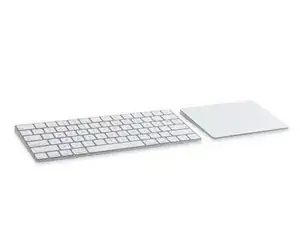
    • Diese neue "Magic"-Generation hat, wie die alte zuvor, ein einheitliches Design für einen koordinierten Schreibtisch.

    • Das neue Gerät ist etwa 2,5 cm breiter und 6,4 mm tiefer und bietet dadurch über eine zusätzliche Tracking-Oberfläche von etwa 38,7 Quadratzentimetern.

  4. uWuDoZ6tUpxRo62m
    uWuDoZ6tUpxRo62m
    mkMgbsPPkMNnYetc
    mkgsx1kO2BCRQRoK
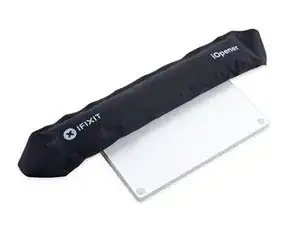
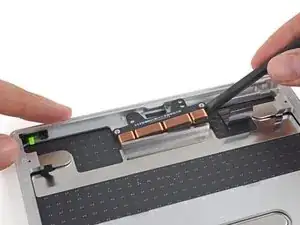
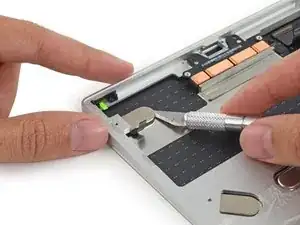
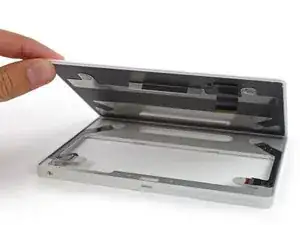
    • Da es keinen einfachen Weg gibt, um in das Magic Trackpad 2 zu kommen, fordern wir unserem iOpener alles ab, um den Klebstoff, der das Trackpad zusammenhält, zu lösen.

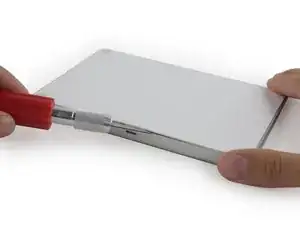
    • Wir wissen wie es geht. Mit einer scharfen Rasierklinge können wir den starken Klebstoff, der die hintere Abdeckung festhält entfernen.

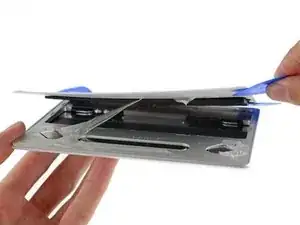
    • Wir schneiden, hebeln und bewegen das Werkzeug hin und her, bis wir Stück für Stück durch den Klebstoff kommen.

    • Viele Plektren haben es nicht durch diesen Teardown geschafft.

    • Als wir einmal drin waren, wurden wir von etwas begrüßt, dass Shelob´s Lair ähnelt. Ein furchterregendes, klebriges Durcheinander.

    At this point BE AWARE there's a flat digitizer cable that you can (I think) simply pull/ease off the main board. Don't do what I did and try to pry it gently. Do THAT and you'll remove it, entirely, from the main board (bye bye trackpad).

    Neil Clayton -

  5. Ak4m4Z2l5K2FqOwE
    Ak4m4Z2l5K2FqOwE
    kr1FoIneLDmUsyS2
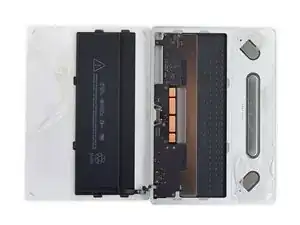
    • Beim Öffnen stellen wir fest, dass die Magie, die dieses Trackpad zusammenhält, eigentlich nur Unmengen von Klebeband ist, deren Zweck man wahrscheinlich auch durch Schrauben hätte erfüllen können.

    • Wir finden etwas, das aussieht wie ein großer iPhone-Akku, der auf der Rückseite des Geräts befestigt ist. Mit 3,78 V, 7,65 Wh liegt dieser 2024 mAh Lithium-Ionen-Polymer-Akku jedoch unter dem 2750 mAh Akku des 6s Plus.

    • Apple behauptet, dass der integrierte wiederaufladbare Akku Abfall reduziert, indem sie die Verwendung von Wegwerf-AA-Batterien im vorherigen Trackpad überflüssig macht.

    • Dies ist sicherlich ein lobenswerter Gedanke, aber verantwortungsbewusste Besitzer des Magic Trackpad v1.0 haben ihre eigenen wiederaufladbaren Mignonzellen verwendet, um Abfall zu vermeiden und das Gerät am Ende seiner Lebensdauer besser recyceln zu können.

    "allowing users to use their own rechargeable AA's saves waste and makes the device more recyclable at the end of its lifespan"

    Because most people are totally using rechargeable and not disposable batteries. /s

    olivicmic -

    True, I haven't used batteries in years. Everything I have is either AA or AAA or other type of rechargeable.

    Nice try Apple... welcome to 21st century.

    crus -

    It's clear that the real reason of irreplacable batteries is to reduce lifespan of Magic Trackpad 2, the same true for irreplaceble parts of latest MacMini's. We all loved Apple for customizability, but their greediness with latest products, will slowly make majority of user to prefer another products, when they realize it, it will be too late...

    ifr33t -

    This is an old post but this is clear BS. If we assume 300 charging cycles (a very conservative guess) and assume Apple's claims are true that one charge will last you about a month (probably true considering Apple usually doesn't lie about battery life) this leads to an assumed battery life of 300/12 = 25 freaking years. In 25 years you probably won't even remember that you ever owned this trackpad and you surely won't be using it anymore.

    Do some math before posting such accusations. Considering that tons of people use disposable batteries and that rechargeable batteries also have a certain life span before they need to be replaced this included battery is with 100% certainty going to be better for the environment. Also Apple will replace your Magic Trackpad 2 for $29 if your battery isn't holding a charge anymore. Yeah, totally greedy!

    Zunivolo -

    Zunivolo, batteries loose their capacity even if they aren’t used

    Surgie -

    I think the non-replaceable battery problem in the Magic Trackpad is blown out of proportion. I’ve had mine for a year and I’ve charged it maybe 6 times. The battery is going to last forever anyway. It uses roughly 2-3% a day with my usage pattern.

    r_jones -

    Hmmm, had my trackpad 2 for a number years (maybe 4), but just recently time between charges is has suddenly dropped to no more than a couple of days. battery shot and no way to replace? Not good.

    Mark Flinders -

    Same here! Had mine a few years, now only lasts a few days between charges. Only reason I am reading this page is because I want to replace the battery, not throw it away!

    Kai Kewley -

    After a reparation, would just like to share with you that information :

    I recently dismantle the Magic Trackpad 2 because he had any longer has a battery but it could still operate with the lighnting cable (the taptic engine no longer vibrates).

    So, I replaced the battery and I was able to notice by this simply change I refinded the feeling of the click and the noise emitted by the vibrations. So , I think the battery is necessery to the Magic Trackpad 2 fonction properly.

    PS : Take care when you when you remove the rear plastic part as not to damage (after it easy to put on back with some little glue).

    Guillaume Lion -

    having the exact same issue; where did you find the battery?

    Eddie Perez -

    Where can I order a replacement battery for my A1535?

    andrew -

    ihr habt leider vergessen, ein bild einzuschieben, wie man den anschluss des akkus vom unterteil gelöst bekommt!

    hans -

    Still using my first gen with lithium rechargables! I also had a gen 2 which I got rid of when the battery gave up, then bought a used gen 1 to replace it so how I have two gen 1 units with my older mouse’s with removable batteries! As I didn’t like not being able to use it while plugged in. Apple doesn’t have a clue!

    Dan -

  6. wdZKV42BMjsZteZW
    wdZKV42BMjsZteZW
    XIKERs4hZrOGPNyc
    d6aeAUES5SIf1YCC
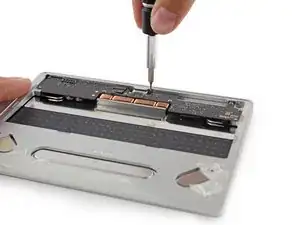
    • Wir legen den Akku und die Rückseite beiseite, und wenden uns der Vorderseite und all ihren Besonderheiten zu.

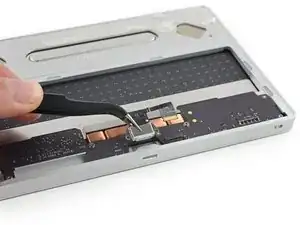
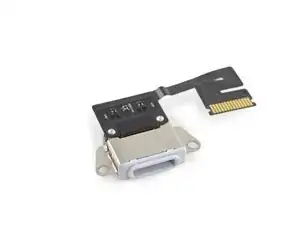
    • Keine Sorge - dieses Lightning Connector Kabel schient unverlötet und somit abnehmbar zu sein.

    • Und richtig, wir klappen die ZIF-Verriegelung um, entfernen die T3-Schrauben und voilà - der Lightning-Anschluss ist ab!

    • Das ist eine gute Nachricht für die Reparatur - ein kombinierter Lade- und Datenanschluss wird häufig benutzt und kann eine häufige Fehlerquelle sein.

  7. xl3WmB25TpFmSnMO
    xl3WmB25TpFmSnMO
    FO1TtwmeEaEUMfWx
    uC6PbCSEwHBEaU6d
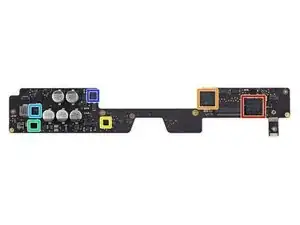
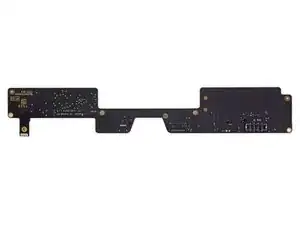
    • Wir nehmen das schlanke Logic Board heraus, um einen besseren Blick auf ihr Silizium zu werfen. Hier ist, was wir finden:

    • Broadcom BCM20733 Enhanced Data Rate Bluetooth 3.0 Single-Chip-Lösung

    • ST Microelectronics STM32F103VB 72 MHz 32-Bit RISC ARM Cortex-M3

    • NXP 1608A1 Lade-IC

    • Texas Instruments BQ24250C I2C/Single Input I2C/Standalone Switch-Mode Li-Ion Akku-Lader

    • Intersil ISL656A Zwei-Phasen-PWM-Controller

    • International Rectifier IRFH3702 Einzelner N-Kanal-HEXFET-Leistungs-MOSFET

    I'm kind of surpised that the Bluetooth chip is v3.0: Apple's specs say the Magic Trackpad is compatible only with Macs supporting v4.0.

    Dominic Dunlop -

    There weren't any Apple devices with Bluetooth 3.0; they went from 2.1 + EDR to 4.0.

    David Ebert -

    Yeah this has the same BCM20733 Bluetooth chip as the mouse and keyboard but yet Apple says it requires a Mac with BT 4.0?

    rgarjr -

    Yeah, so how are we supposed to take this? Is it only using Bluetooth 3? What about the FCC filings that suggest it's BT 4.2? It would be nice to know because I want to know if it's going to be a significant improvement over the Magic Trackpad 1, which I have lots of connectivity and signal interference issues with.

    Tevya Washburn -

  8. pygAHqWyM6qyNFQv
    pygAHqWyM6qyNFQv
    OrQyIKwptOTkaeRJ
    2AFFx4RFJMvI2H4q
    • Beim Herausheben der Taptic Engine , sind wir enttäuscht, dass das einzige haptische Feedback, das wir erhalten, die Kraft unseres Spudgers auf dem Aluminiumrahmen des Trackpads ist.

    • Diese neue Taptic Engine ähnelt den Taptic Engines im Retina MacBook und im MacBook Pro und soll dem Magic Trackpad 2 ein ähnliches Force Touch-Gefühl verleihen.

    • Diese Kupferdrahtspulen bilden leistungsstarke Elektromagnete, die gegen die an der Unterseite des Trackpads angebrachte Stahlstange drücken und ziehen, wodurch die gesamte Oberfläche schnell und kurz summt und so den Klang und das Gefühl eines Klicks simuliert.

    The Taptic board is held down by two T5 screws.

    relaxing -

  9. qKyDNMChFdnVa24t
    qKyDNMChFdnVa24t
    uSG2PgWDZsrudSB6
    • Genau wie andere Force Touch-Modell, die wir gesehen haben, liegt das Trackpad auf vier federnden Metalllaschen, die mit durchsichtigen Klebepads gesichert sind.

    • Die einzige Möglichkeit, das Trackpad abzutrennen und einen genaueren Blick darauf zu werfen, besteht darin, den Klebstoff zu durchtrennen. Leider ist das auch die einzige Möglichkeit, eine beschädigte Trackpad-Oberfläche zu ersetzen.

    • Nachdem wir den Kleber entfernt haben, können wir einen Blick auf das werfen, was sich zwischen dem Aluminiumrahmen des Trackpads und der Oberfläche des Trackpads verbirgt.

  10. FAkDCQIErklGdyNR
    FAkDCQIErklGdyNR
    AC2FOkVvTisZphpH
    alBLKNAyJOPymgya
    • Auf dem Touchpad befindet sich ein einziger, eleganter Chip.

    • Broadcom BCM5976 Touch Controller (Teil der gleichen Serie von Broadcom Touch Controller Chips, die in vielen Apple Geräten verwendet werden)

    • Die Dehnungsmessstreifen, die an jeder der vier Federzungen angebracht sind, werden zur Messung der auf die Trackpad-Oberfläche ausgeübten Kraft verwendet.

    • Wenn du auf das Trackpad drückst, biegen sich die Federn durch, dehnen die Dehnungsmessstreifen und erhöhen ihren Widerstand. Ein Mikrocontroller misst diesen Widerstand und bestimmt das entsprechende Niveau des haptischenTaptic Feedbacks, das ausgegeben wird.

  11. FK3sekGZC3beZ1M2
    FK3sekGZC3beZ1M2
    TNNN6CXSYcZrJNoW
    • Reparierbarkeits-Index des Magic Trackpad 2: 3 von 10 (10 ist am einfachsten zu reparieren)

    • Der Lightning-Anschluss und der Akku können unabhängig vom Logic Board ausgetauscht werden - sofern du es schaffst, das Gerät zu öffnen.

    • Um eine beschädigte Trackpad-Oberfläche zu ersetzen, muss der Kleber an den Federzungen abgeschnitten und neu aufgetragen werden.

    • Die übermäßige Verwendung von starkem Klebstoff macht es sehr schwierig, die Rückwand zu entfernen und behindert den Zugang zu allen internen Komponenten.

    • Ohne ein Servicehandbuch ist es schwierig, das Trackpad zu öffnen, ohne interne Komponenten wie den Akku und die Taptic Engine zu beschädigen.

Evan Noronha

Mitglied seit: 06/02/15

226862 Reputation

24 Kommentare

Will it work at all with my mid 2010 iMac?

cohenyarin -

iMacs had BT 4.0 since the Late 2012 model. Mac mini and MacBook Air: Mid 2011. MacBook Pro (incl. rMBP): Mid 2012.

David Ebert -

I love the design - much more elegant... but it would have been nicer if it could use the apple pencil and be used similar to a wacom tablet device

pauldixon1986 -

It’s designed to use with fingers, it has many cool gestures that require multiple fingers. It’s not a tool for artists.

Surgie -

It works with my iMac 27" 2011, which has no bluetooth 4.0

matthias -

Too expensive

clbreeze -

DO you think/know if it works with batteries removed ??

Felix Bauer -

It does, with lightning cable plugged to USB port.

But then Force Touch does not work.

Certainly because of not enough power from USB port itself.

All other gestures work.

trackmad -

Can someone please tell me what that translucent strip next to the lightning port? Also here's a tip it can be used as a USB touchpad.

gabrielcm -

My guess is that's where the Bluetooth signal comes/goes, due to everything else being aluminium…?

antixsuperstar -

Shallow, dissapoining tear down. No mention of where the Bluetooth antenna actually is, which you teased in the intro. Hello! Beuller? The power switch also looks interesting, if not fiddly to reassemble. And it looks like there are pads on the board for a micro USB or USB-C connector. That would be nice to mention! This tear down really was below average.

ignored -

Can I replace my broken 2015 MacBook Pro 13” trackpad with the guts of a Magic Trackpad?

Josh Mckee -

Sorry, no. Not only is it to big, but I’d assume it’s also incompatible based on different firmwares.

Jake Rose -

That looks like an iPhone 5 battery connector

TheYootz Media Group -

Where can I buy the replacement battery for the Magic Trackpad 2 for a reasonable price? Mine is holding charge just for a few days.

Rimsky Sucre -

I am looking for a spare battery for the trackpad 2

bongdavid -

VHBW provides a replacement battery.

Available through their selling portal (electropapa.com), eBay, and Amazon.

https://electropapa.com/en/akku-fuer-app...

trackmad -

Replacement glass, any 3rd party vendors?

Lic Mystic -

Does the Magic Trackpad 2 also work without Battery only plugged in via Lightning?

Tommy -

Would this trackpad still function plugged in if the battery was removed? My battery is swelling on mine and if I can get away with just removing it and using it while plugged in that would be great. Thanks!

Ryan -

Wow. Magic Trackpad’s inside design(?) is so tidy just as other Apple devices!!

Turtle -

My trackpad has stopped springing back up. Which elements not working would cause that?

Nural Choudhury -

Hi. my trackpad2 broken.

I was disassembling my Magic Trackpad 2 because the battery was swelling.

then i read your article, during step 10, the cable right next to it got damaged. What should I search for to buy this cable?

jy han -

I've just replaced the swollen battery. However, I need to replace the clear adhesive pads on the four springy metal tabs; otherwise, the top of the trackpad will not stay in place. Does anyone know what they're called, where I can get replacements, and what I can use to remove the existing pads? They are made of clear rubbery material and are not easy to remove.

Nish -