Einleitung

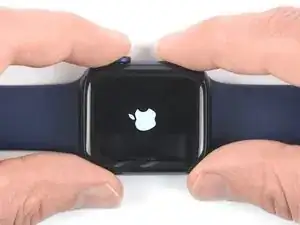
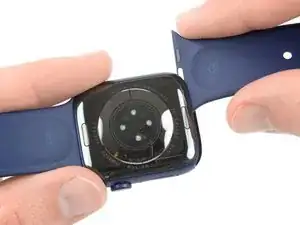
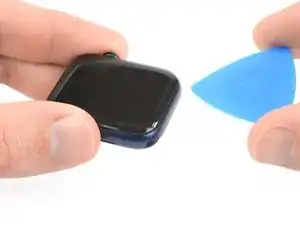
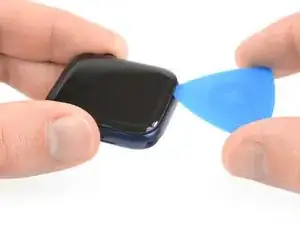
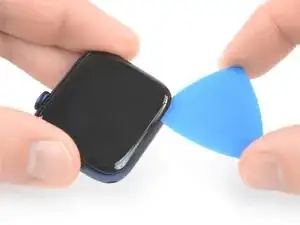
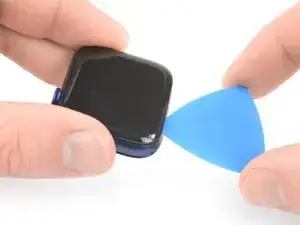
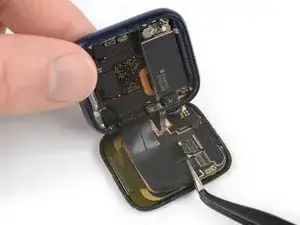
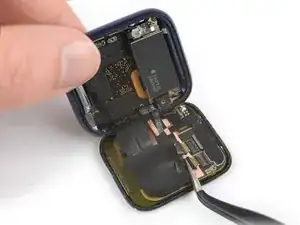
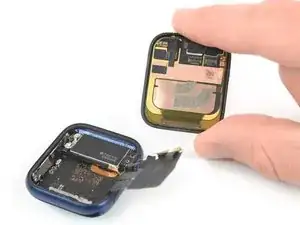
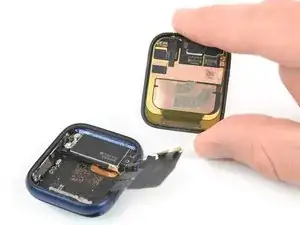
Benutze diese Anleitung, um ein defektes Display in einer Apple Watch Series 6 zu ersetzen.

Durch den Displaytausch kann es Probleme mit Apple Pay geben. Damit sie garnicht erst auftauchen, lösche alle Infos im Apple Pay Account, bevor du das Display tauschst und gib sie anschließend wieder ein.

In dieser Anleitung wird der Vorgang anhand einer Mobil/LTE Version der Uhr gezeigt, aber die GPS-Version ist ähnlich.

Du wirst für den Zusammenbau Ersatzklebestreifen benötigen, um die einzelnen Komponenten wieder zu befestigen.

  1. EFWbVKXYaNDQU4cM
    EFWbVKXYaNDQU4cM
    plhMwOSuZPthNHWj

    If you change the battery of the 44 mm Model, make sure you got the Y000 bit for the tiny screw. I have a pretty comprehensive bit set from iFixit, but that one was not included.

    AD161 -

  2. MFZ6muLZdUPbU3fM
    MFZ6muLZdUPbU3fM
    wSfvILMQH4VKhbKi
    dhhRiMVS15uMFZQ5
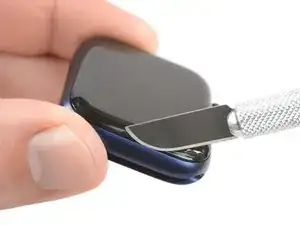
    • Da der Spalt zwischen Display und Uhrengehäuse sehr schmal ist, wird eine scharfe Klinge benötigt um die beiden Teile voneinander zu trennen. Lies dir die folgenden Warnhinweise sorgfältig durch, bevor du weitermachst.

    • Pass auf deine Finger auf, wenn du mit der Klinge arbeitest. Schütze deine Hand am besten mit einem Handschuh aus Leder oder einem Gartenhandschuh.

    • Achte darauf, nicht zu viel Druck auszuüben, da das Messer sonst abrutschen und dich verletzen oder die Watch beschädigen kann.

    • Trage eine Schutzbrille. Die Klinge oder das Glas können brechen und Splitter können ins Auge kommen.

    • Du kannst das Uhrarmband abnehmen oder dranlassen, je nach dem, was praktischer für dich ist.

    I found the supplied razor blade too thick to get in the gap between the screen and the case. I used half a Dorco razor blade to do the job, and some isopropyl alcohol once it started to lift.

    Dave M -

  3. SJDuMHt1uN6hhhMO
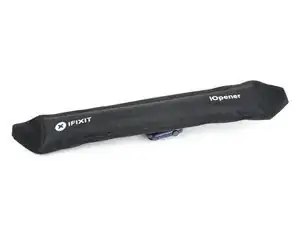
    • Bereite einen iOpener vor (oder benutze einen Fön oder eine Heißluftpistole) und erwärme die Vorderseite der Uhr, um den Displaykleber aufzuweichen.

    • Lasse den iOpener mindestens zwei Minuten auf der Uhr liegen, damit das Display gut erwärmt und so der Kleber, mit dem es am Gehäuse befestigt ist, aufgeweicht wird.

    • Möglicherweise musst du den iOpener mehrfach erhitzen und auflegen, bis der Displaykleber ausreichend aufgeweicht ist.

  4. A2bxrliYwW3GrG6i
    A2bxrliYwW3GrG6i
    ee2YtARrWbppAK2R
    IDVBJeACdDH1FCSe
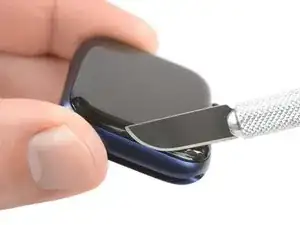
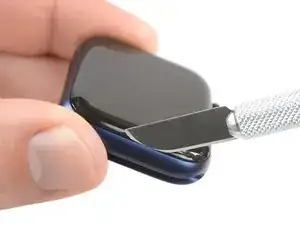
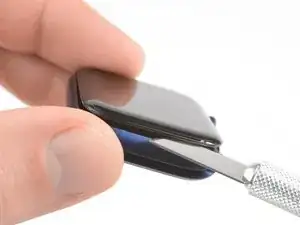
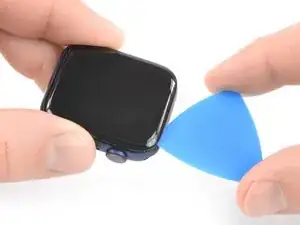
    • Setze die Kante einer gebogenen Klinge in die schmale Fuge zwischen Display und Außengehäuse. Beginne an der kurzen Seite des Displays, die am weitesten von der Krone entfernt ist.

    • Drücke die Klinge fest gerade nach unten in den Spalt.

    • Sobald die Klinge drinnen ist, kippe sie, um das Display leicht zu öffnen.

    I was unable to do this. and I ended up breaking the glass in the process. So this was not a great experience

    Nicolas Randall -

    Only thing that fit that gap for me was a razor blade. Used one of those plastic scraper frames to secure it. Everything went according to this guide.

    Dan -

    With a titanium case there is no give to get the blade within the gap. This step probably works fine with an aluminum case as it has more give. Even purchased new knives to make it work but only ended up scratching the case. Will now need to take to Apple Store and live with scratches...

    Mike Motroni -

    Instead of a knife I used an ultrathin 0.1 mm spudger pry blade (Amazon) to get under the display and actually cut the seal around the whole display.

    AD161 -

  5. wAEV4a5D1hdEDTlZ
    wAEV4a5D1hdEDTlZ
    lX2xwBgODWaXQwWg
    gpF5XWQClblDN1kT
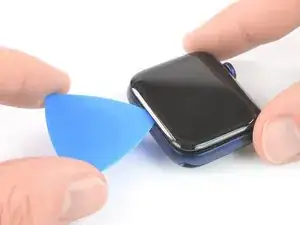
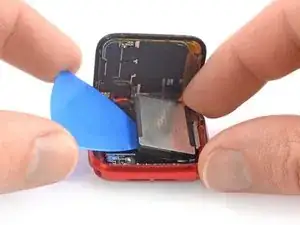
    • Setze ein Plektrum in den eben entstandenen Spalt.

    • Schiebe das Plektrum an der kurzen Kante der Uhr entlang, um den Kleber zu durchtrennen.

  6. aOnHpiBid6lABfXJ
    aOnHpiBid6lABfXJ
    6SMKHYXr4oYVJGOX
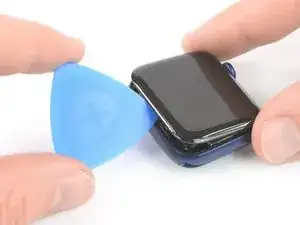
    • Schiebe das Plektrum um die Ecke und an der langen Kante gegenüber der Uhrenkrone entlang, um den Displaykleber aufzutrennen.

  7. PpRZOvOqTaGv2voL
    PpRZOvOqTaGv2voL
    yNNfImYpFYF3Odyi
    • Schiebe das Plektrum um die Ecke, um den restlichen Kleber an der kurzen Kante nahe bei der Uhrenkrone zu durchtrennen.

  8. pMOFHYoITTKgSeim
    pMOFHYoITTKgSeim
    5DOQBaWSeGHBX5Od
    • Lege die Uhr auf eine gerade Oberfläche und benutze ein Plektrum, um den restlichen Kleber durchzuschneiden.

    • Versuche, nicht zu nahe an der Uhrenkrone zu schneiden, um zu vermeiden, dass die Displaykabel beschädigt werden. Wenn du in der Nähe der Uhrenkrone schneiden musst, setze das Plektrum nicht tiefer als etwa 2 mm ein.

    • Schiebe ein Plektrum unter die Displaykante, die sich gegenüber von der Uhrenkrone befindet.

    • Drehe das Plektrum, um das Display vom Uhrengehäuse abzulösen.

    • Versuche auf keinen Fall, das Display zu entfernen, da es immer noch mit der restlichen Uhr verbunden ist.

  9. QlaHvAE26VMHYsim
    QlaHvAE26VMHYsim
    JBpuPYbbpcZEA5bG
    mUOFFRKtJRWwMxyw
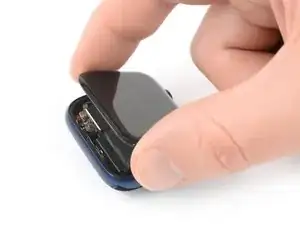
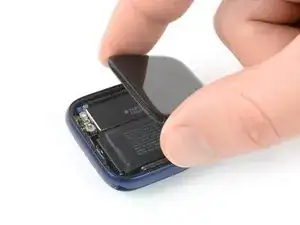
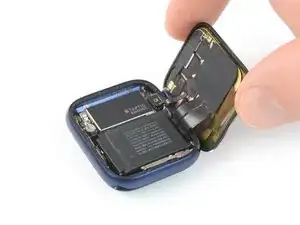
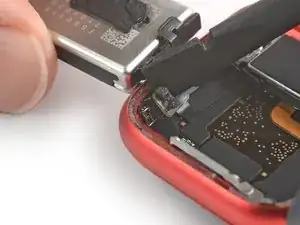
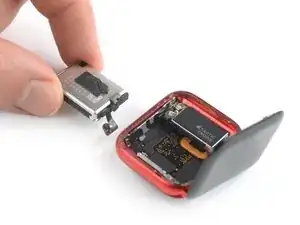
    • Achte darauf, die Displaykabel nicht zu sehr anzuspannen, wenn du das Display zur Seite klappst.

    • Hebe das Display an und ziehe es vorsichtig zur Uhrenkrone.

    • Klappe das Display hoch, sodass es aufrecht steht.

    When I opened my watch I saw two layers of adhesive or are they gaskets? I broke one accidentally but not sure if I should keep the undamaged one in there? Or should both side be totally bare and the adhesive itself is also the seal?

    Also I think I damaged my battery when prying it up since it won’t hold a charge now. I bought a replacement battery and will try that but is there anything else it could be?

    Melina Jefferson -

    Be very careful here... My display cable broke before achieving the angle they show in the last pick above. You may well want to order new cables along with the battery and gaskets. The are only $19.95

    Robert Shettel -

  10. JgLAptdXYs3jPpbj
    • Bereite einen iOpener vor (oder benutze einen Fön oder eine Heißluftpistole) und erwärme die Rückseite der Uhr, um den Akkukleber aufzuweichen. Lasse den iOpener mindestens zwei Minuten auf der Uhr liegen.

  11. XVfNScAogslfrFJs
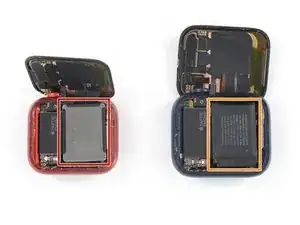
    • Ab diesem Punkt unterscheidet sich die Vorgehensweise für das 40 mm Uhrenmodell leicht vom 44 mm Modell.

    • Wenn du den Akku in einer 40 mm Uhr austauschst, dann mache mit diesem Schritt weiter.

    • Wenn du den Akku in einer 44 mm Uhr austauschst, dann mache mit diesem Schritt weiter.

    These links for replacing the battery for the 40mm and 44mm are going to the battery section of the screen replacement instructions page. They should go to the battery replacement instructions below instead. (This is likely a copy-paste error from that other page)

    Beopaul -

    Yeah, bad links in step 11

    Christopher Truesdell -

    I have edited the links to stay on the correct guide so they should work right once the edit is approved by the admins.

    Jerry Wheeler -

  12. jSAHPOormJWJsQpQ
    jSAHPOormJWJsQpQ
    fhcMwhX35nmenYrG
    2vboKXxkboqgqClV
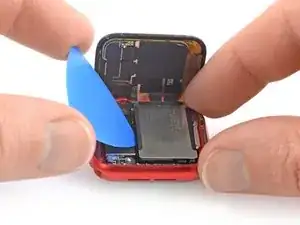
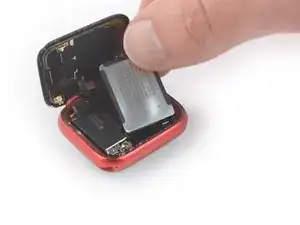
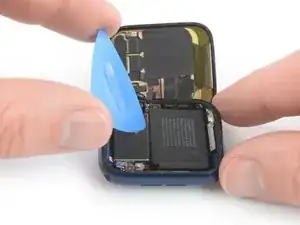
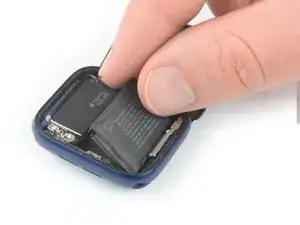
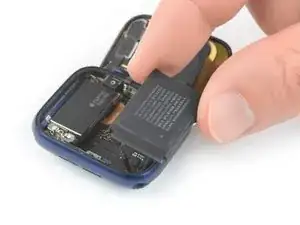
    • In den folgenden vier Schritten wird gezeigt, wie der Akku einer 40 mm Apple Watch Series 6 ausgebaut wird.

    • Setze ein Plektrum zwischen dem Akku und der Taptic Engine ein.

    • Heble den Akku langsam mit gleichmäßigem Druck hoch und löse ihn so vom Kleber ab, mit dem er am Mainboard befestigt ist.

    • Achte darauf, dass du den Akku nicht punktierst oder verformst, da er sich entzünden und/oder explodieren kann, wenn er beschädigt wird.

    • Versuche noch nicht, den Akku ganz zu entfernen. Er ist immer noch mit der Uhr verbunden.

    that ribbon at the top left corner of the battery in the picture is extremely fragile. my pick snapped it in half :(

    Eugene L -

  13. tgj6aDPPOiEBJPfJ
    tgj6aDPPOiEBJPfJ
    JFHEtoXMpLQeiAw5
    1dEHQLFiNaD5uqgV
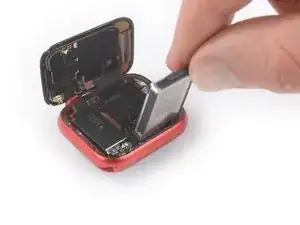
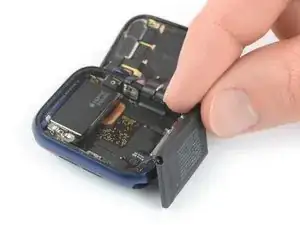
    • Das Flachbandkabel des Akkus ist lang genug, sodass du den Akku außerhalb des Uhrengehäuses ablegen kannst, vermeide es aber auf jeden Fall, das Akkukabel zu sehr anzuspannen, wenn du den Akku aus seiner Vertiefung hebst.

    • Klappe den Akku vorsichtig aus seiner Vertiefung heraus.

  14. QDBq12laXOGXGegh
    QDBq12laXOGXGegh
    OGINSWZCWMCXOPIo
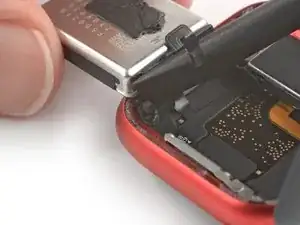
    • Benutze das flache Ende eines Spudgers, um den Akkustecker hochzuhebeln und abzutrennen.

  15. oqmwN1OTVpFqLHXJ
    • Entferne den Akku.

    • Baue aus Sicherheitsgründen niemals einen beschädigten oder verformten Akku ein.

    • Wenn du beim Zusammenbau deinen alten Akku wiederbenutzt, kannst du das originale Klebeband zum Befestigen benutzen.

    • Alternativ kannst du die alten Klebestreifen mit hochkonzentriertem Isopropylalkohol und einem fusselfreien Tuch entfernen und ein kleines Stück doppelseitiges Klebeband wie zum Beispiel Tesa 61395 oder etwas Flüssigkleber wie E6000 benutzen.

  16. 6XaDBcHdYXWfhMoG
    6XaDBcHdYXWfhMoG
    yRCqjU62NCuKYDEB
    gmjPYlvVNro1npF4
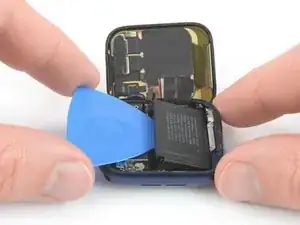
    • In den folgenden vier Schritten wird gezeigt, wie der Akku einer 44 mm Apple Watch Series 6 ausgebaut wird.

    • Setze ein Plektrum zwischen dem Akku und der Taptic Engine ein.

    • Heble den Akku langsam mit gleichmäßigem Druck hoch und löse ihn so vom Kleber ab, mit dem er am Mainboard befestigt ist.

    • Achte darauf, dass du den Akku nicht punktierst oder verformst, da er sich entzünden und/oder explodieren kann, wenn er beschädigt wird.

    • Versuche noch nicht, den Akku ganz zu entfernen. Er ist immer noch mit der Uhr verbunden.

    My watch has a metal shield in between the battery and screen?

    Eric Macfadyen -

    Hi Eric,

    I assume you own the 40mm version of the Apple Watch series 6 which has a slightly different build. The one you see here is the 44mm version.

    Dominik Schnabelrauch -

    Is removing the battery really necessary if you are only replacing the display? I can't see in the following steps where the battery would get in the way of detaching the old screen.

    Christopher Truesdell -

    I’ve already taken off the screen , had a bad scratch I couldn’t get out then totally messed it up so for $50 bucks and some increased knowledge of Apple Watches I have the 6 44mm and the whole screen is off took 2days, I’m a little afraid I may have taken off the lcd part as well and I just bought a digitizer and new battery i didn’t get anything called an lcd they were more expensive but I’ve looked for hours and I didn’t tear anything, any thoughts?

    Jeremy Park -

    Hi Jeremy,

    Unfortunately what the sites that sell just the digitizer (AKA the front glass) aren't telling you is that it's extremely difficult to separate the LCD and the digitizer, as they're bonded together with glue called OCA (Optically Clear Adhesive). It takes specialized skills and equipment to successfully separate them without damaging the delicate LCD, then even more equipment to rebond the display with a new digitizer. I consider myself a very experienced DIY guy and this isn't something I'd try on an Apple Watch. I have done one on a couple of iPhone 6's that turned out with barely acceptable results, and one on a Samsung phone that failed miserably.

    Sorry to say, you'll need to bite the bullet and just buy a new screen assembly, one that includes both the LCD and the digitizer. Presumably you haven't done anything with the replacement part you already bought, so hopefully you can return it.

    Jerry Wheeler -

  17. CVOKxSjaO2NRdIZk
    CVOKxSjaO2NRdIZk
    mAJ4dPYlkjoNuFVy
    PQ2vegO2PZ2wR5HA
    • Das Flachbandkabel des Akkus ist lang genug, sodass du den Akku außerhalb des Uhrengehäuses ablegen kannst, vermeide es aber auf jeden Fall, das Akkukabel zu sehr anzuspannen, wenn du den Akku aus seiner Vertiefung hebst.

    • Hebe den Akku vorsichtig aus seiner Vertiefung heraus und lege ihn außerhalb des Uhrengehäuses gegenüber von der Taptic Engine ab.

  18. vMTf5UqsvMvTPSbf
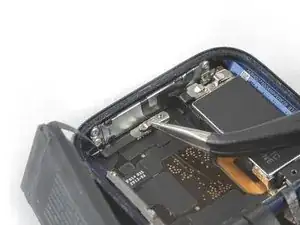
    • Entferne die einzelne 1,2 mm lange Tri-Point Y000 Schraube.

  19. SsonvQBnnOKZXVvs
    SsonvQBnnOKZXVvs
    xrDPZ6DCl3UVa3kt
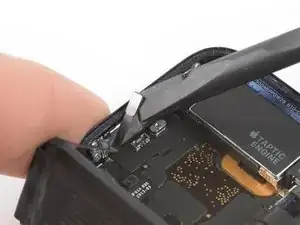
    • Entferne die Metallabschirmung über dem Akkustecker mit einer Pinzette.

  20. bOeJTZWogCpqXaOu
    bOeJTZWogCpqXaOu
    ByGtXXogeBOGKZiC
    • Benutze das flache Ende eines Spudgers, um den Akkustecker hochzuhebeln und abzutrennen.

    Be careful that you don't push the spudger into the battery reciptical port and pop that off the motherboard like I did. Pry straight up. Do not press the spudger into the side of the battery connection port. I think I'm out of luck now.

    Timerly2 -

  21. mPa1MThFppERQEBG
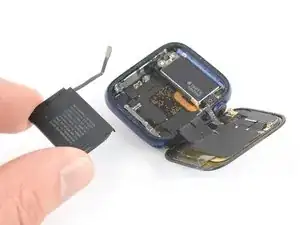
    • Entferne den Akku.

    • Baue aus Sicherheitsgründen niemals einen beschädigten oder verformten Akku ein.

    • Wenn du beim Zusammenbau deinen alten Akku wiederbenutzt, kannst du das originale Klebeband zum Befestigen benutzen.

    • Alternativ kannst du die alten Klebestreifen mit hochkonzentriertem Isopropylalkohol und einem fusselfreien Tuch entfernen und ein kleines Stück doppelseitiges Klebeband wie zum Beispiel Tesa 61395 oder etwas Flüssigkleber wie E6000 benutzen.

    I did not really see any adhesive strip to remove, neither on the battery, nor in the housing. So installed the new one without any adhesive. Though the backside of the new battery had a plastic foil to remove, guessing that‘s the way to make the battery stick.

    To seal the display to the housing again I used B-7000 glue.

    AD161 -

  22. sOZA4gua3CGRSJNt
    sOZA4gua3CGRSJNt
    2cXbmcFH33ZhIuRk
    4n6KAvwUTVBXRBZU
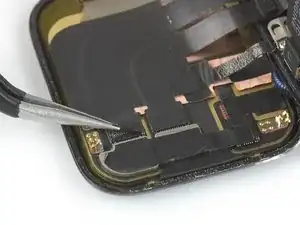
    • Ziehe das schwarze Klebeband behutsam mit einer Pinzette von beiden Displaysteckern ab.

    why do you have to remove the watch back from Face. You're going.to repace it. Isn;t there enough room to get the display positioned right upon re- assembly?

    Bill Brennan -

  23. 6uBMfVTO3U2VJJ4a
    6uBMfVTO3U2VJJ4a
    1tLYIIe2RcShJi6e
    1EMjMBpT1pqSPEPO
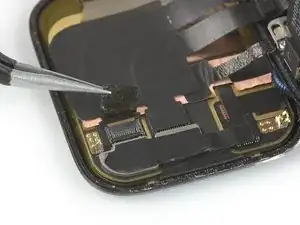
    • Heble die Verriegelungen an den beiden ZIF-Verbindern, mit denen die Displaykabel gesichert sind, mit der Spudgerspitze nach oben.

  24. 4rXMuHwRfRgQWou2
    4rXMuHwRfRgQWou2
    xn6oTNLBQY3uRv2H
    Igt2TYTZBGtbn2IS
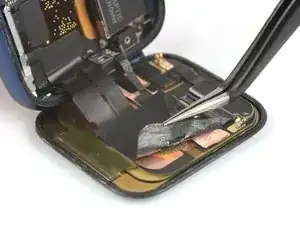
    • Das Display- und das Erdungskabel sind mit einem Sticker an der Rückseite des Displays festgeklebt. Löse die Kanten des Stickers behutsam mit einer Pinzette ab.

    An dieser Stelle muss ich aufgeben. Die Elemente sind sehr stark miteinander verklebt und das Erdungsband reisst sehr leicht.

    Thomas Link -

  25. Jk3wHKlHMHsHt2OJ
    Jk3wHKlHMHsHt2OJ
    vy5eOIFRjAuvawsn
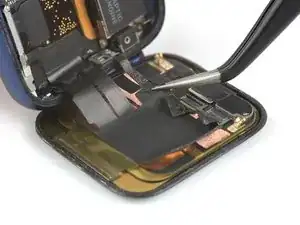
    • Ziehe die beiden Displaykabel mit einer Pinzette aus ihren ZIF-Verbindern heraus.

    • Ziehe nicht an der Uhreneinheit, die Displaykabel könnten reißen.

    This says nothing about the grounding cable..

    Eric Macfadyen -

    Oh. Is that was that was. 👀 I knew I wasn't supposed to break this but the device turned on and functions properly. I'll keep an eye on things and see if my wrists sets on fire at some point. Thank you for pointing this out!

    Paul B. -
    I also have managed to break 👏

    Nick -
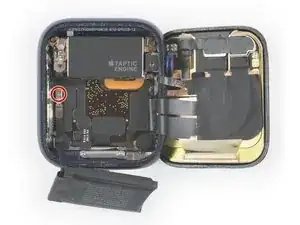
    I damaged the grounding foil/sticker when opening. It’s like tissue paper thin 😱 I was able to reconnect it in a hacky way but is there a replacement part for that available? That part didn’t come up with the rest of the display cable sticky assembly.

    @paul is your watch still functioning properly?

    Melina Jefferson -
  26. psbpm3nHVKXwiogs
    • Löse das Display von der restlichen Uhr ab.

    Can we get the application process of the replacement adhesive added to this guide? I ended up messing up my adhesive (completely my fault) and have to buy another set. I thinking adding the guide into this one would be beneficial to the community. Thanks!

    Nathanial Bosteder -

    The bonding of the tesa tape seems poor. I think I did everything right, but the watch face rises up slightly off the case every day. This is with a new battery and new screen unit. Any tips?

    Nicholas Sweeney -

    Using standard off the roll Tesa tape won't do, you need the special die-cut tape which is a thinner version Apple Watch (40 mm Series 6) Screen Adhesive or Apple Watch (44 mm Series 6) Screen Adhesive

    Dan -

Abschluss

Um deine Apple Watch Series 6 wieder zusammenzubauen, folge den Schritten dieser Anleitung in umgekehrter Reihenfolge. Reinige die Kleberreste an den Kanten des Uhrengehäuses mit etwas Isopropylalkohol (>90%) und einem Wattestäbchen oder einem Reinigungstuch, bevor du die neuen Klebestreifen einsetzt.

Entsorge deinen Elektromüll fachgerecht.

Lief die Reparatur nicht wie geplant? Versuche es mit einigen grundsätzlichen Lösungsansätzen oder frage in unserem Forum nach.

Dominik Schnabelrauch

Mitglied seit: 23/11/16

235812 Reputation

24 Kommentare

Can anyone tell me what that 3rd cable is (circled red in the pic linked below)? It’s linked to the metal back in the phone?

https://imgur.com/0meecS9

gauntletmm -

I think it is just a grounding wire.

Daniele Carminati -

Did you ever find out what that third wire is?

Antonio Silva Carrillo -

I want to know too, I break it while pulling the battery yesterday, but the watch seems working fine

Coco -

It’s a shield (grounding) line to control EMI noise

Dan -

Siete magnifici

Romeo Del Guasta -

Dommage qu’il n’y ai pas de lien d’une batterie à acheter ainsi qu’un lien pour trouver le joint d’étanchéité.

jeremy_110 -

Hello, do we lose the Apple Pay functionality if we replace the screen?

jolan lecomte -

No, i dont think so.

Burak -

Where to buy the replacement glass for series 6 Watch?

Peter Mazzara -

Hallo, bei öffnen habe ich versehentlich das Erdungskabel abgerissen. Läuft die Uhr auch ohne dieses Kabel?

Dominik Müller -

Why would you leave out the steps for replacing or reattaching the screen? It’s not the same in reverse as you have to replace adhesive what’s the process or best practice? Do you reheat the adhesive before replacing screen?

KEVOUGHN ROWE -

Ich finde nirgendwo einen Ersatz Akku für die Apple Watch Series 6, 44mm, steht dieser zur Zeit nicht zur Verfügung oder passt der von der Series 5 ebenfalls, so das dieser nicht separat angeboten wird ?

philipp.lang.621 -

Mil gracias por Tu generosidad al compartir Tu conocimiento con los demás.

Olga Gaviria Gomez -

Can just the top touch glass if lcd is fine?

colin -

Which Tesa 61395 Tape width should I buy for a 44mm watch?

arno nabos -

Is there a way to just replace the glass, or do you have to replace the whole screen?

Aaron Sowma -

Not really, the crystal is glued to the panel with a special optical glue

Someone with the needed heater and vacuum chamber could but one has to have the skills as well. Remember we all can’t be brain surgeons!

Dan -

how separate the digitizer from the crack screen?

William -

This is an assembly where the crystal and LED screen are glued together. If you damaged the crystal the you will need to replace the full assembly which has the panel attached.

Dan -

I need an adesive for the new screen or there is already the adesive in the new spare part?

Davide Cantalupo -

If you buy the kit the adhesive strips are supplied or you can get them independently Tesa 61395 Tape these are precut needed segments to replace either sized watch.

Dan -

The kit comes with tape, but they were useless for me, so I ended up using B-7000 glue. Worked really well and I’m confident with the seal

nathv86 -

@nathv86 - These adhesive tapes are a bit different than glue as they allow the unit to be opened for service. Glues tend to be very permanent! It is very important to have a clean surface on both sides as well as not touch the adhesive as the oils in one's skin will prevent good adhesion. What you use to clean the surfaces is also important! Only use reagent quality solvents as over the counter isopropyl alcohol often has impurities. And lastly pressure and heat helps set the adhesive. Don't be too quick to assume the mounting is set it takes a good hour under pressure and a bit of heat!

Dan -