Einleitung

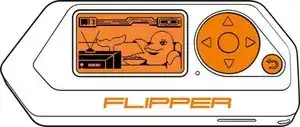
Der Flipper Zero ist ein vielseitiges Multi-tool, welches für Hardware hacking, Prototypentestung in der Elektronik sowie Sicherheitstestungen genutzt wird. Eine der grundlegenden Bauteile ist der Bildschirm, welches die Interaktion des Benutzers mit dem Gerät und Informationseinsicht erlaubt. Sollte der Bildschirm am Flipper Zero beschädigt oder defekt werden, könnte es notwendig werden ihn zu ersetzen.

Den Bildschirm zu entfernen ist ein bisschen schwieriger als andere Bauteile zu tauschen, weil hier Lötkenntnisse beim Entlöten des Bildschirm von der Platine benötigt werden. Mit den richtigen Werkzeugen und grundlegenden Informationen kann diese Aufgabe jedoch auch mit wenig Erfahrung mit elektronischen Reparaturen durchgeführt werden.

In dieser Anleitung werden wir dich durch die Schritte führen, um den Bildschirm deines Flipper Zero, inklusive der Lötkenntnisse, austauschen zu können. Indem du die Schritte befolgst, kannst du den Flipper Zero wieder funktionstüchtig bekommen und das Gerät weiterhin fürs Hardware hacking, Protoypentestung in der Elektronik oder Sicherheitstestungen verwenden kannst.

  1. Gehe zu <strong>Hauptmenü</strong> &gt; <strong>Einstellungen</strong> &gt; <strong>Power.</strong>
    • Gehe zu Hauptmenü > Einstellungen > Power.

    • Wähle Power OFF.

    • Alternativ kannst du den Zurück-Knopf für ca. 10 Sekunden drücken und halten.

    • Bestätige dies, indem du den Rechts-Knopf drückst.

  2. raJt3Q3A3mUaV6Jl
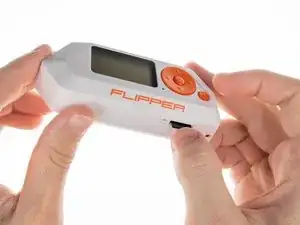
    • Hole die microSD Karte aus dem Gerät heraus, indem du mit dem Fingernagel auf sie drückst.

    ifixit PH1 is too big do not buy

    Aeris (AZ) -

  3. fMudNYEZuGtPmk2j
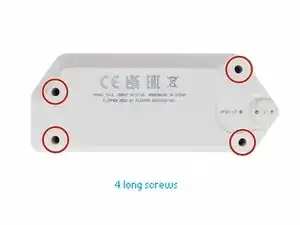
    • Nimm einen PH0 Kreuzschlitzschraubendreher und entferne die vier langen Schrauben, welche die Gehäuserückseite festhalten.

    • Sei vorsichtig, die Schrauben können leicht kaputt gehen.

    Can I use "Essential Electronics Toolkit" for this?

    MDXXIV -

  4. YV2JCfLXowDYIEOA
    YV2JCfLXowDYIEOA
    UDeOVehahANEQROx
    XVOGkVrhAaGcRyhx
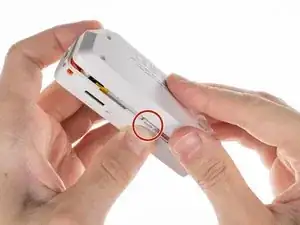
    • Drücke die Mitte der oberen Gehäuseseite nacheinander auf beiden Seiten, um die Haken zu entriegeln, welche die Gehäuserückseite festhalten.

    • Wenn das geschehen ist, kannst du die Gehäuseunterseite entfernen.

  5. vRobAtrM6mjFOAHm
    vRobAtrM6mjFOAHm
    cq65MmxLuSRKokd5
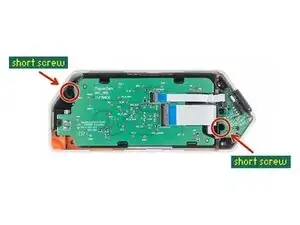
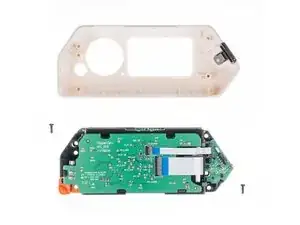
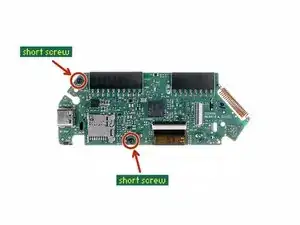
    • Nimm einen PH0 Kreuzschlitzschraubendreher und entferne die beiden kurzen Schrauben, mit denen der Rahmen und die obere Abdeckung zusammen gehalten werden.

    • Wenn die Schrauben entfernt sind, trenne den Rahmen von der oberen Abdeckung ab.

    the upper one is "long"

    Facu -

  6. GRUiEVAAlCyKXC5H
    • Heble den Akkustecker vorsichtig mit einem Spudger ab und ziehe ihn heraus.

  7. TwwFuMGLHATFOfFK
    • Diskonnektiere das große Flachkabel der Platine. Benutze ein Plektrum, um die Lasche, mit der der Verschluss gelöst werden kann, nach oben zu heben und ziehe das Kabel vorsichtig aus dem Konnektor.

  8. tvvYmWejEIZIkHPB
    tvvYmWejEIZIkHPB
    TrZEWqoOasiMZHej
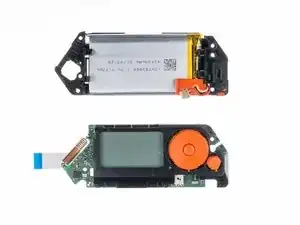
    • Um das Akkugehäuse abzutrennen wackle hiermit leicht hin und her, während du versuchst die zwei Teile auseinander zu ziehen.

    • Stelle sicher, dass du vorsichtigen und gleichmäßigen Druck aufbringst, um die Teile nicht zu Beschädigen.

  9. AL2FifX6umToiCEq
  10. RGagRaUqTEcHkoQX
    RGagRaUqTEcHkoQX
    qMWTZNOPelMoEVPB
    RH2WZK311BhIQVQa
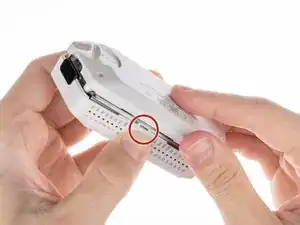
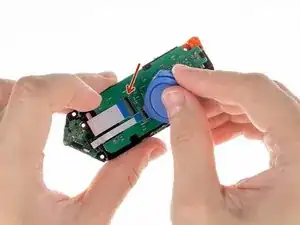
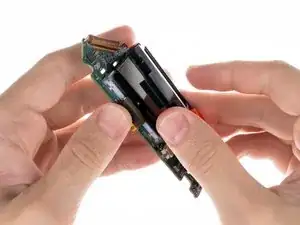
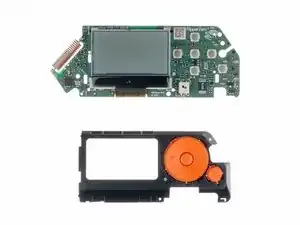
    • Um das Knopfgehäuse und die Platine voneinander zu lösen musst du die unten gezeigte Lasche an der Seite drücken sowie das Gehäuse von der Platine wegziehen.

  11. qgofbwPUDDeW32i5
    qgofbwPUDDeW32i5
    2ESWpBjrtbRPBmgr
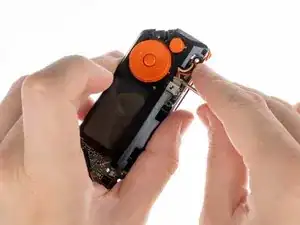
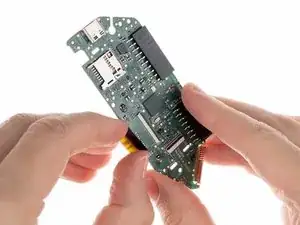
    • Diskonnektiere das Flachkabel des Bildschirms von der Platine. Benutze ein Plektrum, um die Lasche nach oben zu heben, um die Verriegelung zu lösen. Ziehe das Kabel vorsichtig aus dem Konnektor heraus.

    If the screen is broken, but the backlight is still functional, you can carefully peel the screen away from the backlight and reuse the backlight. This also removes the requirement to desolder/solder the backlight. Be sure to use gloves or a soft plastic tool (credit card, spludger, etc) as the adhesive will pick up dirt which will be visible after the repair.

    If your backlight is still functional (glows orange) but you have no images/text on the screen, you can likely re-use the backlight.

    Frosty -

  12. lNKKiCGEiCbiPPAS
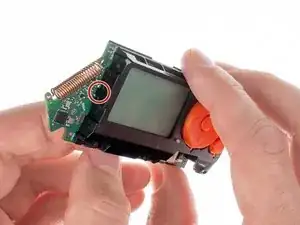
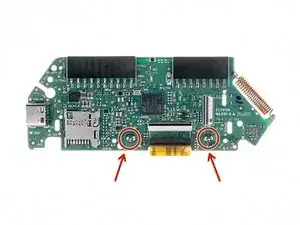
    • Um den Bildschirm entfernen zu können, musst du zwei Lötpunkte auflösen.

    • Schaue dir diese Anleitung an, wenn du wissen möchtest, wie man lötet und Lötverbindungen trennt.

    Those little legs/contacts go to the PCB of the backlight LEDs and are really fragile. I broke one and it's not easy to fix. Be careful!

    Facu -

    BEWARE DESOLDERING!!! I just followed this guide -- I purchased a screen replacement through AliExpress and have concluded that this step is INCORRECT. You are not Desoldering the screen, you are desoldering the backlight!!! If you just need to replace the screen (why you're here on this page probably), you can remove the existing one by carefully using a pry-pick to pull it off the adhesive connecting it to the backlight, then simply replace it with the new screen and reconnect the ribbon cable, all that jazz. That is way easier! Desoldering is completely unnecessary, and puts people at a higher risk of ruining their Flipper for no reason. Please update the guide!

    Brando Calrissian -

    That is, if your backlight is broken. Refer to the comment on step 11

    Tiger -

    While it's technically possible to separate the LCD layer from the backlight and connect a new display in that manner, the original replacement typically includes the backlight already assembled. Therefore, removing the old backlight is necessary when installing the new display.

    Sebastian -

    I also got a screen from aliexpress and it did not include the backlight so I didn’t need to desolder those contacts.

    Bill Weinman (BearHeart) -

Abschluss

Um dein Gerät wieder zusammenzubauen, befolge die Schritte in der umgekehrten Reihenfolge.

Bringe deinen Elektronikmüll hierhin.

Sebastian

Mitglied seit: 19/08/18

29300 Reputation

13 Kommentare

Everything worked fine following this guide. Thank you for the help. In my case was just the glass that was broken, so at the end, i didnt needed to desolder. Just removed the glass with the Plastic pick and worked perfectly. Thank you again for the help.

arthureldo -

Where did you find a replacement glass?

Ben Durrant -

The company behind FZ is not selling screen replacement (they promise they will do it in the future) but for now... So i don't what to think about this guide

Gusbill -

Where can you get an LCD replacement (backlit)?

David Williams -

Checked with Flipper Zero Support and they said there's no replacement screens available. Found one on AliExpress and ordered it so I'll post here in about a month once the display has arrived and I have time to try the replacement, then report back and link the part if successful.

Cody Ouellette -

Did you get a chance to attempt the replacement?

joehannsenn -

I'm going to try and replace the display and keep the original backlight. I'm seeing a lot of reviews saying that the display just needs to come away from the backlight and that desoldering isnt required, but I can't tell where the backlight ends and the display begins. any advice?

Noah -

How did that go ?

John Tracey -

how did you go cody?

Joel Devlin -

Got a replacement display from AliExpress and it works just as it should and only 20$.

Aiden Hughes -

I was able to find and order a replacement screen from AliExpress. I would have thought by now flipper would have a replacement parts section on the official website. It only took about 2 weeks for the screen to arrive and hopefully I can get to changing it out sometime soon. I’ll post with success or tragedy update.

Brandon Agnew -

Disappointing. Doesn't even show how to remove and replace the display.

joehannsenn -

AliExpress selling fake lcd screen - it will not work. i did already, look how look like your genuine screen compare with AliExpress - you will see it total different. most painful as it china behind - no reply, so hard to return, if you do return it will take 2 month track to see as china never collected parcel from post office, i have ban AliExpress wont buy never

oleg birfon -