Einleitung

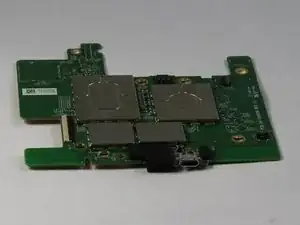
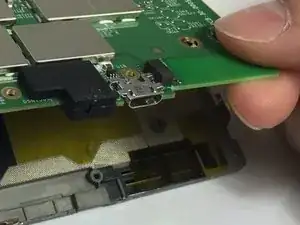
Die Ladebuchse des Paperwhite ist auf der Hauptplatine festgelötet. Wenn sie defekt ist, musst du sie auslöten und eine neue einlöten, oder die Hauptplatine austauschen.

  1. ATyIBub1OurOOAxq
    ATyIBub1OurOOAxq
    GWLGMq6rUAgpIsor
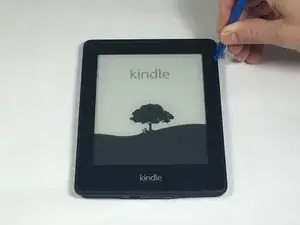
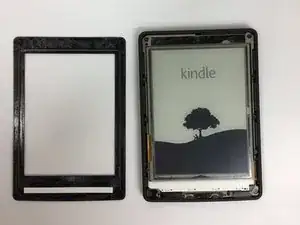
    • Setze das Kunststofföffnungswerkzeug in die Ecken des Paperwhite ein und schiebe es um den Rand herum, um die Displayeinfassung zu entfernen.

    • Achte darauf, an den Außenkanten mit dem Hebeln zu beginnen, dies sind die optimalen Punkte zum Entfernen der Displayeinfassung.

    • Sei vorsichtig und schiebe das Hebelwerkzeug nicht tiefer als 3-4 mm unter die seitliche Displayeinfassung, da du sonst die Displayschutzfolie ablösen könntest.

    I broke an LED light and slightly pulled up the layer protecting the screen leaving some bubbles I can’t really get rid of. This guide has no warning whatsoever about being careful with the spudger and making sure you don’t go too deep. The sticky bezel you pry off can be really sticky and difficult to come off (like mine was). If this guide had a simple warning and explanation to be careful about depth of spudger/plastic tools around LEDs and the middle of the screen I would not have ruined a perfectly good kindle and new battery!

    Albert Einstein -

    I noticed that the screen protector film was starting to lift with the outer bezel. Luckily I stopped at this point as it would have ruined the Kindle. It would seem some paperwhite 2s have a bonded screen film which makes battery replacement impossible. Perhaps you should mention this before owners buy a battery?

    Anna Lien -

    My first attempt started at a bottom corner— while reading I wouldn’t have to stare at any scratches I made. But the bottom bezel has a ton of glue, and is difficult to separate even when you do it last. What worked for me was to start from a top corner, and separate in both directions, using picks and other tools to keep the side bezels separated. Then I worked the bottom bezel free from both corners.

    Matt D -

    Agreed that the information in the instructions is lacking. I wish I had known that the bezel is only glued on and not locked in to the backplate in any way. I think the warning to focus on the outer edges is misleading and definitely steered me way closer to the screen separation issues than I would have otherwise. I wish I had read these comments before starting.

    Dan M -

    Warning: There is a Wi-Fi antenna along the top. I damaged mine (only half of the dipole, so not too bad). It is a flex PCB stuck down and adhered to the bezel.

    F. Mort -

  2. mOiTTDZ2FCyhyt1H
    mOiTTDZ2FCyhyt1H
    padVtGYC4c2UOIxw
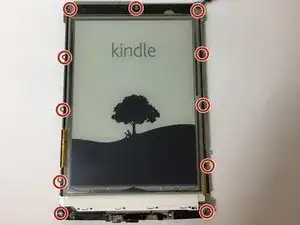
    • Entferne mit einem Schraubendreher die elf 3,2 mm Kreuzschlitzschrauben 000 von den Ecken des Mittelrahmens und hinter dem schwarzen Streifen wie abgebildet.

    • Vergiss nicht die Schraube in der Mitte des schwarzen Klebestreifens!

    I only found eight screws on my missus’ Kindle. Serial number 9062 xxxx xxxx xxxx

    But I also found it was a 3G model, which I didn’t know!

    Mark Sanders -

    Le tournevis qui convient est le Phillips 00, le 000 ne convient pas.

    A l'origine le monteur a freiné les 11 vis avec le frein pour filets Loctite 243, après démontage il en reste assez pour un usage personnel; par contre en cas d'usage militaire il vaut mieux en rajouter une micro dose.

    Sébastien Minet -

  3. YgABaVRCFbdPVsOP
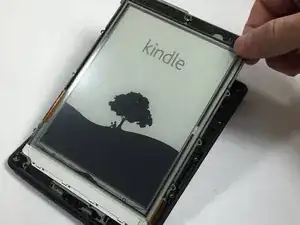
    • Entferne vorsichtig den Mittelrahmen von der hinteren Abdeckung.

  4. FMutHMKJfw1KMTjX
    FMutHMKJfw1KMTjX
    lnQDMPcaadF3R2iO
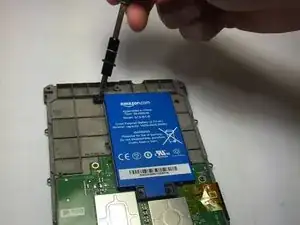
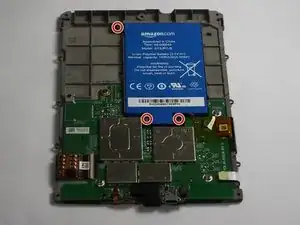
    • Entferne mit einem Schraubendreher die drei 3,0 mm Kreuzschlitzschrauben 000, mit denen der Akku wie abgebildet befestigt ist.

  5. tpxHmFKYLj5qMfPl
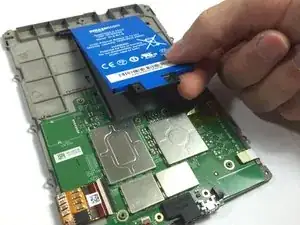
    • Hebe den Akku vorsichtig an und entferne ihn aus dem Gerät.

  6. 2EG5lETTOoFqu4vW
    2EG5lETTOoFqu4vW
    BXkUSZdGHqODCcGm
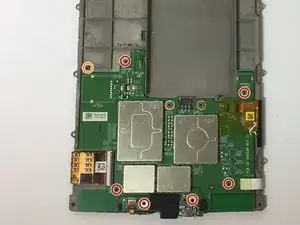
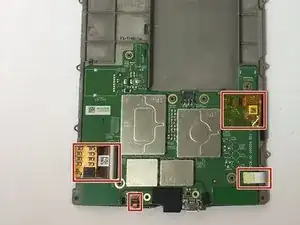
    • Entferne die sieben 3,0 mm langen Kreuzschlitzschrauben #000, mit denen die Hauptplatine befestigt ist.

    • Verliere nicht die orange markierte Unterlegscheibe. Sie ist zum Schutz der Schraube unbedingt notwendig.

  7. CBCR1mhvtdD1MTBP
    CBCR1mhvtdD1MTBP
    ROAXWfHgyBUtZDEO
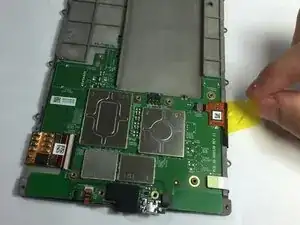
    • Trenne vorsichtig die ZIF-Anschlüsse ab.

    • Einige sind sehr klein und empfindlich, sei vorsichtig!

    these connectors do not seem to be zif connectors but No-Fuss Ribbon Cable Connectors

    durandle -

  8. TxkkIC6Cl5S2orpy
    TxkkIC6Cl5S2orpy
    S2RAprZvpKwITEGn
    OaL25bXVKHNmSP3d
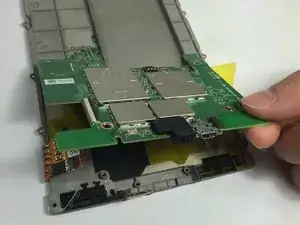
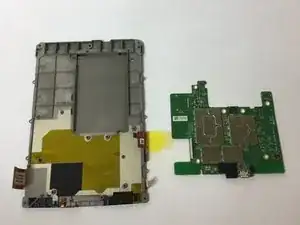
    • Entferne behutsam die Hauptplatine.

  9. LDcVr1AijCtfdbBY
    • Die Ladebuchse ist auf der Hauptplatine festgelötet.

    • Wenn du nicht gleich die ganze Hauptplatine austauschen willst, musst du die defekte Ladebuchse entlöten und eine neue einlöten.

    • Unsere Lötanleitung hilft dir dabei.

Abschluss

Um dein Gerät wieder zusammenzubauen, folge den Schritten in umgekehrter.
Tyler Davis

Mitglied seit: 15/09/16

1720 Reputation

10 Kommentare

How to replace the USB port; replace the motherboard. Kind of a lame fix if you ask me. Whatever happened to soldering a new port on?

Sam Hardeman -

I have not done the fix yet but plan to replace the USB which appears to be a USB - micro B USB 2.0 Receptacle Connector 5 Position Surface Mount available at DigiKey. Is there any reason not to attempt this? I have microscope and soldering station. If not, where do you get the motherboard and how much is it?

Bill Smith -

Any updates? Did you run into any issues?

theend12212012 -

Démontage facile effectivement, mais les cinq microsoudures sur la carte mère sont impossibles à faire avec un simple fer à souder ! Il faut utiliser du matériel pour CMS (composant à montage en surface)…

Ceci dit mon problème vient effectivement de ces microsoudures. En appuyant simplement sur ces contacts mon Kindle s’est remis en marche ! Vive le travail mal fait à la construction…

telerando -

Getting the Kindle open and getting to the charging port was quite ‘easy’. In step 1 the top is stuck on with something like sticky back tape and the top can be gently pulled away from the tape.

Having got to the port I can not figure out how to replace it. This part does not seem to be easy, unless Step 9 is explained in much more detail. The contacts for the port seem to be incredibly small and I can’t figure out how they’re connected, or what part I need to order to replace the port.

Richard Garside -

You can order a replacement USB port from Amazon. That part is easy. Desoldering and resoldering on the new USB port was beyond my abilities. I have ruined my motherboard.

jookieapc -

This is NOT an easy task. Opening up the Kindle is fine, but replacing the USB port by desoldering and resoldering on a new one requires advanced micro soldering skills and equipment.

Oh and, you need to remove the rubber LED power cover and another pad from the other side of the USB port.

jookieapc -

usb pcb pad 4 missing, cannot trace track. On the reverse side there test points TM49 to Tm52 ?

Stuart Moag -

This article was very useful and helped me dismantle a Gen 6 version to resolder the USB charging port that had come away from the motherboard completely.

One of the copper pads for the five pins contacts had pulled away from the PCB and I was unable to refix it properly. Fortunately, it was just a data pin and I am now able to plug it in and charge it normally. I have never used a USB lead for data transfer, so the damaged pad is not really a problem for me.

Thanks for the article, it really was very informative and useful.

Bikemad -

cheers for that info, it is probably the reason why my my port charges but won't show up when plugging it into my computer.

soupamanx -