Einleitung

In dieser Anleitung erfährst du, wie du einen Mikrotaster an der Logitech G915 TKL-Tastatur ausbauen und ersetzen kannst. Ein Mikrotaster muss möglicherweise ersetzt werden, wenn die Taste keine Eingaben mehr registriert und sichergestellt wurde, dass das Problem nicht an der Tastenkappe liegt.

Vergewissere dich vor Verwendung dieser Anleitung, dass das Problem mit der Taste nicht auf eine gebrochene Tastenkappe oder eine Ansammlung von Staub oder Schmutz im Bereich der Taste zurückzuführen ist.

In den Schritten 7 und 8 musst du den kaputten Mikrotaster ablöten und einen neuen anlöten.


Für diese Anleitung brauchst du einen Kreuzschlitzschraubendreher #00 sowie einen Lötkolben, Lötzinn und eine Entlötlitze.

  1. bCUsGvdAnPHmn1lN
    bCUsGvdAnPHmn1lN
    VYndwZOt6wZs4Yaf
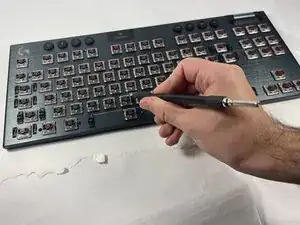
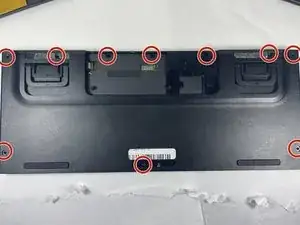
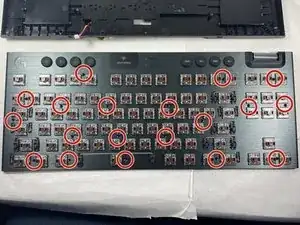
    • Entferne alle Tastenkappen von der Tastatur.

    • Schraube die in der Abbildung eingekreisten 2-mm-Kreuzschlitzschrauben #00 heraus.

  2. DICefjQuwWWuORcy
    DICefjQuwWWuORcy
    mYlFAqyMqbhgaRdW
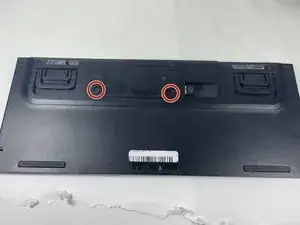
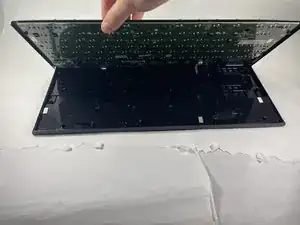
    • Drehe die Tastatur um und ziehe den Logitech-Aufkleber in der Nähe der oberen Mitte der Tastatur sowie die Kunststoffschicht darunter ab.

    • Entferne die beiden 2,5-mm-Kreuzschlitzschrauben #0, die in der Abbildung eingekreist sind.

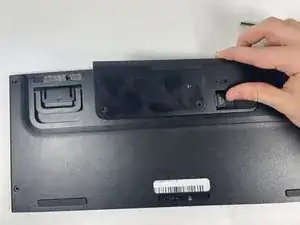
    • Entferne die Rückwand, indem du die Kerbe auf der rechten Seite erfasst und nach oben ziehst.

  3. LUFtUvDNATJFyFyl
    LUFtUvDNATJFyFyl
    3WQIKvsVijMX3FdH
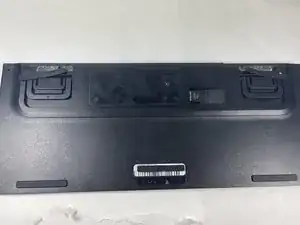
    • Entferne die im Bild gezeigten Schaumstoffstreifen.

    • Entferne die im Bild markierten 2 mm langen Kreuzschlitzschrauben #00 auf der Rückseite der Tastatur.

  4. Y2YZlkrUODOJuokG
    • Entferne das Tastaturgehäuse. Die Hauptplatine wird sichtbar.

  5. aJo1MVRdDHNcZCxF
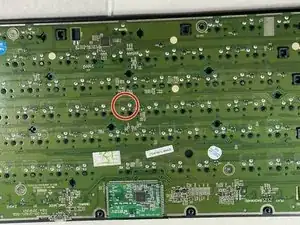
    • Finde die Lötstellen des Mikrotastes, den du austauschen möchtest.

  6. TLeTsaJfHYpb51Cc
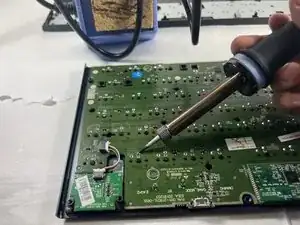
    • Erhitze vorsichtig die Entlötlitze.

    • Lege die Entlötlitze auf die Lötstellen und entlöte sie.

    • Setze den neuen Mikrotaster an die Stelle des alten ein.

    • Löte den neuen Mikrotaster fest.

    what type of switch is it?

    pedro henrique ramos ferreira -

    @pedrohenri96529 The Logitech G915 comes with tree different Options of switches. Logitech calls them their Low-Profile GL- Switches. You can read more about them here. I believe they’re manufactured by Cherry but don’t quote me on that.

    nicht_menschlich -

    Thanks very much, happens that my W stopped work, and I only could find informations related here.
    What type is it to buy and how to replace with the new one.


    These switches uses 2 or 3 solder pins?

    pedro henrique ramos ferreira -

    @pedrohenri96529, I suppose you have that exact keyboard of this Guide. If so, you should buy the switch you want to have. Depends on what you have right now. On the link I have put in a post earlier you can see three different low profile switches. Tactile, linear und clicky. You can also hear what they sound like. If you want the same switch you already have I would recommend you buy that one. I haven’t found any official reseller of those switches in particular. Best bet would be to reach out to Logitech and ask them how to get replacements.

    You probably wouldn’t have a great time with any third party switch because of the height difference.

    I believe it’s two solder pins. There is a third plastic pin but that’s just for alignment.

    nicht_menschlich -

    YES!! The very same keyboard, Loggi doesn't even tell me what is technical name of the switch, I know is the brown one, they only send me apollogies however nothing usable and not even a way or hint to discover its name and exactly way to find how to match an option.

    I've already unmounted it, THANKS VERY MUCH for this tutorial, helped 100% for unmounting it.
    I'll try to change for a key I don't use and start trials until "something" good/bad happens...

    I believe is this one, Brown type.
    Kailh Choc Low Profile Switch, 1350 Teclado Chocolate, Clicky Tátil Linear, Interruptores Brancos para Laptop, Teclado Mecânico - AliExpress

    Loggi NEVER MORE. 250$ appologies for a 10c problem. This is a full sallary here in Brasil. Its disgusting.

    pedro henrique ramos ferreira -

    Hi.

    Is it possible to open the switch from the other side without desoldering it?

    One of the plastic pinns on my D key broke off and fell down in the switch, msking it hard to press down.

    Niklas Lemcke -

    Looking at the assembly fotos on Aliexpress (linked in the messages above) to see how it's constructed, it seems possible.

    Muru Roa -

    Thank you so much for the guide! I bought the wrong type of switch perhaps a 3rd party switch for my replacement but I managed to use the soldering iron to melt the holes a little bigger to allow the key cap to fit. Responsive and working completely as intended! Much appreciated!

    Yashin lalji -

Abschluss

Um das Gerät wieder zusammenzubauen, führe die angegebenen Schritte rückwärts durch.

Ethan Bedard

Mitglied seit: 13/03/23

614 Reputation

0 Kommentare