Einleitung
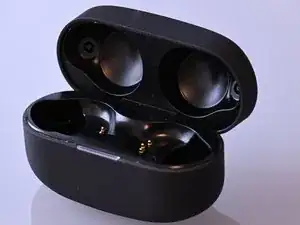
Mit dieser Anleitung wird der Akku des Ladeetuis ersetzt, falls er beschädigt ist oder nicht richtig lädt. Dies wird dadurch angezeigt, dass die LED an der Vorderseite des Etuis nicht aufleuchtet, wenn das Etui geöffnet wird, während es nicht geladen wird; oder dass die LED rot blinkt, wenn das Etui geladen werden sollte.
Werkzeuge


Ersatzteile
-
-
Öffne den Deckel des Ladeetuis und entferne die Kopfhörer, falls sie sich im Etui befinden.
-
-
-
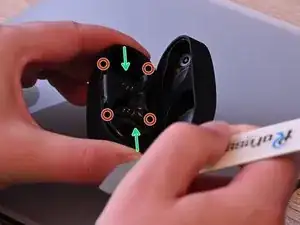
Drücke mit einer Hand die kurzen Kanten des Etuis zusammen (in Richtung der grünen Pfeile). Dadurch entstehen auf allen vier Seiten leichte Lücken im oberen Rand.
-
Führe mit der anderen Hand einen Spudger oder ein Plektrum in jede der vier Lücken ein und heble das innere Kunststoffteil vorsichtig ein wenig auf.
-
Die Klammern in den vier Ecken (durch die roten Kreise gekennzeichnet) sind nicht sehr fest und sollten sich leicht lösen lassen.
-
Ich habe einen Spudger aus Metall verwendet, aber du solltest lieber einen Spudger aus Kunststoff nehmen, da die Gefahr einer Beschädigung geringer ist.
-
-
-
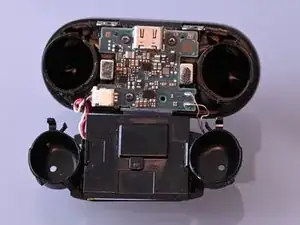
Sobald die Clips gelöst sind, kannst du die innere Einheit (an der das Scharnier und der Deckel befestigt sind) herausheben.
-
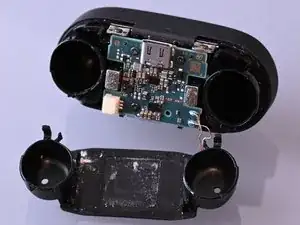
Das untere Kunststoffteil hält den Akku und die Ladespule, es ist ziemlich lose mit Clips eingerastet. Klappe es behutsam zur Seite.
-
Diese Clips sind fragil, wenn sie abbrechen ist das nicht weiter schlimm, weil das Unterteil nachher durch die äußere Hülle in Position gehalten wird.
-
Wenn du dazu in der Lage bist, kannst du die Kupferkabel der Ladespule jetzt ablöten und beim Zusammenbau nachher wieder anlöten. Dadurch reduzierst du die Gefahr einer Beschädigung enorm.
-
-
-
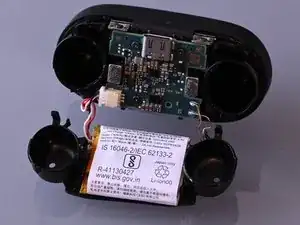
Über dem Akku befindet sich ein schwarzes Plastikteil, das jetzt frei liegt. Hebe es hoch und entferne es. Achte darauf, dass du dir die ursprüngliche Ausrichtung für die erneute Montage merkst.
-
-
-
Wenn du zur Unterseite der Platine gelangen willst, musst du die PH 0-Schrauben, die die Platine befestigen, herausdrehen.
-
Dies ist jedoch nicht notwendig, wenn du nur den Akku austauschen willst. Du kannst es aber machen, um mehr Platz zu haben.
-
Die Magnete ziehen die kleinen Schrauben stark an, was störend sein kann.
-
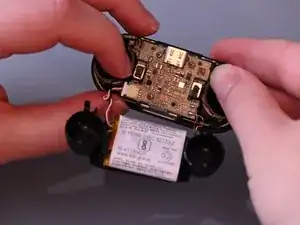
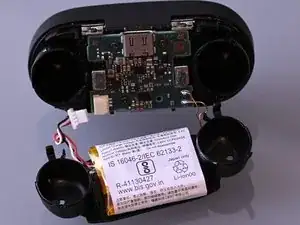
Entferne vorsichtig den Stecker des Akkus.
-
-
-
Jetzt liegt der Akku frei. Löse ihn vorsichtig von der Unterseite des Kunststoffrahmens, eventuell mit etwas (mäßiger!) Hitze oder Isopropylalkohol, um den Kleber zu lösen.
-
Baue den neuen Akku an der gleichen Stelle ein und setze das Ladeetui wieder zusammen.
-
Um dein Gerät wieder zusammenzusetzen, folge den Anweisungen in umgekehrter Reihenfolge.

20 Kommentare
Hello there, I am facing a peculiar issue recently. And I am unsure how to fix it. My WF1000 XM4 case after I got some water in it from the rain, whenever I want to charge it via USB C the case completely shuts down. I opened case, and the disconnected the battery and put in a silica gel bag. And then well, after that I again connected the battery. And the lights went up and it works but I can’t charge it. Whenever I want to charge it, the case shuts down and I have to disconnect and reconnect with the battery to turn it on. The green lights and all everything’s fine. But I can’t seem to recharge it. So, my question is, would a battery replacement be enough to fix it or do I have to replace the whole case?
Does it charge the headphones with the battery disconnected while connected to USB C?
I suspect the problem to be on the PCB in your case. You could try to clean any corrosion with isopropanol. Especially around the chips and the battery connector.
Thanks a ton Jonathan, you were a big help in guiding me through this repair process cause in Bangladesh my country there's no support for repairing tiny electronic devices like this. I tried cleaning some of it with isopropyl alcohol on a cotton swab. But, then I noticed my Sprayway contact cleaner was expired in 2022 which makes it ineffective in 2024. I couldn't clean the internal of the USB C where I feel the mail culprit of the corosion lies if there is. Cause it was in my pocket and I was wet. And after cleaning it I still couldn't charge it. The battery still powers off automatically and the case turns off completely.
Now, as you asked me to try charge the headphones directly with the battery disconnected, well it works. But a few observations. It doesn't connect the first time. It connects the second time and it blinks red twice continuously. It charges the earbuds properly and also works to connect and disconnect from the phone but it shows red light blinking twice. Green and Orange light work too
And btw can I please get your email so that I can contact you directly if I need more assistance. If it's alright. Here's mine, zarif.kaisar@gmail.com
Red blinking is normal when the battery is disconnected. As it charges when the battery is disconnected, I assume the problem is the battery. Can't guarantee that there is no damage on other parts, however.
I don't do private support, I just wanted to help people by putting the howto on the site, so I'm not giving my email, sorry.
Thanks mate, you've been a tremendous help. And I respect your privacy and choices. One last question, it is charging no doubt, but the right earbud seems to discharge a bit quickly like going down from 99 % to 89 % after connecting and disconnecting it. Only the right one. The left one seems to discharge at a normal rate. Got any ideas?
And using this way until I can replace the battery would it cause any problems?
Can't help with that, sorry. The ear buds themselves are pretty hard to repair, but they should also be somewhat waterproof. There is another howto that shows how to replace the earbud batteries, you might want to look at that: Sony WF-1000XM4 In-Ear Kopfhörer Akku tauschen
I had no problems using the case without a battery, I don't think it would cause any damage.
Man, the weirdest thing happened. I again wanted to test if the battery gets charged with force charging of sorts. I have power bank slash power brick from Baseus. Link here: Baseus Power Station 2 10000mAh Black Power Bank Price in BD. When you double press the power button in the picture it powered up the battery and the case turned on again. And now weirdly enough, after a few tries it charges. It is now charged up to 41% and now again I see flashes of red light. So, after I read on google that it can be due to the battery is heating up. So, yeah totally have to swap the battery soon, no question but I mean I am confused. Should I keep the battery connected use this way, I don't see and water anymore inside as I have used silica gel to extract all the moisture, and wait for the new battery to come? And tell me one thing how's the battery from your Amazon Affliate link? How long does it function properly?
Hola, hice todo el procedimiento paso a paso pero cuando conecto para cargar el estuche se enciende la luz roja que parpadea, lo que hice fue volver a conectar la batería original que tenia y si funcionaba correctamente al cargarlo.
Entonces luego probé en conectar el estuche para cargarlos sin ningún bateria conectada y enciende la luz roja parpadeando, al parecer es que el estuche no reconoce la batería nueva, necesito de su ayuda nose a que se debe esto.
Desde ya muchas gracias por una respuesta favorable.
Daniel -
The linked battery is 500mAh, but the battery in my case is 520mAh. Will this make much of a difference? Or should I find a 520mAh one?
asislife -
That shouldn't make much of a difference except that the new battery would have a little bit less capacity. But you can certainly try finding another compatible one, I just linked one random example.